

Mac Pro 2010 Review
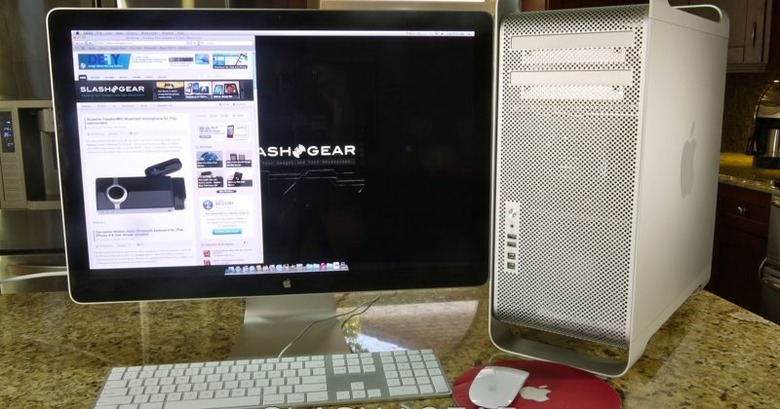
Apple's updated 2010 Mac Pro line was a long time coming, but it certainly addressed would-be buyers' key complaint: the choice of processors. Now offering everything from a single Intel Xeon through to a pair of six-core chips, the new Mac Pro range claims to be "the most powerful, most configurable Mac ever." We've had a dual-processor quadcore Mac Pro on the SlashGear test bench for a couple of weeks; check out our full review after the cut.
Our review unit slots into the middle of the updated Mac Pro range, with two of Intel's 2.4GHz quadcore Xeon E5620 CPUs, 6GB of 1066MHz DDR3 memory and an ATI Radeon HD 5770 1GB video card. With a 1TB 7,200rpm hard-drive it comes in at $3,499 – for $1,000 less you can have a single 2.8GHz Xeon quadcore and half the memory, while for $1,500 more there's the dual 2.66GHz hexacore Xeon flagship. Still no Blu-ray – not even the option – so it's a standard 18x SuperDrive, four PCI Express 2.0 slots, five USB 2.0 ports and four FireWire 800 ports. Networking options include two-gigabit Ethernet ports, Bluetooth 2.1 and WiFi a/b/g/n.

There's no shortage of graphics choices, either: the Radeon HD 5770 has Dual-Link DVI port and pair of Mini DisplayPort connectors. As for audio, there's a digital optical input and output, plus analog in/out on the rear panel, and a headphone socket on the front (along with two each of the FireWire and USB ports). We'd love to see USB 3.0 or even eSATA there too, but sadly Apple hasn't seen fit to install them in this particular Mac Pro generation.

Take off the side panel – an easy task with the flip-up (and lockable) latch on the back – and Apple's unusual interior layout is revealed. Everything is sectioned off, with the processors and memory at the bottom in a pullout tray, the PCI Express 2.0 slots in the middle, and then the four 3.5-inch hard-drive bays slung above. Each bay has a drive carrier that a standard SATA 3Gb/s drive clips into, before slotting – cable free – into place. Our review unit had a single 1TB drive, but you can specify up to 8TB of traditional HDDs or up to four 512GB SSDs and an optional RAID controller for drive redundancy (RAID levels 0, 1, 5 and 0+1 supported).
Slick design, a sensible layout and plenty of ports are no use at all if the core system doesn't hold up its end of the bargain, and happily the 2010 Mac Pro is capable of some serious crunching. We performed some of our benchmark testing natively in OS X, and then other elements in Windows 7 Ultimate running in either Parallels or Boot Camp. It's common for Mac Pro owners to spend at least part of their time in a dual-booting or multimode environment, depending on the software tools they're reliant on, and so we felt this would give a more balanced view of the desktop than OS X figures alone.
We started out with Geekbench, a synthetic test of processor and memory performance. Tested natively in OS X 10.6.4 Snow Leopard (with the latest patches and updates installed), the Mac Pro scored 14,378. In comparison, a 2009 Mac Pro – with a single Xeon 2.66GHz processor but 12GB of DDR3 memory, a configuration costing roughly the same as the machine in today's review – scored 9,600.
[sgbenchmark id=112 show=score]
[sgbenchmark id=94 show=score]
We then booted into Windows 7 Ultimate 64-bit using Boot Camp, and the Mac Pro scored 11,451. Loading Windows in Parallels – which allows you to run both Mac and PC apps at the same time – saw a Windows 7 Geekbench score of 6,017, while scores using VMware ranged from 5563 to 6017. It should be noted that these virtualization scores were calculated when Parallels and VMware were running in four core mode; although they scored higher when using all eight cores, that leaves no resources for the host OS and isn't advisable in real-world applications.
[sgbenchmark id=114 show=score]
In contrast, Lenovo's hefty ThinkStation C20 workstation, with its 8GB of DDR3 memory and dual 2.66GHz Xeon X5650 processors scored 19,565 in Windows 7 Professional. You pay considerably for those extra 5,000 points, however, considering the ThinkStation C20 is a $6,774 machine (almost double what Apple is asking for this Mac Pro).
We then turned to PCMark Vantage, which runs in Windows 7 rather than OS X and rates a system across seven categories (Memories, TV and Movies, Gaming, Music, Communications, Productivity and HDD) and then a final score. We tested the Mac Pro three times in all, using Boot Camp, Parallels and VMware, and had pretty consistent results across all batches. In Boot Camp, using the full 6GB of RAM, the PCMark score was 8,377, with particularly strong scores in Communications and Gaming.
[sgbenchmark id=118 show=score]
In Parallels, with 4GB of the RAM assigned, the system scored 8,689 overall, with Communications and HDD ahead. Finally, in VMware, the PCMark score was 8,066 with Music and HDD leading the way. It's important to remember that, in both virtualization setups, the software is emulating hardware so the GPU performance is less than when running a native OS. The Mac Pro fell behind the C20 by 1,400-2,000 points in these situations, but it's still an impressive showing considering both the price difference and the fact that the PCMark testing was done in the Apple machine's non-standard OS.
[sgbenchmark id=117 show=score]
Day to day, then, there's little you can throw at the Mac Pro and expect to slow it down. We processed HD video while watching different content, browsing with multiple tabs in several windows, and with several other apps running in the background, and we couldn't get the Apple desktop to break a sweat. It's hard to imagine the everyday user that would require such a machine; most would likely be better served with an iMac, given that model's cheaper price and brilliant IPS display. Still, the absence of USB 3.0 and Blu-ray – on both iMac and Mac Pro – does still rankle a little, given rival PCs have offered both for some time now.

If you're involved in frequent video, audio or image editing, however, or any sort of CAD or other processor-intensive application, then the Mac Pro deserves serious consideration. Strong performance not only in OS X but when running Windows 7 – particularly in Boot Camp – offers the best of both worlds for the platform agnostic, and while the Mac Pro's upfront sticker price may seem high, compared to native Windows machines of similar build construction it's actually surprisingly competitive. For those who want the very highest performance, the dual hexacore Mac Pro is an expensive option, but this midrange model arguably delivers the best balance of crunching power and price.
[sgbenchmark id=112 show=system]
[sgbenchmark id=94 show=system]