

Lenovo x61/x60 Tablet PC HDD Errors Require Firmware Update
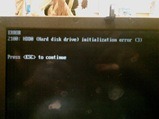
If you've booted up your x61 or x60 tablet recently and received and error 2100 boot error, it's from your hard drive. Apparently there is a new firmware update available for the drives.
Mr. Faulkner had to find this out the hard way as he was on the verge of sending his tablet in for repair for the same issue for a second time before he found the fix. If you have received this error, all you have to do is find the proper firmware update, burn the ISO to a disk, insert it and boot to the disc, do the update, and then everything should work fine without erasing all your date.
If you have yet to receive the error, I'd still go to this link and see if there is a firmware update for your drive, backup everything, and do the update before you unexpectedly receive the error. Just thought I'd let all of you with one of the affected tablets know before it happened to you.
[via gottabemobile]