Friday, Jun 27th 2008 by Vincent Nguyen


Worth Reading?


YesNo


+24 [34 votes]
Loading ...

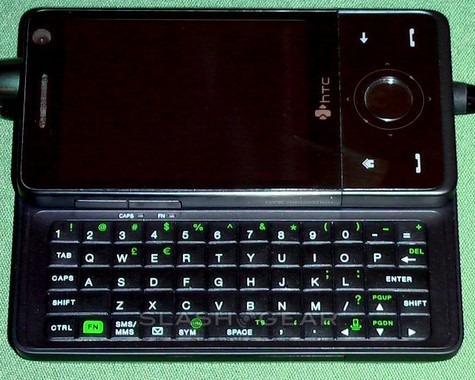
I had an opportunity to check out the HTC Touch Pro aka Raphael smartphone at an informal meet up with HTC earlier today.  According to HTC, the Touch Pro is the company’s Touch Diamond (but more) and by more it is beefier in thickness due to a slide up 5-row QWERTY keyboard.

HTC Touch Pro

To an untrained eye, the HTC Touch Pro may look just like the Touch Diamond.  Other than the more rounded edges, they’re nearly identical.  I found that the keys on the Touch Pro are smaller than those on other HTC QWERTY smartphones like the T-Mobile Wing or the Tilt for AT&T, but they’re still usable and have a good feel to them.

HTC Touch Pro

Another difference between the Touch Pro and the Diamond is the lack of a glossy back surface, which I welcome because I can’t stand fingerprints.

HTC Touch Pro

The Touch Pro also has a microSD memory card slot located on the upper left hand corner underneath the cover.  To the right of the microSD memory card slot is the SIM card slot.

HTC Touch Pro

The battery was missing from the device; so I didn’t get to test-drive the TouchFLO 3D user interface or its performance in comparison to the Diamond.  If you love or think you love the Diamond, but can’t live without a QWERTY keyboard and don’t mind a thicker device, then the Touch Pro might be a great choice for you.

HTC Touch Pro

Click to view the entire image gallery of the HTC Touch Pro.  Enjoy the hands-on video below and make sure to click through to watch the video in high quality!

Subscribe via RSS or Email | Read 5,214 times


  1.  TheVersatileGuru   View all comments by TheVersatileGuru  Neutral  Add karma Subtract karma Quote

    Looks neat. Its a shame you didn’t have the battery to fire it up–I’d have loved to see that!

  2.  NLS   View all comments by NLS  Neutral  Add karma Subtract karma Quote

    Looks very nice - I am torn betweeen this and Xperia. In my own review both got the same score (really by chance, didn’t cook things up and didn’t know until I summed the numbers), so I won’t be sad to chose one over the other (reminds me of the LOOX720 vs. X50v… got the first, never looked back).

    Anyway looks fat enough, but this adds to the “tool not just fashion like Diamond” statement it wants to make.

    Please PLEASE Vincent, next time you have an exclusivity, take a digital camera with you, NOT your phone!

    Thanks.

  3.  NLS   View all comments by NLS  Neutral  Add karma Subtract karma Quote

    …on the other hand thanks for the video.

    Also, why you mention the camera is 2.8MP and the cover writes 3.2?

  4.  Juttonn   View all comments by Juttonn  Neutral  Add karma Subtract karma Quote

    I’m really looking forward to this device. I was a bit worried with the thickness of the device, but it just slightly thinner than the Palm Centro (Palm’s smallest device) and the HTC Mogul. A little thicker than my current stand alone PDA, the HP 210, but much smaller in the other dimensions. I think it is miniature height and width that make the depth seem as thick as it does in the photos. I guess the slider keyboard requires the device to be thicker (although that doesn’t explain why the Centro is so thick).

    Speaking of the Centro, my brother has one and it feels really comfortable to hold in the hand, and not too thick. Part of that is the rounded back. While the Touch Pro’s back is not quite as rounded (judging from the photos), it is smaller in every dimension than the Centro. Yet will be far and away a better device with a larger, higher res screen, larger, slide-out keyboard, WiFi, GPS, etc. Oh, and it doesn’t run on Palm OS.

    Still looking forward to this. Thanks for the pics and video.

  5.  skyline GT R-35   View all comments by skyline GT R-35  Neutral  Add karma Subtract karma Quote

    Gentleman, I would like to understand the A-GPS option of this phone. Please, help me with this. If I know, the A-GPS is a higher version of the classic GPS. Big advantages of this verion are that it helps me by the cold start of GPS (I can get much faster my position) and of course when the gps signal is lost. In this case I can get another signal or info from the “operator”, but this info is a GPRS signal, which costs money. But what about this: I don´t need all the time this GPRS info - I can wait few minutes by the cold start for my actual position and I don´t need every time the “assisted” support of the GPS by traveling on places, where aren´t higher buildings to block the GPS signal. My question is: Is it possible to turn this “assisted” option off in the phone??? What else can I do as a phone user to set this option off\on???

  6.  Bob Bobson   View all comments by Bob Bobson  Neutral  Add karma Subtract karma Quote

    Gentleman, I would like to understand the A-GPS option of this phone. Please, help me with this. If I know, the A-GPS is a higher version of the classic GPS. Big advantages of this verion are that it helps me by the cold start of GPS (I can get much faster my position) and of course when the gps signal is lost. In this case I can get another signal or info from the “operator”, but this info is a GPRS signal, which costs money. But what about this: I don´t need all the time this GPRS info - I can wait few minutes by the cold start for my actual position and I don´t need every time the “assisted” support of the GPS by traveling on places, where aren´t higher buildings to block the GPS signal. My question is: Is it possible to turn this “assisted” option off in the phone??? What else can I do as a phone user to set this option offon???

    “Assisted” means that they use the cellphone towers as “pseudo” GPS satellites. The towers know exactly where they are, and send their location to the phone when the phone locks onto the tower.

    This saves power and makes the GPS feature work better inside buildings. It also means you can get away with a single-channel GPS receiver instead of the 12 channel receiver you have in most standalone GPSes.

    You wouldn’t want to turn it off; a normal GPS will use far more power than A-GPS does.

    Devices such as the iPhone 3G can even use less power depending on how much accuracy you want; this feature is suposed to be available in other phones soon as well.

  7.  skyline GT R-35   View all comments by skyline GT R-35  Neutral  Add karma Subtract karma Quote

    Thank you for your comments, Bob. Now I know how it works (…the “assisted” feature…), but one task is still open:

    Is it possiple to turn it off-on…? Sometimes I need only the GPS, no A-GPS.

    You mentioned that A-GPS uses less power than GPS. OK, but mostly I travel by car and I have the possibility to use adapter, so the “less power” is not so important for me like the money for the assisted feature. I know that this is a good think and it can be very useful in “hard times”, but as I wrote I don´t need every time this assisted feature.

    Would you pay for it, even when you know, that next days - on your little trip - you won´t use it and you can turn it off?

    Bob, thank you one more time!


Add your comments

Fill in the required fields below to leave a comment or login to your account. If you haven't signed up, you can do so free here. With SlashGear account, you will be able to participate on SlashGear Forums discussion.


Close [X]
E-mail It
About / Advertise / Contact / Archives / Privacy Policy / Terms of Use
Copyright © 2006-2008 SlashGear, All Rights Reserved.