REGISTER LOGIN

Worth Reading?

NoYes

+32 [36 votes]

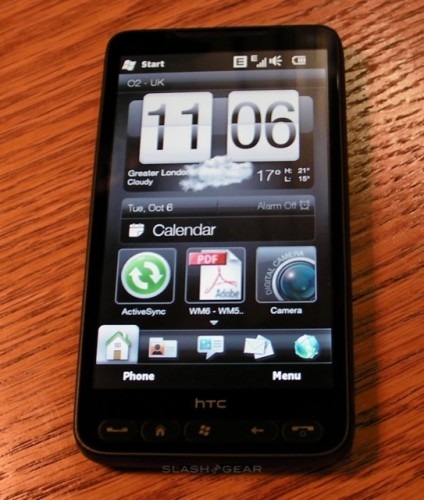
It’s fair to say that the last time we saw excitement to this degree about a Windows Phone it centered on the HTC Touch HD, and so it seems only right that it’s the company’s successor to that handset, the HTC HD2, that is prompting such interest in 2009. Announced last month after copious rumors, what makes the HD2 special is its 4.3-inch capacitive touchscreen, HTC Sense UI and 1GHz Qualcomm Snapdragon chipset. It’s taken a while, but the HTC HD2 has finally dropped onto the SlashGear test bench, so check out our first impressions and an unboxing video after the cut.

Updated with first-boot video demo after the cut

htc hd2 slashgear hands on 14 424x500

Inside the box it’s the usual HTC array of accessories, including an AC adapter (with interchangeable plug), USB to microUSB cable and a wired stereo headset. The HD2 differs from previous HTC devices in that it doesn’t use an ExtUSB connector, which has helped them keep the Windows Phone thin. What we don’t have – and we hear won’t be available until December – is the HTC Car Kit for the HD2, which adds a powered windscreen/dashboard mount, new docking battery cover for the phone itself, and automatically kicks it into navigation mode whenever it’s clicked into place.

Switching on, and there are setup wizards for ActiveSync Exchange, Facebook, Twitter and YouTube integration. Like the HTC Hero, the HD2 integrates Facebook friends with entries in your contacts and comes with the company’s own Twitter client, Peep, which gets its own tab on the shortcut bar along the bottom of the homescreen. It’s hard to describe how easy typing on the huge 4.3-inch touchscreen is; in portrait orientation, when on-screen QWERTY keyboards can be cramped in width, the combination of large buttons and decent auto-correction makes for error-free typing. As for flipping the HD2 into landscape mode – screen rotations are practically instantaneous – the keyboard is ideal for two-thumb typing. Even in the short time we’ve had the HD2, we’re already faster at typing on it in this way than we are with most hardware keyboards on smartphones.

The touchscreen is equally good in the browser, which is Opera Mobile 9.7 as standard. HTC have added multitouch support, which works as you’d expect; alternatively you can double-tap on blocks of text or images and the screen automatically zooms and reflows to fit. Thanks to the Snapdragon processor this happens incredibly quickly, and we’re wondering just how much of a MID-crossover the HD2 might be.

First-impressions, then, are excellent, and we reckon the HD2 is a legitimately exciting Windows Phone. We’ll be putting it through its paces for the full SlashGear review, so if you’ve any questions you’d like to see answered then leave them in the comments and we’ll do our best to address them!

HTC HD2 unboxing video:

First-boot demo of HTC HD2:

Subscribe via RSS or Email | Read 14,225 times

11 Responses to “HTC HD2 video unboxing & first-impressions”

  1. JudgeTreve November 2, 2009

    Is it true that the very nice looking weather animation is only working (on the home screen) with the default background? On my HTC TOUCH PRO 2 (WWE)with WM 6.5 the animation is only working on the default background.

    Will the weather itself update frequently (like on the HERO) on the homescreen under the clock? Again, on my TOUCH PRO 2, it usually takes three hours before the weather (under the clock) is updated. That’s not nice when you move around a lot. The weather and the place are then not right.

    +5  Add karma Subtract karma  
    • Liaw Kim Poh November 2, 2009

      I am not sure if it is still the same for Manila 2.5, but for Manila 2.1 Sense with weather you can change the \windows\wallpaper_default.png manually to keep the weather with new wallpaper

      Neutral  Add karma Subtract karma  
  2. renosj November 2, 2009

    Hi, I would like to ask you – put in review some detail camera quality test. It means camera samples in full resolution+super fine quality setting – landscape, macro etc. And compare result quality for example with Diamond 2, which is said to be the best WM camera device. I think, this test will interest a lot of users. Thanks in advance!

    +3  Add karma Subtract karma  
  3. BeeQAL November 2, 2009

    Great first impressions. Looking forward to the full review.

    Great work as usual guys :)

    Neutral  Add karma Subtract karma  
  4. Alec Spyrou November 2, 2009

    I have heard that there are no hardware drivers for the graphics chip on this device !

    That is very disapppointing news for a device that is seen by many as a mobile Plasma TV/media player. Many of us want to rip content for playing on this device.

    I understand the lack of hardware driver was also the case on the HD. Can you check with HTC regarding why this is the case. I know they will say performance is good (they would wouldn’t they !)

    Going to the expense of installing a graphics chip and not providing graphics drivers is a strange thing to do.

    Can you ask HTC whats the point ??
    Maybe I am missing something?

    +4  Add karma Subtract karma  
  5. BobM1 November 3, 2009

    As I use mobile for a lot of email, I should like to see some comparison of HD2 with Touch Pro 2 in terms of screen, speed and ease of typing. Currently using TyTn II, question is which one to upgrade to, hmmm.

    +1  Add karma Subtract karma  
  6. EternalMovement November 3, 2009

    Hi for the review could you please check out the following things please :)

    How is the call quality for phone calls? Most of the previews on the net barely mention this!

    Some pictures taken at night to see how the dual led does and post them up for us to see :)

    Is the sound quality up to scratch when listening to music through headphones?

    Thanks.

    +1  Add karma Subtract karma  
  7. devbod November 3, 2009

    Could you check how Remote Desktop works using a capacitive screen. Curious to see how usable it is without a pointer to resort to. For some (like me) its a ‘must have’ app so an easy zoom to scale things up to finger friendly size would be handy.

    Neutral  Add karma Subtract karma  
  8. Darren Williams November 3, 2009

    Please, please, could you report on how well this phone actually functions as a phone! Such as the signal reception strength (compared to say the other phones in the office) and call quality etc.

    Many Thanks!

    +1  Add karma Subtract karma  
  9. Daniel November 4, 2009

    How long is it before you’re gonna do a full review of the phone? cant wait :D

    Neutral  Add karma Subtract karma  
  10. mylifeinfiction November 6, 2009

    I WANT THIS PHONE!

    I HOPE IT GETS ON T MOBILE!!!

    Neutral  Add karma Subtract karma  

Post a comment

Please login to leave a comment. If you haven't signed up, you can do so free here. Lost your password? Reset it. With SlashGear account, you will be able to participate on SlashGear Forums.