

Gateway P-6831FX Gaming Laptop Review
We may receive a commission on purchases made from links.
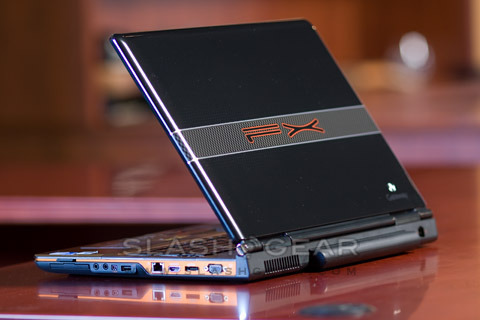
Packing a laptop with a full-sized keyboard, screen bigger than many use with their desktop and the sort of specs that gobble through even the most capacious of batteries has always struck me as cheating a little. Call me old fashioned, but I do like my notebook to be portable and my desktop to be sturdy; Gateway, however, weren't willing to stop at just calling me names. They sent over their 17-inch P-6831FX, resplendent with orange pinstripes and dedicated NVIDIA GeForce graphics, to show that just because a laptop is large, it doesn't mean it can't be agile too.

Looking at the spec list, it'd be difficult to find the P-6831FX too lacking. An Intel Core 2 Duo T5500 CPU running at 1.66GHz, 3GB of RAM and a 250GB 5,400rpm Serial ATA hard drive are coupled with a GeForce Go 8800GTS graphics card bearing it own 512MB of GDDR3 memory; that pushes the 17-inch WXGA+ Ultrabright display up to 1440 x 900, or alternatively squirts out via the HDMI v1.2 port. An 8x dual-layer DVD re-writer, fingerprint reader, 1.3-megapixel webcam, a/b/g/draft-N WiFi, Bluetooth 2.0+EDR and gigabit ethernet round out the hardware, and OS duties are handled by Vista Home Premium.

Of course, all that adds up to something that can't really compete with a MacBook Air on portability. Weight is around 9.3 pounds, while the big screen means the P-6831FX measures in at 1.7 x 15.75 x 11.75-inches (at its biggest points). Not something you want to be toting as a road warrior, but it's certainly not unimaginable to shift the Gateway around to LAN parties and from home office to garden.
First impressions are variable. The keyboard feels solid and is truly full-sized, but the trackpad buttons are noisy, feel cheaply made, and gave us cause for concern about how long they'd survive, especially given a gaming battering. Vista reported its usual optimistic battery expectations, but with a DVD running through Vista Media Center we managed to drain the 9-cell, 2600mAh power pack in 117 minutes. Not bad at all for a desktop replacement, but if you manage to drag the Gateway onto a plane you'd better only want to use it for a short-haul flight.

You could make a pretty strong argument for keeping it hooked up at home, though; the P-6831FX makes a good source in a home cinema setup. We tried it with an Onkyo DCT 9.8 preamp-processor and with Panasonic's AE2000u projector, and it happily settled into 1:1 mapping at 1080p 24hz. That includes the preamp set at either through or to 1080p 60hz; the Gateway's video card did better at HDMI handshake than the Toshiba Satellite X205-SLI4 we reviewed in February. As for audio, we were able to bitstream 7.1 channels through the HDMI, with sound quality the equal of the X205.

Watching movies without the projector, though, shows up a minor irritation: the blue power LED is far brighter than it needs to be, and is a real annoyance in the dark. Nothing a dot of black tape wouldn't cure, but it betrays a lack of consideration by Gateway for how the P-6831FX will be used. [Matt in the comments tells us that Fn+F1 shuts off all LEDs aside from the HDD; thanks Matt!] The media controls above the keyboard are also slightly less tactile than we'd like, leading to uncertainty whether they've been pressed or not, and the touch-sensitive volume control is little more than a gimmick. Better is the eSATA port, for hooking up an external, faster hard-drive, and it makes up for a rather measly three USB ports.
It's worth noting that you won't find the P-6831FX on Gateway's website, it's a special edition intended for Best Buy; if you want to buy direct then you're looking at the P-171S FX, complete with tweaked specs: Intel's T7250 chipset running at 2.0GHz, and they've swapped the DVD drive out for a slot-loading version. Still no Blu-Ray, but at least you're not paying for the HD-DVD drive Gateway used to include.

[Click to view full image]
In our 3DMark tests, the P-6831FX scored 6632 overall, made up of 3145 for SM2.0, 2198 for HDR/SM3.0 and 1413 for the CPU. During stress testing, the CPU temp saturated at 65 degrees, with max voltage at 1.36V. Hard drive testing with EVEREST showed an average read time of 16.90ms, while HD Tach RW v3.0.1.0 rated the P-6831FX's drive at 113.8MB/s burst speed rates and 17.3ms random access times. Considering the average CPU, they're decent scores, and the 3GB of RAM likely props up the performance somewhat. Having a dedicated graphics card pays dividends for gaming, too, with frame rates comparable to machines far more expensive than the Gateway.
Frankly, it's hard not to warm to the P-6831FX, even with my confessed antipathy to desktop replacement laptops. For the price – Best Buy have it for $1,349.99 on their site – you could do a whole lot worse; Gateway's own P-171S FX comes in at $1,599.99 for the updated CPU and slot-loading DVD. If you've got the desk space (or the muscles to carry it) and are looking for an affordable but still capable alternative to some of the flashier gaming rigs from Alienware or Dell's XPS range, the Gateway P-6831FX is definitely worth a look.
You can see our full gallery of P-6831FX photos here.
[rating:3.5/5]