REGISTER LOGIN

Worth Reading?

NoYes

+16 [120 votes]

5d mark ii bug 1Canon took a huge beating on its latest Mark III DSLRs’ flagships with the controversial Auto-Focus snafu. Make no mistake; the newest release and much-promising 5D sequel if continue to face technicalities, will tear them into pieces, losing more prominent domination in pro as well as prosumer markets. Early reports in favor of the improved AF, white balance and high ISO sensitivity despite the increased sensor sizes; however, like most cameras at its initial rollout, 5D mark II can’t escape the early-adopter bugs.

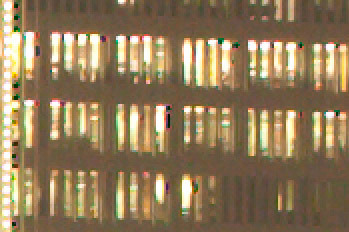
Facing the toughest pixel-peepers, images taken with the new camera shown clusters of black dots/edges on the right side of blown highlight areas. Numerous discussions are heating up at community forums; some reported artifacts are presented on raw data (not post-processing errors) and are more rampant in high ISO but appeared less on low iso shots, others, include a Canon tech response to the ill-effects are limited on long exposures with high ISO images, similar occurrences have been reported and fixed via firmware in previous models.

Frankly, it’s not an issue at alarming rate; of course, unless your works involve pixel-peeping beyond 100% or billboard-sized commercial printing. The tiny black dots on aren’t likely to affect the overall 21MP image. Thanks goodness the issue is said to be easily repaired, personally, I don’t think the Canon’s biggest blunder the past decade could take another hit.

[Update on the fix: Eric has informed us about a workaround being posted here : But suggestion to disable certain camera functions does not solve the issues. See our latest update Canon will address 5D Mark II’s Black Dot Issues soon ]

[Update : Canon issued service notice on vertical banding and block dots issues]

[Update : Canon 5D Mark II firmware update hands-on : Problem fixed ]

5d mark ii bug 2

5d mark ii bug 3

Black-Dot topics discussed at community forums below:

Photo.net, dpreview, photography-on-the.net, fredminranda

[photo credit : http://glubsch.wordpress.com/]

Subscribe via RSS or Email | Read 23,545 times

11 Responses to “Canon 5D Mark II early bug reports : Black-Spot Artifacts”

  1. Arnold - Mr.Gadget December 7, 2008

    Keepin’ an eye out for this however not a major issue since I’m not a pixel-peeper.

    Had mine for a couple of days now and love it.

    Neutral  Add karma Subtract karma  
  2. James Raley December 7, 2008

    This is absolutely in consequential!!! Every digital camera ever made using Bayer pattern sensors suffers from some type of one to two pixel wide chromatic distortion at the boundary of blown highlights. This is because the Bayer filters use combinations of three red-green-blue receptors to interpolate color, and the three colors all saturate at slightly different light intensities. It physics!! If you want to eliminate this entirely, you’ll have to find a new sensor technology.

    Neutral  Add karma Subtract karma  
  3. A Plus December 7, 2008

    James,
    Are you referring to blooming edges??? Take a look again, none of Chromatic Aberration (lens induced) and Purple Fringing (much-sensor induced) ever suffer “Black” pixel Chromatic distortion.

    Neutral  Add karma Subtract karma  
  4. kelly December 7, 2008

    anyone have another example with a pic that isn’t horrible? looked on the FM forums (haven’t had time to go through the rest), that sample is pretty miserable. would be interested if it’s the overexposure, just high ISO, or combo of the 2… thinking about upgrading here, but might wait till tax refund time (then again, availability may dictate that anyway, can’t seem to find anyone with one in stock)

    Neutral  Add karma Subtract karma  
  5. Andrew Yip December 10, 2008

    I was able to reproduce the problem with mine, even with those settings turned off. You can see some samples here:
    http://www.andrewyip.com/blog/.....-ii-images

    Neutral  Add karma Subtract karma  
  6. Stephan Hoerold December 11, 2008

    Daniel, I think it would have been fair to ask for permission before you use any of my photos. I don’t even see credits anywhere. My original photos have a clear watermark showing my copyright information. You used a crop out of these photos.

    +2  Add karma Subtract karma  
  7. Jenn December 16, 2008

    Anyone else having the auto-off problem? My unit turns off and does not turn back on unless I remove the batteries.

    Neutral  Add karma Subtract karma  
  8. bova December 24, 2008

    Noel Carboni of ProDigital Software has made an PS action that will eliminate the Black Spots until Canon gets it sorted.
    http://actions.home.att.net/5D....._Dots.html

    Neutral  Add karma Subtract karma  
  9. Julie July 15, 2009

    Has anyone had this problem???? On viewing an image more closely only at 50% I noticed a random block of brown color against what was a plain cream wall. I’ve been on the internet all day trying to find this problem. Having no joy I’ve just called Canon, who for some reason don’t even want to see the image I’ve taken, they are going to try to recreate the fault by using my settings (200ASA,60th, F11, like that’s really pushing it) and will get back to me. Feels like a brush off, anyone had this problem?

    Neutral  Add karma Subtract karma  
    • Daniel Lim July 15, 2009

      cpi: I recall your issue with images taken under indoor fluorescent light, but at 1/60th, it shouldn’t be an issue.

      Neutral  Add karma Subtract karma  
  10. Julie July 16, 2009

    Yep you’re right this is not an issue. The shot is a clean, crisp, staged office shot. Using a tiny bit of window light and soft boxes. It was more of a studio set-up, I’m hardly pushing the camera to the brink, woo 200 ASA, 60th @ F11. I’m baffled by this problem and even more surprised by Canons response.

    Neutral  Add karma Subtract karma  

Post a comment

Please login to leave a comment. If you haven't signed up, you can do so free here. Lost your password? Reset it. With SlashGear account, you will be able to participate on SlashGear Forums.