JP REGISTER LOGIN

Worth Reading?

NoYes

+58 [76 votes]

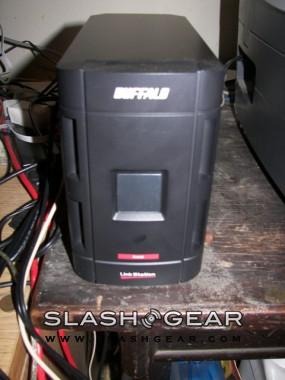
So I met with Buffalo at CES, and then shortly after they were kind enough to send me their LinkStation Pro Duo for review. I must say I am impressed, it is quite squarely aimed at business users, but for home users, it has some fairly useful features as well.

The first thing that hit me when I took it out of the package was that there didn’t seem to be enough, for lack of a better word, crap, in the box, but there was. This thing has such simple setup that other than the unit itself all there was inside was the power cord, Ethernet cable, software disc, and then a quick start guide and some warranty information. The power cord was like the outlet half of a laptop power cord, no brick as the power supply was built into the unit along with a cooling fan.

One other thing that surprised me was the size of this thing. It measures in at 3.9×6.4×8.7 inches, which is about the same size as any other dual drive external hard drive, but this thing has some heft with a weight of 6.8 pounds! So, even if you could connect to it directly via USB, it still wouldn’t be all that portable of a solution.

So, I plugged it in, attached the Ethernet cable to the device and then the other end to my router and then I went and installed the software. The software installed NAS Navigator which allows you to change some setting for the drive from that interface and also links you to the web interface for the drive as well where all the other settings can be accessed and changed. The software also had to courtesy to, on my Windows machine, automatically map the device as a network drive.

Inside the box there are 2 500GB hard drives, you have your choice of running those as one giant 1TB drive in RAID 0 or as a mirrored 500GB volume for data redundancy in RAID 1. I chose to run it as a large 1TB drive because I don’t have anything sensitive enough to need data redundancy, and I thought I could come close to filling up 1TB with all the junk I have on my computer, but alas I cannot, that’s a lot of data.

Actual performance of the drive was pretty amazing once I got all the data I wanted on it, I wanted to see how fast the data transfer was, so I transferred as much as I could to the drive, I had to separate transfers going at the same time with a total of 216GB of data being transferred, it took a few hours, but one finished before the other, so the first transfer sped up a lot after that, so multiple transfers apparently slows things down, and I only have a 100MB network, but the drive has a gigabit Ethernet port. So the multiple transfers plus the fact that the drives are just 7200RPM SATA drives, plus the fact that I was transferring 216GB of data, and I can see why it took a few hours.

But, once the data was on the drive, accessing it from the web interface on another machine and downloading something was blazing fast, my other desktop hit a little over 5 megabits per second when downloading a file from the drive. Obviously a download from a computer not on the local network, via the Web Access interface is going to be determined by your ISP and your max upload speed. Also, one nifty thing they did have was that you could play music from the drive within the web interface using the QuickTime browser plug-in, or you could download it and play it.

On the back, it has a power port, the RJ-45 jack, a USB port, a power button, and a power switch. The USB port is the same type as is on your computer and is for connecting a flash drive or another external hard drive, not for connecting to your computer. The power button is what turns the device on or off; the power switch is for manual or auto modes. When you first set up the device, it must be in manual mode, but after you have it set up, you can switch it to auto and it will shut off whenever the PC its connected to is shut down, I left it on manual because I wanted to be able to access it when I wasn’t home, and I didn’t feel like leaving my computer on to do so.

This particular drive supports TCP/IP, SMB, FTP, HTTP, NTP protocols; it also supports Active Directory as a client and can be accessed from anywhere using the Web Access interface. Here’s how the Web Access interface works, you set up the device for Web Access by assigning it a name (it has to be one that hasn’t already been taken) and then regardless of whether you have a static or dynamic public IP address it will resolve all of that for you, all you have to do is go to BuffaloNAS.com/yourNASname and you are in.

Now, that sounds easy, but for business users there are tons of features to help keep things secure at the same time. First off, you can set up multiple shares on the drives and set up separate user accounts for everyone (or you can assign those permissions in AD) and then set which shares they have access to, this would allow only users with the proper rights access to the drive both internally or externally. Or you can set access to the drive to anyone, and then anyone who has the name of your NAS can go to the Buffalo NAS site and get on your NAS and download stuff. On the NAS’ web interface there are tons of other management and security features making this the ultimate in convenience and security.

One last cool feature of the drive is that it also comes with Memeo backup software for one click backups of your system which is nice. I didn’t have much of a use for it as I never do backups anyways, but I am sure there is a large audience out there for such a feature.

Overall, I love this drive, and although I’d like to keep it, I sadly must send it back, but I am definitely going to check out a few other NAS units and if I don’t like any of those more, I’m buying one of these, it really is quite amazing. But alas, I must give the downsides as well as the upsides, but don’t worry, there aren’t many. The first is that although this drive is aimed at businesses where there will likely be someone who knows what they are doing, if a home user were to buy one and didn’t know what they were doing, setting up the web access could be a pain with all the port forwarding, setting up the share, and all that, but they have tried to make it as easy as possible, and if your router supports UPnP you could be up and running in as little as a few clicks, but if not, manually forwarding the port could be a bit of a daunting task, but its not impossible. The second complaint I have is that when it mapped the drive as a network drive, it mapped it, in Windows, to the next drive letter which meant that every time I connected something via USB, such as a flash drive or my other external hard drive, to my computer the new device wouldn’t show up, because it was also assigned the same drive letter, it took me a while to figure this out, and from then on I’ve had to change everything I plugged in’s drive letter manually, I am sure there might be an easier, more permanent fix, but I don’t know what it is. My last complaint is that in the Web Access interface, you can only download a single file at a time, you can’t download the entire contents of a folder all at once, something to fix this would be great. Overall, I give this gadget 4 out of 5 gears, its really cool and if you are a business user definitely warrants the three to four hundred dollar price tag (depends on where you buy it).

Rating:

  • ★
  • ★
  • ★
  • ★
  • ☆

Subscribe via RSS or Email | Read 28,235 times

18 Responses to “Buffalo LinkStation Pro Duo review”

  1. zeiss March 11, 2008

    seems like lack of USB connectability to a computer is a major con. who wants to transfer 1 TB via wireless?

    does anyone one know if these drives can be easily swapped out? in a few years as drive prices drop, could one insert 2 x 1TB, for example?

    -5  Add karma Subtract karma  
  2. James Allan Brady March 12, 2008

    I am almost absolutely positive they can be swapped out as there were controls for when you did that to re-sync the RAID and format and all that jazz

    and as far as your transferring 1TB over wireless comment goes, that would be a dumb idea, but it used Ethernet, not Wireless, i mean, sure, you could connect via wireless through and AP or a router, but Ethernet gets up to 1Gbps speeds which would make transferring to this thing faster than FireWire or USB

    +6  Add karma Subtract karma  
  3. rjc March 13, 2008

    Hi,
    We (at the place where I work) bought the LinkStation for backup purposes.
    At first the software supplied with it couldn’t detect it, now it crashes all the time when a backup’s being run. The worst thing of all is that despite it running a modified Linux (samba is Debian stock one – at least that’s what it says) it doesn’t leave any logs for one to look at.
    In other words, from my experience – it’s a piece of junk, don’t buy it!

    Kind regards,
    rjc

    -4  Add karma Subtract karma  
  4. James Allan Brady March 13, 2008

    Did you try calling Buffalo to get it resolved? I had some issues at first, called Buffalo, and they were friendly, intelligent, and very helpful

    also, Samba is a network file and printer sharing protocol that allows Linux based systems (Linux and Mac OS X) talk with Windows networks, it is the default network filesharing system for Debian, but that in no way means that Linux is running on the LinkStation.

    as far as the crashing goes you might want to check a couple of things, first, make sure the power switch on the back is set to manual, second, if its messing up mid-backup i doubt its a hard drive issue, it sounds more like a network issue so look into that as well.

    +1  Add karma Subtract karma  
  5. kevi jestice March 22, 2008

    My home network runs 2 Vista machines and 2 XP machines. The software for the LinkStation ran perfectly on Vista. In fact I didn’t do anything except insert the disc and click when asked.
    The XP machines were a big probelm and would not see the LinkStation. Tried all sorts of stuff. Eventually it was the Zone Alarm firewall that needed to have the LinkStation IP added as a trusted address, even though the LinkStation was within the routers/firewalls own domain. The software gave no hint to the problem.

    Overall very impressed. It does what it is supposed to do.

    +4  Add karma Subtract karma  
  6. Sudy Nim March 23, 2008

    Here’s a tip – the Linkstation series uses a UDP broadcast (it’s a best effort protocol, unlike TCP) for connecting. It’s like yelling in a crowded room. If your PC hear’s the NAS, it will allow the connection. If it doesn’t hear it, you’re out of luck. It’s part of UPNP (universal plug and play) protocol. Also some business users might have problems if their company’s VPN software is running as they can have firewall software.

    If you are having problems connecting, try disabling any software firewalls on your PC first. I have found that the Linkstation tries to connect to you when you try to connect to it, and incorrectly configured firewalls screws it up. If that fixes it, make sure your firewall is configured to allow these ports: UDP 1900, TCP 2869

    Here’s a link from Microsoft: http://support.microsoft.com/kb/886257

    +2  Add karma Subtract karma  
  7. allNYtech August 13, 2008

    Here’s a major tip – When first using the Buffalo (or most NAS boxes), connect it to a network that has a DHCP server (if at home, and you have a router or wireless router, you’re OK). On Buffalo, change power switch to manual. Plug in ethernet (network plug) wire into Buffalo and other end to router. Disconnect network cable between your router and internet connection (not necessary during setup). Disable any and all firewall sofware on the PC you’re using (this includes windows firewall). Turn on the Buffalo and wait 2 minutes. Insert the CD and follow prompts. I did it exactly this way, except not using the CD. I configured my Buffalo NAS for static IP (a fixed IP that doesn’t change) outside the range of my router’s DHCP list (usually 1-100). I didn’t use the software that came with it, I used either windows backup or downloaded a free program to backup (I need logs). :) Then made backup software “backup” to Buffalo drive. I did all of this without any issues. Now, please enable any/all firewall software you disabled earlier and reconnect your internet to your router. :) I would suggest configuring to RAID1 “Mirroring Mode”, this makes both drives have the same information for redundancy. :) I also like the fact the powercord is not another brick you have to deal with (all internal). :) Done! Very satisfied with this device. By-the-way, the pictures here make it look a lot larger than it really is.

    +4  Add karma Subtract karma  
  8. pjones2012 September 17, 2008

    I have two (02) computers – Laptops – with a third (3rd) one on the way from the manufacturer – my laptops are currently not networked.

    I will however probably network them in the future.

    Therefore I am wondering can I use the Buffalo LinkStation Pro Duo with my laptops individually as my configuration is now as well as in the future when I network them together?

    If this Hard Drive does not allow me to do this does anyone have an External Hard Drive Solution that has this capability.

    Thanking any responder in advance.

    pjones2012

    Neutral  Add karma Subtract karma  
  9. Rick September 27, 2008

    Instead of your drives fighting over drive letter assignments why not just reassign the drive letter to the NAS? Right click My Computer, select manage, and under disk management rename it something like “Z:”. Then your USB drives won’t hide from you when you plug them in.

    +1  Add karma Subtract karma  
  10. Clayton October 4, 2008

    I am having issues with my Buffalo Link Station Pro Duo. When I start it up and try to access the software I receive the following message. “LS-WTGL-EM89A is under EM mode. Update firmware or contact your local technical support .” I have tried multiple times to update the firmware from the downloads on the support pages. I have had no success updating the firmware though. I keep receiving an error message stating “LS-GL that needs updating wasn’t found.” I am at a loss with this unit. Any suggestions?

    +5  Add karma Subtract karma  
  11. Steen Knudsen October 8, 2008

    Well. I have used Buffalo for a long time now and the duo linkstation is my 3.
    First of all. About backup. My best setup is a Drivestation in the usb and then i use the backupsoftware there is in the linkstation. Its perfect and you get your log by mail. In the duo drivestation you also have Raid and then you have your data 3 places. Just to be sure.
    It runs perfect. I never had problems with a linkstation. Its not intended to be used as a backup drive as i read somewhere on this page. For that purpose you need the drivestation.
    In our company we have 2 of them. In each end of our 3.500 sqm building. And they are setup to mirror each other. Another way to secure data (i now have the same data 4 times – and all automatic)

    Once a month i connect an extrenal drive to the 2. usb plug in the linkstation and the software automatic make a full backup on it to over night. I have this in a backup bank somewhere in town.
    We work with graphics and speedproblem with large files are no problem. AD easy to setup to with the domain server.
    It also have a FTP server in it and its nice when someone works at home on files and can send them directly to the linkstation so we can continue working with them and get the prints done. Large files have always been a problem on the mailsystem.
    Well – i am a happy Buffalo user.

    +2  Add karma Subtract karma  
  12. Wing October 20, 2008

    I bought mine last week.

    The menu has changed. The duo now comes with two usb 2.0 ports, a print server and a media server ( the latter not even mentioned in the manual)! It shows up as media server pvconnect and when clicked it opens MediaPlayer. I did not have the time to wait and see what happened next. I can’t make it visible in iTunes yet…

    The backup software works great and indeed 500 GB is a lot of space!!
    Got three (XP) pc’s connected to it and a Vista laptop. This one is wireless, NAS-navigator doesn’t see the device. I’ll try it wired next month…

    Accessible from the web, no ip- or drive letter issues…I’m happy :-)

    +1  Add karma Subtract karma  
  13. Simon Brenner November 10, 2008

    Hey Wing,

    thanks for your comment!
    Wow, it would really astonish me if the Pro Duo came with two USB ports, print server and media server!!! I never read about that and never saw any picture of the 2. USB port, for example…
    Are you sure this is true?! Can I read somewhere about that?

    Thanks a lot!

    Neutral  Add karma Subtract karma  
  14. Dare November 12, 2008

    Does this have a bittorrent feature, that allows downloads of torrent files without having the pc on?

    Neutral  Add karma Subtract karma  
  15. Simon Brenner November 22, 2008

    [quote comment="54053"]Hey Wing,

    thanks for your comment!
    Wow, it would really astonish me if the Pro Duo came with two USB ports, print server and media server!!! I never read about that and never saw any picture of the 2. USB port, for example…
    Are you sure this is true?! Can I read somewhere about that?

    Thanks a lot![/quote]

    Ok folks, now I can answer my own questions. I recently bought a Pro Duo 1TB and it really has 2 USB ports, a print server and a media server!! I sometimes read about some kind of version 3 of the Pro Duo so they seem to have kind of upgraded the Duo – very cool features indeed!!!!

    Greetings!

    +1  Add karma Subtract karma  
  16. labelsig December 9, 2008

    I’ve had this NAS for 5 months and have experienced nothing but Raid errors until now I can’t even connect to the unit. Tried to deal with customer support and they are seriously terrible to deal with. 30min+ hold times, credit card authorization systems that cannot even verify our corporate card properly which hinders the replacement of the unit. Just terrible customer service! RUN AWAY!!!

    Neutral  Add karma Subtract karma  
  17. Wing December 21, 2008

    There’s new firmware available!!

    http://www.buffalotech.com/support/downloads/

    Neutral  Add karma Subtract karma  
  18. Pars October 2, 2009

    Hi. I’m new to splash Gear and would be very thankful if you help me with some Information. As I speak persian and German much better than english, i hope you show understanding if I make mistakes in writing.
    I already bought a Buffalo Linkstation Pro Duo with USB and 2 TB. Setting everything was so easy even for a Novice like me.(I tought!) But now I have Problems. How can I make some Folder accessable to some people and block them from seeing or reaching other folders and Datas on my LinkStation?
    How can I put security to work for me? I use this one for sending and hopefuly receiving Datas from my Family and friends from around the Globe.
    Thanks.

    Neutral  Add karma Subtract karma  

Post a comment

Please login to leave a comment. If you haven't signed up, you can do so free here. Lost your password? Reset it. With SlashGear account, you will be able to participate on SlashGear Forums.