REGISTER LOGIN

Worth Reading?

NoYes

+72 [80 votes]

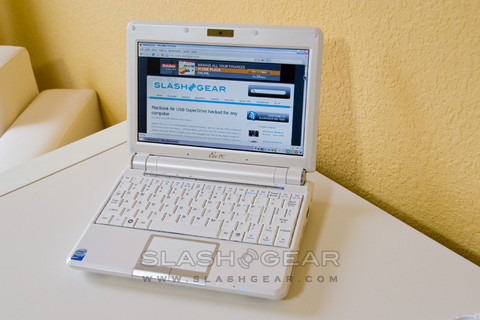
If the ASUS Eee 900 basically amounted to a larger-screened version of the 7-inch original, then the Eee 901 marks its graduation into a distinct model.  Packing Intel’s latest 1.6GHz Atom N270 processor, in place of the 900’s Celeron 900MHz, ASUS could reasonably have left the rest of the notebook the same and simply added a little to the price.  Thankfully they’ve subjected the 901 to a mild degree of fettling, tweaking case and controls and making for a markedly more attractive proposition.  ASUS sent over the Windows version of the 901; check out what exactly impressed us after the cut.

eee pc 901 1

The Eee range needs little introduction.  Kicking off with the 7-inch original, in 2G Surf, 4G Surf, 4G and 8G forms, ASUS followed up with the 8.9-inch 900.  Most recently – and delayed courtesy of Intel’s Atom CPU shortage – the 901 replaced the 900, and ASUS also introduced the 1000 and 1000H, both with 10-inch screens.

eee pc 901 2

Aside from the new processor, which can be quickly throttled back to save battery power during low-load use, ASUS have left alone what they got right with the 900.  The single, pivoted mouse button bar of the original Eee was a nightmare, and the 901 thankfully has two separate buttons, making navigation far less frustrating; there’s also the same two-finger scrolling as with the 900.  Unfortunately the keyboard hasn’t been reworked; it’s usable, certainly, but MSI’s Wind and Acer’s Aspire One have raised the game and “usable” simply isn’t good enough any more.

eee pc 901 3

Two versions of the Eee 901 are available, one running Windows XP and fitted with 12GB of SSD, the other coming with Linux and 20GB of SSD storage.  Both use two SSD chips, one 4GB for the OS and the other either 8GB or 16GB depending on model.  More space than the 7-inch version, certainly, but those looking to carry large numbers of files will be glad of the 20GB online YOStore service subscription ASUS include.  RAM comes in at 1GB, no change, but thankfully the other big criticism from users has sunk in and ASUS now fits a 6600mAh battery as standard.

eee pc 901 6

Physically, the casing has gone glossy where the 900 was matte, and the corners have been smoothed off.  There’s a little extra bulk, though, and the bigger battery has tipped weight over the 1kg mark.  Still portable, but subjectively not quite as attractive as the Aspire One.  An SDHC slot still offers memory expansion, while VGA out, headphone and microphone sockets remain.

eee pc 901 5

It’s battery life that’s the key improvement over the 900, actually, not brute processor speed.  The Atom’s strength is its frugality and the flexibility of overclocking and underclocking it offers; a dedicated button just beneath the screen hinge cycles the 901 through Super Performance (overclocked to 1.8GHz), High Performance (natural 1.6GHz), Power Saving (underclocked to 800MHz) or Auto modes, garnishing extra grunt or scaling it back.  Alternatively, leave the Eee to handle its own hardware speed and the combination of Atom, updated Intel GMA 950 graphics and SSD should eke out far more battery life than before.  Our early tests suggest the 901 is far more capable in real-world usage: watching video, rendering webpages and multitasking with several simultaneous apps.  It took only 26 seconds from cold boot into the Linux OS. We’ll be updating this review with battery life details from real-world use, but ASUS themselves claim up to 6hrs of use from a full charge.

eee pc 901 8

Thankfully, considering ASUS pre-configure one of the two shortcut buttons (the other is the Super Performance toggle) to Skype, the 901 is a happy camper when it comes to video conferencing.  The original 1.3-megapixel webcam is joined by a new dual-microphone array (the 900 had a single mic), and the draft-n WiFi offers all the bandwidth you need.  Both shortcut buttons can be remapped.  Bluetooth is onboard too, but switching the wireless options on and off is made more complicated than it really need be; the F2 button handles that, but while ASUS moved the status LEDs so that they wouldn’t be blocked by a wrist, they didn’t actually add in any more.  WiFi and Bluetooth therefore share an indicator, making differentiation tricky.

Perhaps that’s nitpicking, and it’s true to say that we were more impressed with the Eee 901 than we expected to be.  While we were expecting the faster CPU to muddy the waters in terms of differentiating the 901 from a “normal” notebook, what it’s actually managed to do is make a convincing case for a usable ultraportable with serious longevity.  Purposefully underclocking a processor sits at odds with the usual computing race for speed, but the lithe Atom does a great job of flicking between throttled-back and overclocked so that it no longer feels like a compromise.

eee pc 901 9

What could undermine the Eee 901 is nothing to do with its hardware; actually, its ASUS themselves who may have made for a difficult sell.  Priced at $599 for either Windows or Linux versions, the 901 sits significantly higher than the MSI Wind ($499 for the XP model, $399 for the Linux; both with 80GB HDD) while the $379 Linux-based Acer Aspire One undercuts them all (albeit with less storage).  All use the same Atom processor.  The Eee 901 is our choice on specs alone – faster WiFi, more SSD capacity and Bluetooth as standard, together with a spare slot for future 3G WWAN expansion – but if it were our own money that decision would be a whole lot harder.  A great machine, yes, but a few months too late to be the convincing knock-out ASUS hoped it would be.

Disclosure: The unit we received is a pre-production (engineering sample) system.

Unboxing Video

YouTube Preview Image

Rating:

  • ★
  • ★
  • ★
  • ★
  • ☆

Subscribe via RSS or Email | Read 27,009 times

22 Responses to “ASUS Eee PC 901 Linux Edition Review”

  1. Bree Pearson June 24, 2008

    Looks awesome Ewdi, I love the little EEE!

    +2  Add karma Subtract karma  
  2. Anon June 24, 2008

    Lucky… :(

    Any word on the US release?

    +1  Add karma Subtract karma  
  3. Ewdison Then June 24, 2008

    [quote comment="43978"]Lucky… :(

    Any word on the US release?[/quote]

    It should be in July

    [quote comment="43967"]Looks awesome Ewdi, I love the little EEE![/quote]

    Yes it does Bree, pretty fast too compared to the old eee 900

    +1  Add karma Subtract karma  
  4. Eeek! June 26, 2008

    I gotta get me one of these! Awesome review, well done guys!

    +1  Add karma Subtract karma  
  5. JT June 27, 2008

    FYI: I just spoke with a representative at Asus and he indicated the 901 would roll out in North America on Monday of next week (6.30.08).

    +2  Add karma Subtract karma  
  6. bardog June 28, 2008

    Great review Ewdi! I was weighing if i would go with eee or wind! After reading this review, I’ve decided to go with eee 901

    Neutral  Add karma Subtract karma  
  7. Michael June 30, 2008

    Can an AC adapter be used on the Eee pc? or do you have to keep recharging the battery?

    Neutral  Add karma Subtract karma  
  8. Ewdison Then June 30, 2008

    [quote comment="44279"]Can an AC adapter be used on the Eee pc? or do you have to keep recharging the battery?[/quote]

    Yes you can use AC adapter only if you prefer

    +1  Add karma Subtract karma  
  9. lotyrin July 4, 2008

    [quote comment="44279"]Can an AC adapter be used on the Eee pc? or do you have to keep recharging the battery?[/quote]

    Are you some kind of idiot? Seriously, I can’t even understand how you imagine it could work otherwise.
    Like, some kind of battery-charging base station, where you have to take the battery out and recharge it? Do you think it runs on AA batteries!? *facepalm*

    -11  Add karma Subtract karma  
  10. WaveyDavey July 17, 2008

    How useable is the linux on the 901? I had read complaints about the 900 that it isolated the user from the underlying making it impossible to install your own software and difficult to manually upgrade apps such as Firefox.

    +1  Add karma Subtract karma  
  11. Ewdison Then July 17, 2008

    It’s pretty responsive and usable, but you can always go to different route and install eeebuntu and have full control of the linux os

    Neutral  Add karma Subtract karma  
  12. Gadgeteer July 17, 2008

    Thanks,
    you answered my finaly query about the future proofing “a spare slot for future 3G WWAN expansion”

    Now just have to hope enough of these will be made (still no release date for the Linux version in UK)

    +1  Add karma Subtract karma  
  13. Wian July 21, 2008

    it’s a nice toy if you have the time to play
    http://www.eeehacks.com

    Neutral  Add karma Subtract karma  
  14. ple July 23, 2008

    Pros: Small, great Battery life, easy to use, plays SD video great(AVI, DIVX) screen looks great … Got it last Friday and had it all going within an hour and painlessly patched OS and BIOS updates in 3 hours

    Cons : keyboard is cramped, no PCMCIA = No real problem

    Thoughts: got this for the train and for travel, it meets the requirements very well – a little smaller than I expected (a good thing) – sits very neatly on my lap, overall very very happy (ps am getting about 6 – 6 1/2 of battery time on this puppy (Nice)

    Neutral  Add karma Subtract karma  
  15. iCoder July 24, 2008

    I reccomend you buy the Acer Aspire One The Newest release of 120Gb and 1GB theirs nothing to lost with that and plus a bigger keyboard and cheaper!

    Neutral  Add karma Subtract karma  
  16. michael mandlin July 28, 2008

    Hello, I was under the impression that there is a substantial difference in battery life between the linux and XP version. Does anyone know?

    At first I thought the linux had radically better life, and then CNET’s specs comp says the XP is 8 hours and the linux has 6 hours. That’s kind of counter-intuitive. What gives?

    I was hoping to order this tomorrow, so if anyone can give me a head’s up, I’d appreciate it.

    Thanks,

    Michael

    Neutral  Add karma Subtract karma  
  17. Titanium Candy July 30, 2008

    Reasons why i would not buy this product,

    1: costs too much

    2:I rather just have, A FREAKING LAPTOP >:O !!!!!!!!!!!!!!!!!!!!!!!!!!!!!!!!!!!!

    -5  Add karma Subtract karma  
  18. Marius Muscalu October 24, 2008

    [quote comment="45743"]I rather just have, A FREAKING LAPTOP[/quote]

    A freaking laptop isn’t for everybody . . . this is why Asus Eee has such a popularity.

    Neutral  Add karma Subtract karma  
  19. bdegrande October 26, 2008

    [quote comment="45451"]I reccomend you buy the Acer Aspire One The Newest release of 120Gb and 1GB theirs nothing to lost with that and plus a bigger keyboard and cheaper![/quote]

    And the 901 has the extra reliability of solid state, a much better touchpad (buttons in the right place, two finger scrolling), 802.11n wireless, Bluetooth standard, a 6 cell battery, and more and easier memory exoandability. I’ll take the Asus.

    Neutral  Add karma Subtract karma  
  20. bdegrande October 26, 2008

    [quote comment="45218"]How useable is the linux on the 901? I had read complaints about the 900 that it isolated the user from the underlying making it impossible to install your own software and difficult to manually upgrade apps such as Firefox.[/quote]

    Asus should make it easier to open up the OS ro full desktop mode. It takes a few terminal commands, and then you can use the full KDE desktop. It is easy to install software if it happens to be in an Asus-approved repository, the EEE Download button not only installs it, but creates an icon in Easy Mode. If you want to install other software, you will have to do some tweaking to add repositories, or if you have full desktop mode enabled, you can use the Synaptic package manager (or run Synaptic or apt-get from the terminal in Easy Mode). The advantage of not installing another distribution is that you can be sure that all of the hardware will work.

    Neutral  Add karma Subtract karma  
  21. bdegrande October 26, 2008

    [quote comment="45743"]Reasons why i would not buy this product,

    1: costs too much

    2:I rather just have, A FREAKING LAPTOP >:O

    !!!!!!!!!!!!!!!!!!!!!!!!!!!!!!!!!!!![/quote]

    And after you carry a freaking laptop around for a while, you will get a netbook.

    Neutral  Add karma Subtract karma  
  22. WhadUpDoe December 24, 2008

    Hey,

    I just purchased one of these with Linux, and I am very happy with it. The keyboard does take some getting used to…especially if you have big hands. But after a few days you can manage…Also, the Linux OS on the netbook is kind of hard to tweak…I have had a lot of difficulty adding in codecs and other programs. And, unless you are very smart, you need an external DVDrom to install windows on it (which they provide you the disk).

    I

    Neutral  Add karma Subtract karma  

Post a comment

Please login to leave a comment. If you haven't signed up, you can do so free here. Lost your password? Reset it. With SlashGear account, you will be able to participate on SlashGear Forums.