

Apple OS X Leopard In A Nutshell
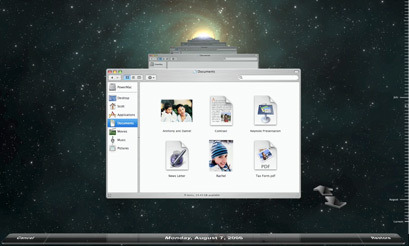
The purpose of this article is to briefly sum up for you, all the new changes, features and enhancements that were unveiled at the WWDC keynote address. So sit back, relax and just take it all in. Mac OS X Leopard aka Vista 2.0 will knock your socks off.Time Machine provides a one stop back up solution for the entire system with absolutely no fuss whatsoever. The system tracks every change and provides you with archives of the previous states that your disk was in. The phrase Time Machine is slightly misleading because it doesn't allow you to move forward in time – just back. So in the event that you [purposed] accidentally deleted your mother-law's vacation pictures, simply go back a couple of days and restore them. It's a nifty feature that Time Machine can backup on as needed to an external, internal or network drive. If you should backup to the internal drive and it goes bad, you can kiss your data good bye.Spotlight enhancements will now allow search on other Mac systems across network, and it's now supporting more search syntaxes. Current features of Spotlight include searching for files, images, email and contacts.

There's not a day that goes by that I don't have Mail opened. I swear by it. I'm stoked about Notes box and the ToDo list! Lifehackers get ready because these two enhancements alone will skyrocket your daily productivity. There are way too many times when I have to send myself an email as reminders; the new Mail will have a dedicated box that formats Notes messages resembling Post its! Hot diggity damn. Who here goes through a single day without making a ToDo list? My wife and colleagues often send me email reminders to do this and that, and every now and then a handful will slip through the cracks (got to be my old age kicking in). No more! Mail will now let you highlight text in any applications, even document files and turn them into a ToDo list. Wahoo – jumping for joy. To take this one step further, third party application developers need to write applications to synch the ToDo list with Google calendar, PDAs and smart phones. Other new Mail enhancements include stationary in HTML – I'm not too terribly excited about this but it's nice for those that want it.

iCal now supports group calendar using CalDAV. It's even more useful now if you implement a compatible WebDAV server, which automatically schedule meetings during times when everyone is free and it even book meeting rooms! Holy smokes – that's a great enhancement.
The concept of Spaces isn't entire new because UNIX and LINUX operating systems current offer this feature. Leopard is based on the BSD platform so it's natural to see the feature also available. So what is Space and how's it going to increase your productivity? Imagine having mail, a couple of spreadsheets, three or four word documents opened and not to mention Safari and Firefox all opened s

imultaneously. Pretty cluttered huh? Now picture four virtual desktops that you can quickly switch between. Logically sort out your applications based on functions or how ever you like it. For me, I do a lot of research prior to writing an article on a specific gadget or topic. So it's nice to place Word, image editor and browsers into one Space. This frees up the other three Spaces for other applications. The second Space I'd use for Mail – allowing a cluttered free environment to have as many email opened, as I want without pulling my hair out. You get the picture. Similar to Expose, you can zoom out to see all four, and did I mention that you could drag application across Spaces? Neat huh?
Dude iChat is getting major enhancements such as screen sharing over iChat video; allowing you to share PowerPoint, videos in QuickTime, or show off slideshows. My home office is often very messy, making it down right embarrassing at time when I have to conference in clients or colleagues. Thanks to chat's backdrop, I can now overwrite the messy office with any image.

Dashboard is a program that runs mini applications called Widgets. Leopard will make it easy to turn any part of a webpage into a Widget. Nothing to exciting here but it's still worth noting.64-Bit Support We can expect Apple's new operating System – Leopard to be available in the spring of 2007. The OS fully support 64-bit applications while simultaneously run older 32-bit applications. This is all native without emulation of any sort. New Mac Pro desktops will feature the Quad Xeon 64-bit chips and have software that takes advantage of the native architecture.Core Animation is a graphical developer tool for scripting.Bundled Applications included in Leopard will include Bootcamp version 1.0, Front Row, and Photo Booth. Bootcamp allows users to boot up Windows OS on MacIntel machines. Front Row is Apple's media browser and Photo Booth allows you to take pictures of yourself using the built-in digital camera.
All in all, these new features and enhancements is a major step towards making OS X more useful.