Friday, Oct 27th 2006 by Chris Davies


Warning: imagesx(): supplied argument is not a valid Image resource in /home/slgear/public_html/wp-content/plugins/post-thumb/post-thumb-image-editor.php on line 155

Warning: imagesy(): supplied argument is not a valid Image resource in /home/slgear/public_html/wp-content/plugins/post-thumb/post-thumb-image-editor.php on line 156

Warning: Division by zero in /home/slgear/public_html/wp-content/plugins/post-thumb/post-thumb-image-editor.php on line 174

Warning: imagecreatetruecolor() [
function.imagecreatetruecolor]: Invalid image dimensions in /home/slgear/public_html/wp-content/plugins/post-thumb/post-thumb-image-editor.php on line 176

Warning: imagecopyresampled(): supplied argument is not a valid Image resource in /home/slgear/public_html/wp-content/plugins/post-thumb/post-thumb-image-editor.php on line 178

Warning: imagedestroy(): supplied argument is not a valid Image resource in /home/slgear/public_html/wp-content/plugins/post-thumb/post-thumb-image-editor.php on line 179

Warning: getimagesize(/home/slgear/public_html/gallery/data_files/7/4/thumbnails_150x100/thumb_Windows_Vista_Tablet.bmp) [function.getimagesize]: failed to open stream: No such file or directory in /home/slgear/public_html/wp-content/plugins/post-thumb/post-thumb.php on line 117


Worth Reading?


YesNo
Loading ... Loading ...

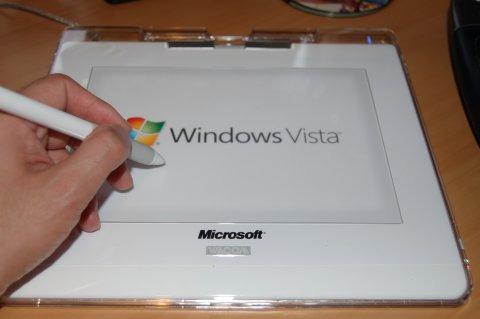
One of the things that has got Tablet PC users most excited about Microsoft Vista is the idea that the pen computing-specific features will be neatly rolled up into the main operating system, hopefully bringing them to a greater audience’s attention and encouraging more into the Glorious Way Of The Stylus.  Geekzone have sat down with a Vista-branded Wacom usb tablet and tried out the latest OS build and reported back on some of their first impressions - handwriting recognition, flicks and gestures.
Windows Vista Tablet

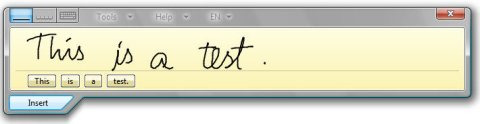
Windows Vista - handwriting recognition

Above: Windows Vista handwriting recognition panel (aka TIP)
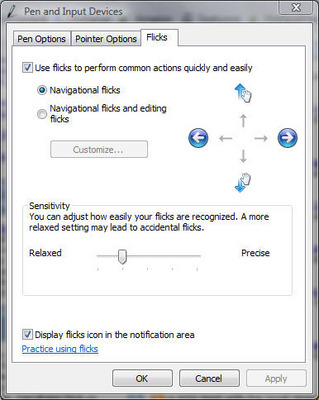
Windows Vista - Flicks control panel

Above: Windows Vista Flicks control panel

I’m hoping they’ll go on and maybe do some video of the interface in action.

Using a Tablet with Windows Vista [Geekzone]

Subscribe via RSS or Email | 4881 Subscribers | Read 69 times


  1.  inago   View all comments by inago  Neutral  Add karma Subtract karma Quote

    Hey there, i have a couple videos that i just uploaded of Vista’s pen features….done using a business version.
    Pen flicking: http://www.youtube.com/watch?v=WN5eWRYCOm0
    Handwriting: http://www.youtube.com/watch?v=vF0n2IvdCpI

    enjoy!

  2.  Chris Davies   View all comments by Chris Davies  Neutral  Add karma Subtract karma Quote

    Thanks! I’ve given your clips a post of their own: http://www.slashgear.com/more-.....223550.php

    Hey there, i have a couple videos that i just uploaded of Vista’s pen features….done using a business version.
    Pen flicking: http://www.youtube.com/watch?v=WN5eWRYCOm0
    Handwriting: http://www.youtube.com/watch?v=vF0n2IvdCpI

    enjoy!


Add your comments

Fill in the required fields below to leave a comment or login to your account. If you haven't signed up, you can do so free here. With SlashGear account, you will be able to participate on SlashGear Forums discussion.


Close
E-mail It
About / Advertise / Contact / Archives / Privacy Policy / Terms of Use
Copyright © 2006-2008 SlashGear, All Rights Reserved.