REGISTER LOGIN

Worth Reading?

NoYes

+1 [7 votes]

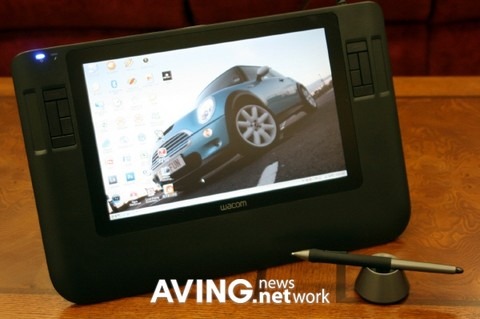
It has a 12.1” LCD panel and can be used as a second monitor and a tablet at the same time. You can set it on the desk and use it, or you can hold it in your arms to work if you prefer since it weighs a mere 1.8kg.

WacomCintiq12WX

There is an express button that connects the tablet to your computer allowing you to use it with your computer. There’s a stand on the back, the power button is on the top, and there is a pen along with a precious base for it.

WacomCintiq12WX 2

There is also a large box that comes with it for connecting everything, it received the power cable, USB cable, and DVI input and outputs it all through one cable for ease of use. The AVING guys seemed to like it and it looks like a thing of beauty, let alone whatever art you are creating on it.

[via AVING]

Subscribe via RSS or Email | Read 2,336 times

5 Responses to “Wacom Cintiq 12WX high-end tablet released – commands respect”

  1. Tom Wingo April 7, 2008

    Well after spending a month with my new WACOM Cintiq 12 WX I found that I could indeed live without it. While it’s the perfect size and what I’ve always wanted, reality has shown me that WACOM dropped the ball on this Cintiq terribly. The 1280×800 screen squished down to 12 inches was tough on the eyes when using FLASH. However, the biggest issue that I’ve also heard from other users is the poor accuracy and jitter of the pen in the corners and along the edges. I’ve used the larger Cintiq and am used to a small amount of jitter but the 12WX was terrible. In fact when I contacted WACOM their tech support who had a tablet near the phone reported that theirs was just as bad. They attributed it to the internal switched power-supply for the display and that there was no way to fix the problem.

    Needless to say I returned mine without the re-stocking fee after a brief discussion of the shortcomings with a sales manager. Perhaps when WACOM actually fixes the power-supply or switches to an LED backlight I’ll be back singing the praises of the 12WX.

    I still read reviews of the Cintiq 12WX that rave about it’s features in spite of accuracy issues. What kind of reviews are these? It seems most publications are too keen on advertising money to write an actual review that tells it like it is. That’s bad for the user.

    +3  Add karma Subtract karma  
  2. Mulyanto July 6, 2008

    I have had problem with flickering and wavy while drawing in some screen area.
    I’d contacted wacom too, and they still not answered :(

    Neutral  Add karma Subtract karma  
  3. dave bowman July 10, 2008

    I have a cintiq 12wx and I’m very disappointed. The jitter and accuracy are simply unacceptable for a professional (expensive) product. For instance, you can only draw a straight line in the centre area of the screen. Other areas have severe warping or wobbling effects. Wacom replaced the first one, the second one is little bit better but has the same flaws.
    Many people complained about the 12wx on the european wacom forum while wacom kept telling people the interference is caused by the second monitor and plenty of other nonsense. The electronic design of the 12wx is simply flawed. I wonder why the forum is closed down a couple of months ago…

    Like Tom Wingo said, I wonder too why magazines keep publishing rave reviews about the 12wx. Every 12wx that I tried (5 or 6 by now) all have the same flaws to various (but never subtile) degrees, ranging from bad to unusable.

    -1  Add karma Subtract karma  
  4. sahbiot September 7, 2008

    Sheessh! I just bought mine, now I’m dreading it after reading what you guys have said.

    Neutral  Add karma Subtract karma  
  5. Mads Nygaard Pedersen December 28, 2008

    I have had the Wacom Cintiq 12 WX for 2 months now. I have not used it extensively, as I am in a bit of a learning curve here. I have been making graphics for years without a tablet so I need some time to adjust I guess. I have to keep at pace with my work tasks so am suing the wacom at home and experimenting in my spare time.

    Anyway, my point of posting here is to reference 2 simple points:

    1. I cannot recognise the majority of complaints made here. E.g. “you can only draw a straight line in the centre area of the screen. Other areas have severe warping or wobbling effects.” is all Hebrew to me. I think the inaccuracy experienced by some is due to shifing from a larger model to the 12 WX – whereby, the level of detail and accuracy evidently will be lacking as one is better used. I think this is inavoidable. Am using this on a Macbook Pro as well as a regular PC – no issues as such – though I am slightly disappointed by the lack of screen extendabilty options on the mac..
    2. This is ‘only ‘a $999 product – I dont know how much more I would expect at this price – though I’d evidently love to get more value for my buck – who doesn’t?
    3. I think the wiring is the most annoying issue by FAR. USB cable, video card wiring and power cables with transformer box makes this far from elegant and in my experience not very handy in regards to portability. Also I had hoped to be able to hook this up to an iMac at home that I plan to setup as Media Center – however, the extensive wirink hooks required does not make this as attractive as I had hoped.

    Overall I am content by the performance of the board. Could probably be a bit more accurate, but overall decent and I my experience not at all as flaky as others ave experienced. I’d rate it 3.5/5.

    Neutral  Add karma Subtract karma  

Post a comment

Please login to leave a comment. If you haven't signed up, you can do so free here. Lost your password? Reset it. With SlashGear account, you will be able to participate on SlashGear Forums.