Monday, Sep 18th 2006 by Michael Goldstein


Worth Reading?


YesNo
Loading ...

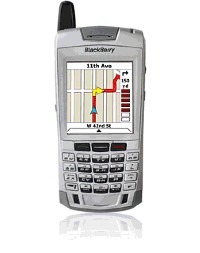
nav-1Do you spend too much of your time in the car traveling from one appointment to another with MAPQUEST print outs in the passenger seat? Thank goodness MAPQUEST has launched a MUST-HAVE service extension to its already popular brand called MAPQUEST NAVIGATOR. http://www.mapquest.com/mobile/

In a nutshell, MAPQUEST NAVIGATOR is a Global Position System (GPS) enabled application that provides a seamless voice guided navigational experience, turn-by-turn directions, and moving maps – all while allowing the cell phone user to receive phone calls.

Just like the more expensive in car navigation systems (priced between $600 and $2000), MAPQUEST NAVIGATOR downloads a large corridor of route information, so in the event you enter a bad cell reception area, the auto route is able to continue guidance and reroute once cell reception is reestablished.


Available from 9/12/2006. Service is priced at a modest $9.95 per month and is available on select Sprint and Nextel phones. Sadly the service is not yet available on other carriers.

As a less expensive alternative to this offering and available on most cell phone carriers WAP connections is MAPQUEST MOBILE is a steal at $3.95 per month.

Next time you get MapQuest directions, don’t print them. Click on the ‘Send To Cell’ link at the top of the page.

An alternative application for SYMBIAN based mobile phones is WAYFINDER and is available pre-loaded on many SONY ERICSSON phones. http://www.wayfinder.com

Wayfinder Navigator can be used as a stand-alone map application or together with a small Bluetooth™ GPS box that keeps track of the user’s position to provide turn-by-turn instructions. http://www.sonyericsson.com

The only problem with this service is that it requires cell phone users to buy yet another piece of equipment (the GPS box). Aside from equipment purchase ranging from $89 up, the monthly fees associated with WAYFINDER are comparable to those offered by MAPQUEST.

Subscribe via RSS or Email | Read 406 times


  1.  zorg   View all comments by zorg  Neutral  Add karma Subtract karma Quote

    I’ve been using TomTom Navigator 5 with my Treo 650 for about a year. This is a bluetooth device the size of a pack of gum. I put it on the dashboard and have the maps of the USA on an SD card in the Treo. There is also a monthly subscription that I haven’t tried that warns me of congestion ahead in real time. I’ve only regretted not having that once, so far.

    I really like the voice prompts on long, boring highway stretches where I might miss the exit.

    I also like the accuracy, like where it can tell that I’m on an access road instead of the main road.

    Finally, I like the fact that it has many stores, movie theaters, government buildings, etc., preprogrammed in so that I can just look for them by name. I’ll often type in the information when somebody tells me their location so that I don’t have to push too many buttons when I’m in the car.

    I also used it while walking around an unfamiliar campus … it has a pedestrian mode …

    I only got TomTom because it supposedly worked with both Mac and Treo, but I highly recommend it for many reasons now!

  2.  BF   View all comments by BF  Neutral  Add karma Subtract karma Quote

    when using it walking around a campus, I assume you have to carry along the bluetooth GPS device as well?

    I hate that the “man” (whoever you want that to be) cripples the GPS in these newer phones. I think the capability is there for it to be fully functional GPS. Something about AGPS I read somewhere.

  3.  Vincent Nguyen   View all comments by Vincent Nguyen  Neutral  Add karma Subtract karma Quote

    We reviewed the Blackberry 7100i back in February - and it does have a built-in GPS. The 7100i is offered through Sprint.

    Written and video review here:
    http://www.slashgear.com/black.....211691.php

    Also check out the Suunto x9i GPS Wristwatch.
    http://www.slashgear.com/suunt.....061100.php

    when using it walking around a campus, I assume you have to carry along the bluetooth GPS device as well?

    I hate that the “man” (whoever you want that to be) cripples the GPS in these newer phones. I think the capability is there for it to be fully functional GPS. Something about AGPS I read somewhere.


Add your comments

Fill in the required fields below to leave a comment or login to your account. If you haven't signed up, you can do so free here. With SlashGear account, you will be able to participate on SlashGear Forums discussion.


Close [X]
E-mail It
About / Advertise / Contact / Archives / Privacy Policy / Terms of Use
Copyright © 2006-2008 SlashGear, All Rights Reserved.