Sony Vaio RT Review - Top Tier All-In-One Multimedia PC
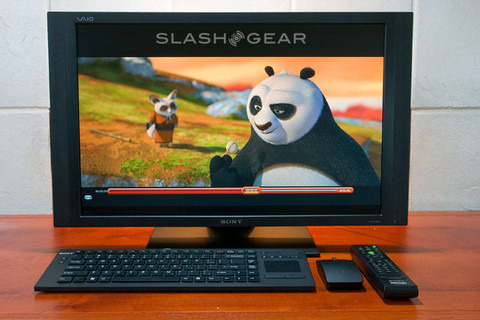
Forget the iMac, HP Touchsmart, Gateway or Dell XPS "One", we've got a powerhouse all-in-one multimedia PC from Sony; it might not have a catchy name but it sure means business. The Sony VAIO Sony VGC-RT150Y no ordinary PC; It is a top notch VAIO that combines the technology of an HDTV with the computing power of a quad core multimedia PC. Behind the 25.5-inch XBRITE Full HD LCD Screen there's an Intel Core 2 Quad 9400 processor, 8GB of RAM and 1TB of hard-drive with built-in digital TV tuners, Blu-ray burner and masses of A/V input and outputs for full 1080p living room entertainment. But with the price tag of $4,000, can it live up to the hype?
Compared to my NEC MultiSync 2690 LCD, the Sony VGC-RT150Y with a similar screen size has a much larger shipping package and it weighs a ton! That is to be expected for an all-in-one oversized PC. My first impressions after removing it from its packaging and setting it up on my test bench were pure amazement. I know it's huge but looks bigger in person, heavy and not easy to move around for display that's weighs about 41lb. Despite its massive footprint and chunky dimension, it sits sturdy and solid on a small footprint base. Like most big displays, this one ships with the base attached.

The gun-metal finish VAIO offers an ergonomic stand that can be swiveled about 80 degrees, 40 to each side. Tilting is only allowed at small degrees (we'd estimate no more than 5 degrees) in either backward or forward directions, and the monitor can be raised by up to 2.36-inches. Adjustment and panning of the screen are very smooth and the movements are frictionless. The VAIO RT is easily one of the best big displays when it comes to ergonomics and appearance.

If desired, the unit can be wall mounted with the base removed. I should point out the awkward location of the TV tuners, directly behind the stand. One would need to use an angled RG6 coaxial cable, otherwise the presence of coaxial connection would prevent the monitor from tilting downward. Also, it's fairly frustrating to hook up a stiff, screw-type RG6 coaxial cable in such a tight space.
Boiled down, the RT is like a supersized laptop with depth twice that of a regular LCD monitor. Ventilation slots are located on bottom but concentrated mainly on top where the video card breathes.

The rear panel supplies the TV tuner connections for analog and digital ATSC signals and has number of cable holders designed to tie and route the power cable on the back of the unit. User-accessible replacement parts are limited to the hard drive and memory from the back panel. Removing the back panel revealed a ported-design subwoofer sitting above the tuners.


The extra-thick side panels do not go unused; a green light built into the power button rests on side of the panel, followed by a display off/on switch and HDD activity light. On top of a Blu-ray/CD/DVD burner there's abundant multimedia connectivity arranged conveniently on the sides: five USB ports, an ExpressCard/34 slot, network port, mini Firewire jack, eSATA port, WiFi on/off switch, auxiliary audio, headphone and mic inputs and last but not least, a multimedia card reader compatible with CF, SD and Sony's own Memory Stick format.

VGC-RT150Y as PC
Beneath the cover there's an Intel P43 Express chipset, 2.66-GHz Intel Core 2 Quad Q9400 processor, a pair of half-terrabyte hard-drives in a RAID 0 configured array, 512MB NVIDIA GeForce 9600M GT graphics card and 8GB of 800MHz DDR2 SDRAM; OS is the 64-bit version of Windows Vista Ultimate. The 25.5-inch WUXGA screen is matte finished, great for combating glares, reflections and fingerprints, but lacks depth and paunchiness for viewing images or movies.
Like most VAIOs, the RT is Bluetooth enabled with A2DP technology protocol to enable stereo music playback wirelessly via a compatible headset or speakers. The WiFi on/off switch on the side panel triggers an integrated Intel WiFi Link 5100AGN compatible with 802.11a/b/g/n networks.

With a flip of the switch, WiFi setup worked right out the box for the set of wireless keyboard and mouse. The low profile keyboard offers a full-size standard key layout and touchpad along with media controls and battery indicator in a sleek, low-profile design. The key movement has good feel, thus typing is smooth and pleasing. The included mouse is ergonomic and elegantly designed to be comfortable and productive. Despite its relatively diminutive size, it is a full-fledged five-button wheel mouse.

Fired up, the VAIO from a cold boot sounds like a jet engine just spooled up. The initial boot was loud but slowly calmed down after start-up, the whole process took about 2 minutes and 40 seconds before a complete boot to "my desktop". Fear not, the VAIO allows a very robust sleep mode with a single click on the power button. The resume and temporary shut off are one of the most responsive in any system I've ever tested. You'll quickly learn to love it; it's like the RT is an HDTV, not a PC. There is also a display on/off button beneath the power button; as the name suggests it toggles the display on and off for both the PC and video sources from HDMI or S-Video.
Like most built-to-order systems, the VAIO comes preinstalled with a few usual suspects. Thankfully, though, Sony kept the bloatware at a minimum. There are more useful apps such as Sony's In-house multimedia burner and player, together with full versions of entry level video and image editors like Adobe Photoshop Elements 4.0 and Premiere Elements 4.0. These two should let you take advantage of the RT150Y's quad-core processing power and huge chunk of 8GB memory. We kept those untouched but proceed to remove the AOL junk and Windows Live Onecare before getting on with the multimedia and benchmarking.
Last, but not least, a Matshita (Panasonic) UJ230AS Multi-burner takes care of reading and writing CD, DVD and Blu-Ray content. The Bundled Blu-ray software player, InterVideo WinDVD leverages the power of NVIDIA PureVideo HD hardware acceleration capabilities to deliver highly efficient hardware decoding for playback of HD content, thus freeing up the CPU to perform other tasks.

The Sony XBRITE's full-HD and Blu-ray version of the John Woo masterpiece The Battle of Red Cliff is a deadly combination, with jaw-dropping image presentation. To throw in some irony, my obsolete HD-DVD – although covered in dust – looked just as good on the Sony XBRITE; seriously, though, Ann is irresistible in any format. Sadly there's no glass or gloss front panel, as that would put it over the top for HD image viewing.

Moving on to the TV recording functionality, as mentioned the RT comes equipped with two tuners, one for analog and the other for digital ATSC (HDTV)/NTSC TV. Setting up live and recording TV shows requires Windows Media Center to stream and store captured media file directly onto the VAIO, but you'll need a ATSC antenna to get the party started. After setting up a RadioShack amplified antenna and allowing Vista MCE to scan though available QAM channels, we were able to pickup local OTA as well as unencrypted cable channels in HD. Recording and live TV works as advertised though the included MCE remote could be a little more responsive.

Benchmarking
As expected, the laptop-grade GPU doesn't exactly excel in the OpenGL subsystem 3D and graphic intensive SPECViewPerf benchmarks, despite having 512MB of memory, but it still scores a healthy 21.25 FPS on PCmark Gaming 1-GPU Gaming with Overall Gaming accumulated to 4587.
The RT150Y also makes a good run on video transcoding and playback, with the PCmark Vantage score from TV and Movies Suite at 3057 nearly twice as much compared to a quad core Q9650 system we reviewed last week. MPEG-2 Blu-Ray playback also achieves 23.48 FPS. The system, however, botched on HDD suite, posting a rather disappointing score for a RAID-0 array. Two questionable tests were HDD5 at 8.44 MB/s (video editing using Windows Movie) and HDD6 at 16.59mb/s (Windows Media Center ). Those two were the responsible parties for the low overall number. We also ran HD tune to ensure the 7200.11 series Seagate (ST3500320AS) hard drive array worked as advertised. Same result, the burst rate of 77.8 MB/s is clearly not up of the speed for a stripped array, high density dual-platter drives with 32MB of cache.


All the PC guts do not make up for a $4,000 price tag, is the RT a serious contender as a standalone HDTV display? To find out the answer, we put the Sony's XBRITE fullHD screen on workbench for more in depth calibrations.
VGC-RT150Y as HDTV
The 16:10 aspect ratio LCD screen has native resolution of 1920 x 1200 with a matte finish. On top of the usual PC terminals there are A/V inputs and outputs on the sides of the LCD bezel, together with a built-in Blu-ray/CD/DVD player, display on/off button, HDMI input selector, S-video/Optical audio/IR output and a pair of HDMI input as well as output terminals! The availability of HDMI out would permit the use of external display, more dedicated audio processing with an A/V receiver, or simply cater to those who prefer a sole HDMI cable solution for both audio and video connections. So the connectivity is there, but does it handle the usual HD formats correctly?

To test its HD signal compatibility, we fed the usual 480i/p, 720p and 1080i/p from a number of HD sources including a PS3 and an HD-DVD player with 1080p at 24hz into the HDMI input. Straight or though the Onkyo DCT 9.8 Pre-pro, the VAIO synced instantly and achieved 1:1 mapping with full HD at 1080P 60hz or 24hz without cropping. All signals resolved correctly without over or underscan with screen aspect ratio set at full.

The RT, however, lacks the same hardware adjustment as a serious HDTV might have. Video enthusiasts or working pros looking to calibrate white balance or tweak the picture to its best would be sadly disappointed. The OSD menu can be accessed via the side panel and provides full range of screen aspect ratio, closed caption, volume control, Sony logo display toggle and auto input sensing on and off, but it lacks video mode presets and adjustment of the individual RGB channels. Only one user mode is available which allows fine-tuning on LED backlight, brightness, color temperature, contrast, saturation, hue, gamma, sharpness and a picture reset. I wish the OSD would stay just a little longer on the screen. It's not an easy task to make picture adjustments without a remote control, not to mention an OSD that stays barely a few seconds.
On workbench, the factory defaulted mode washed out and was slightly warmer than I would prefer but it measured up rather closely to D65 with average color temperature at ~6200k and Delta E of 6.8. The Gamma setting at 2 is the closest you can get with ideal levels for gamma curve. The CIE diagram indicates primary colors on red and blue are close to the HD standard of REC 709 but green and secondary colors are way off. That is usually the problem for wide color gamut displays; unfortunately the VAIO doesn't comes equipped with a Color Management system for much profound calibration, making mapping secondary colors on HD color space an impossible task.


If you are playing attention, the CIE diagram also suggests the VAIO has color gamut closely matching AdobeRGB color space. But at what coverage? We don't have an answer. These along with panel type are one of the few questions we have for the manufacturer but didn't get an answer.
So we don't have the panel type but our contact did inform us it allows for viewing angles of up to 85 degrees; whether that's a measurement of horizontal, vertical or all sides of the monitor came back as "no comment".
The official panel specification does not disclose anything further than it has a Sony's XBRITE fullHD technology. We were told the RT150Y has a brightness rating of 380 cd/m2, 1000:1 contrast ratio and 5ms panel response rate just in case you want to do a match up with other 25.5-inch LCD panels available on the market.

Gradient and off-axis color shifts are fairly noticeable. Also included is a side-by-side screenshot with 40 degree viewing from the side. The ambient light behind the panel was on for a reason; it indicated pictures taken shared similar color temperature settings, thus any color shift on the screen is a direct result of the display itself. You be the judge.

Luminance uniformity could use some improvement; something like NEC's Colorcomp that's capable of reducing LCD uniformity errors would be greatly appreciated.


Enough of the technicality; in film and gaming, the Sony's XBRITE-FullHD LCD technology lives up to expectation. It delivers punching colors and excellent picture clarity in full 1080p HD presentation.


The 2.1 channels speakers deliver great sound quality and extended bass thanks to the dedicated subwoofer. The Sony logo glows, but it's not distracting while viewing movies in the dark and can be turned off via the user menu if so desired; alternatively, it is programmed to fade to black when playback via the built-in Blu-ray player begins in full screen. After decades in the home-theater business, Sony sure knows how to serve the video enthusiasts.
Conclusion
The Sony VAIO VGC-RT150Y certainly isn't for everyone. It's expensive, heavy, and it lacks a few obvious features such as an integrated webcam. For the roughly $4,000 asking price you could certainly pick up a separate PC and similarly-sized LCD.
What you'd miss out on, though, is the convenience of having everything integrated, and the space saving. Mount the RT150Y on the wall and you're not going to notice the slight extra depth over a basic HDTV, certainly not when you consider there's a very capable Blu-ray player in there too. Screen quality is good out of the box, with only the smallest adjustments making significant improvements. It lacks some of the more complex settings, but that won't be an issue to any but the most enthusiastic of owners.
As a media PC, then – and by that we mean for both media viewing and media editing – the RT is a capable choice. It's a premium option with a limited audience, but those who can afford it are unlikely to be disappointed.








































































































WB









Getty Images








































Getty Images/20th Century Fox




Warner Bros.


Ubisoft


Lucasfilm


Irrational Games


MTV Films


Walt Disney Studios



Getty Images




















































































Walt Disney Studios

United Artists

The CW




Getty Images

Getty Images







Getty Images



















CW










Getty Images




















Getty Images






Getty Images










































Getty Images








Marvel Studios


















Paramount




Netflix







WB





Getty Images













Warner Bros.






Netflix


Getty Images

Getty Images


Netflix




Warner Bros.








STX




Getty Images




Getty Images

Getty Images





Buena Vista Pictures











HBO



Walt Disney Studios

WB/DC

Lionsgate

Getty Images

Getty Images

Getty Images

Marvel Studios


Netflix





Columbia Pictures











Getty Images


Getty Images

Getty Images





Getty Images








Presley Ann/Getty Images