

SONOS Digital Music System Reviewed
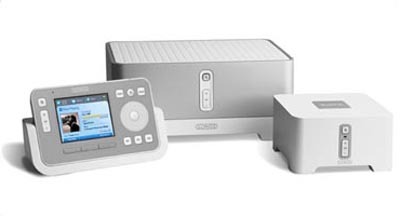
The Sonos Digital Music System is the must have home audio system for today's digital music lovers. The system allows for digital music from multiple sources to be wirelessly streamed to multiple zones and controlled from multiple locations to play in synchronization or to each play different music. All this might be expected from a home audio system, but the key here is the super easy wireless setup, the convenient Rhapsody integration, and the clean modest design that fits well in any room. This system makes a mighty contender for your wallet this holiday season, and I got my lucky hands on a set for a test drive.
My experience with it was great and I have to say it in the spirit of the golden arches that I'm lov'n it. I am more the typical mp3 hording, iPod toting individual and not an extreme decked out audiophile, and so I feel unqualified to really judge the sound quality. But to my untrained ears, I found the sound quality to be superb.

For reviewing purposes, the folks at Sonos were so kind to provide a ZP80 Bundle that consisted of one controller with charging cradle and two ZP80s. This was enough to setup a basic two-room system. One of the ZP80s must be connected directly to a home network such as a cable or DSL modem via an ethernet connection, while the other ZP80 is free to be placed in some other room. Both ZP80s must then be connected to a stereo or amplifying receiver (not included) via the supplied RCA cable.
The ZonePlayer 80
The ZonePlayer 80s have a sleek and clean design that fits nicely with most décor and coexist well with any home theater or stereo system. They sit quite well atop my old-school-ish black stereo systems, pictures of which you'll see later. On the front are a mute button, a LED light, and a volume control button, while on the back are two ethernet jacks, optical and coaxial digital outputs, analog input/outputs, and a power supply jack. The overall dimensions measure about 5-inch-wide by 5-inch-deep by 3-inch-high. The package comes with a manual, a system setup software disc, and four cables.


The Controller and Cradle
The controller has a very simple and clean iPod-ish feel. Most notable similarity is the touch-sensitive scroll-wheel and the minimal array of buttons. The charging dock or cradle can be placed on your table top or mounted on a wall. The power adapter plug can be removed from the cradle and plugged directly into the controller if you should wish to do so.


Setup and Installation
Since I don't have an incredibly large and impressive collection of MP3s I opted for my first test run to do the super quick and easy, PC-free setup. There was no need to turn on my computer or install any software whatsoever. And in exactly 5 minutes, the beautiful melodies of chart topping tracks began flowing through my speakers courtesy of the included 30-day free trial of Rhapsody music service. The setup and music access was so easy that I was tempted to just sit back and enjoy the next 30 days. But, instead I repeated the process to take some pictures to prove to you folks just how easy it was.
Before I went about setting up the ZP80s, I made sure to plug in the controller and cradle for charging up.

Then, I setup one ZP80 in my home office next to my cable modem and wireless router. Any router would do, but I happened to have a wireless one. Having to connect one of the ZPs to the router via an ethernet cable was probably the only annoying limitation for me since I had a wireless router that I usually kept in a storage room. Now I had to pull it out and put it in my office next to my stereo. But nonetheless, I hooked it all up in no time. Power supply in, RCA cable in, and ethernet in. Done.


Next, I setup the second ZP80 in my living room. And this setup is even easier. Power supply in. RCA cable in. Done. No need for the ethernet connection on this one, as this ZP communicates wirelessly with the other ZP already connected to the router.


So, then it was time to tinker a bit with the controller. It was still charging in its cradle but that didn't matter as it's usable even while charging. Following the prompts on the screen, I setup the two zones as "Office" and "Living Room." Since my system was already registered, I got a free 30-day Rhapsody Trial at my fingertips. I pressed the Music button, selected the Rhapsody Music Guide and with a few more scrolls and clicks I was on my way to home audio bliss.
The Controller Interface
The full color screen on the controller was very bright and crisp. The overall interface was very easy to navigate. The only quibble I had was with a slight lag in response time I experienced when operating the controller while beside my computer. I don't know if this has something to do with signal interference, but I often had to turn around and aim the controller directly at the ZP80 to avoid the lag. There is also no on/off button on the controller. Instead you have to navigate through a few menus to click the device off.
I took one video of the interface in action and some other screenshots.


Working with PC and Mac
So, the system is spectacular in its simplicity and quality while playing songs off Rhapsody, but how does it do with an existing collection of MP3s? Well, for that I installed the software on to both my PC and Macbook Pro. And again, within minutes I am playing music off both of them with ease. The software setup was incredibly fast and below is a screenshot of the Desktop Controller that shows up after the install is finished. I had to set up the music library and let the software index my songs, but that process was fairly intuitive.

The unfortunate part, but expectedly so, was that songs purchased off iTunes could not be played on the Sonos, at least not directly. Sonos claims that it is compatible with iTunes, but only so much in that it can play imported playlists from iTunes that consist of songs that were not purchased from the iTunes music store. So, what good does that do? Nothing really. A potential solution around this is connecting your PC or Mac directly to one of the ZPs via the included RCA mono-to-stereo cable and play your iTunes music as a line-in option. But then again, why make this effort, when you can probably find all the same songs on Rhapsody, play them and transfer them unlimited times, and get Rhapsody Radio for just $14.99 a month.
Line-In from other Audio Devices
Sonos lets you play music from external audio sources such as a CD player, portable MP3 player, or even your television via the line-in option. I decided to try and hook up my Sansa e280 MP3 player to the system using the included RCA mono-to-stereo cable. I was able to have both zones playing songs from my Sansa, and I could play, pause, and adjust the volume for each zone separately. But besides play, pause, and volume there was little else I could control, such as skipping forward or backwards and browsing the playlist. All that still had to be adjusted on the line-in source, the Sansa.

Conclusion
This system gets a big thumbs up. It's not your traditional hefty audiophile wiring monstrosity that needs professional installation. Instead, it's a clean and simple modular package for all music lovers that can be easily installed even by those with no sense of wiring, such as myself. To my untrained ears, the sound quality was excellent. The integrated Rhapsody music service makes getting new music very convenient and cost effective. Overall, the basic ability to wirelessly stream music from multiple sources to multiple zones while being able to sychronize the music in all zones as well as separately control the music in each zone via multiple controllers or computers makes one drown in a pool of drool. The price tag is a mighty $999 for this ZP80 bundle that I got my lucky hands on. But sadly I must bid it farewell as it is a review unit. Additional ZP80s are $349.99 each and ZP100s are $499 each. OUCH. Yes, it hurts, but the pain is worth it. And when better to find an excuse for dropping a grand on home audio than this merry holiday season. It sure beats the $12k you'd have to spend for the Sooloos, although that has other merits of its own.
Pros
Cons