Tuesday, Oct 23rd 2007 by Chris Davies


Worth Reading?


YesNo


+20 [36 votes]
Loading ...

Out of all of Verizon’s holiday lineup, the most anticipated (and the most hyped) has been the Voyager. A clamshell with full touchscreen on the outside and QWERTY keypad for fulsome messaging on the inside, it’s been granted the usual title of “iPhone Killer” and Verizon’s Chief Marketing Officer Mike Lanman pushed out all his chips by saying “we think it’ll be the best phone … it will kill the iPhone“. SlashGear’s Vincent Nguyen cajoled some hands-on time with the Voyager at CTIA - including some exclusive video of it in action - and gave some preliminary feedback; we’ll be bringing you a full review later on when we’ve had time to really get to know the handset’s quirks.

LG Verizon Voyager

Check out the hands-on video with the Verizon Voyager after the cut…

YouTube Preview Image

Made by LG, the Voyager’s interface is similar to that of the Prada, only in full colour rather than the fashion-phone’s “goes with everything” monochrome; it also uses the same capacitive touchscreen, with none of the flex of traditional passive touchscreens. Where it differs, though, is in size and the haptic feedback you receive when using it: the panel is comfortably larger, and each time you press an icon or make a menu selection it pulses slightly to let you know you’ve chosen it. Tricky to explain, but in practice it works brilliantly, adding that extra degree of physicality that makes some people prefer hardware keyboards over on-screen.

LG Verizon Voyager

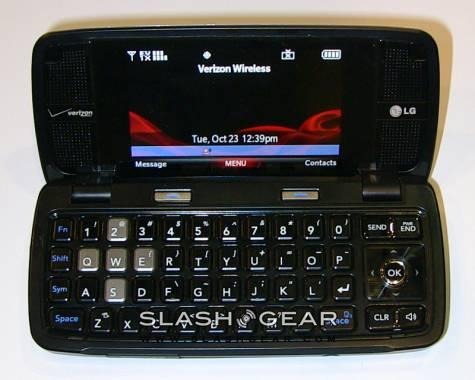
Of course, if you want a physical keyboard then you only have to flip open the Voyager and there’s a full QWERTY layout, together with stereo speakers flanking the second screen. It’s not much smaller than the outer display, but since you’re expected to navigate using the D-pad it’s not touch-sensitive. As you’d expect, the Voyager supports the full gamut of messaging options - SMS, MMS, IM and email - as well as having a decent HTML browser that can either be used with the handset closed, tapping on links, or open, using the keyboard to navigate through the page. It lacks the visual flourish of the iPhone’s mobile Safari browser, but blows the Prada’s stilted, under-developed example out of the water.

LG Verizon Voyager and Venus

First impressions, then, are pretty positive. The Voyager’s selling point - trick touchscreen and sexy clamshell action aside - will be Verizon’s high-speed cellular broadband, which will inevitably overshadow the iPhone’s reliance on dowdy EDGE. But where the iPhone excels is the purity of the user experience; it remains to be seen whether there’s simply too much Verizon in the Voyager to make it not just a “good” handset but a “great” one.

LG Voyager for Verizon

There are plenty more photos of the new Verizon handsets in the SlashGear Gallery; keep reading SlashGear for our full review of the Verizon Voyager by LG, coming soon!

Subscribe via RSS or Email | Read 2,934 times


  1.  Paul   View all comments by Paul  +3  Add karma Subtract karma Quote

    Everyone’s waiting to see the HTML browser in action and the video cut off right when you opened the brower….that really hurt..i was like nooooooooooo.

  2.  vx freak   View all comments by vx freak  Neutral  Add karma Subtract karma Quote

    ditto!!! show the web browser!!!

  3.  cliff   View all comments by cliff  Neutral  Add karma Subtract karma Quote

    According to an online, hands on review by PC Magazine, the Voyager will not synch contacts and calendar with a PC. If this is true, it’s a real deal-killer. Anyone have any hands-on confirmation?

  4.  cliff   View all comments by cliff  +1  Add karma Subtract karma Quote

    Just found the owner’s manual and users guide online on lg’s website:

    http://us.lge.com/products/mod.....AGER.jhtml

    It appears that the PC Magazine hands-on review was correct, in that you CANNOT synch the voyager with your PC’s contacts and calendar. The manuals speak only of synching music, but do not offer anything on calendars or contacts.

    I’m with VZ, and they have the best coverage in my area, but I may be forced to go reluctantly to AT&T for the Tilt instead. Pros: AT&T offers considerably cheaper data plans, plus AT&T offers rollover of unused minutes. The Tilt is heavily reviewed online with the highest of marks. Cons: AT&T has weaker coverage in my area, Voyager is just cooler than the Tilt.

    I’m hoping someone has just bought the Voyager and discovered that it does, in fact, synch with their PC’s calendar and contacts. Please post if you have done so! :-)

  5.  CagTagMomma   View all comments by CagTagMomma  +1  Add karma Subtract karma Quote

    I am wondering if this is not going to wind up like the enV x9900, which had the same typ of documentation re: no sync app…… however, when you get the music data kit/usb it does have a way to import/export Outlook contacts and Calendar. It did it pretty well, needing minimum cleanup - e.g., the enV didn’t have address field in contacts, so was forced to put address in notes field. But that was much easier to do from PC and then just download to phone. Same w/ calendar…. minor field issues that didn’t match, but at least got all the appts in the right spot. Also, Verizon does sync for extra charge of $19 per mo on enV. Again, not mentioned in documentation. I’m betting this will be the same way. Last time I looked at Voyager specs on Verizon site, it said no Mobile Web or MB2 too…. and we see that is not true! I will be buying the Voyager on Sat. at least that is when Verizon is suppose to call me…. after I called them and pitched fit because I just used my new every 2 just 2 mos ago to get out of my Treo 650. I’m disabled (trouble w/ numb finger tips etc) and the enV is so hard to navigate w/ the arrowkeys in front.

  6.  NOT Liiink   View all comments by NOT Liiink  +1  Add karma Subtract karma Quote

    I have the phone and it’s real kewl. Do not buy this phone though if you like to listen to loud music. It is also really difficult to put Itunes music on it, and it does not come with the 2.5 mm headphones. The Mobil Tv on it is great and so far has 8 channels. And the browser is as internet freindly as the Iphones, except for the fact that you cant download software from the internet and you can’t view videos from the internet (such as Youtube). I am sure though that they will fix the video viewing problems.

  7.  Steven   View all comments by Steven  Neutral  Add karma Subtract karma Quote

    ..i have this phone and its rele nice..for some reason it looks very ugly in these pictures but it is really good


Add your comments

Fill in the required fields below to leave a comment or login to your account. If you haven't signed up, you can do so free here. With SlashGear account, you will be able to participate on SlashGear Forums discussion.


Close [X]
E-mail It
About / Advertise / Contact / Archives / Privacy Policy / Terms of Use
Copyright © 2006-2008 SlashGear, All Rights Reserved.