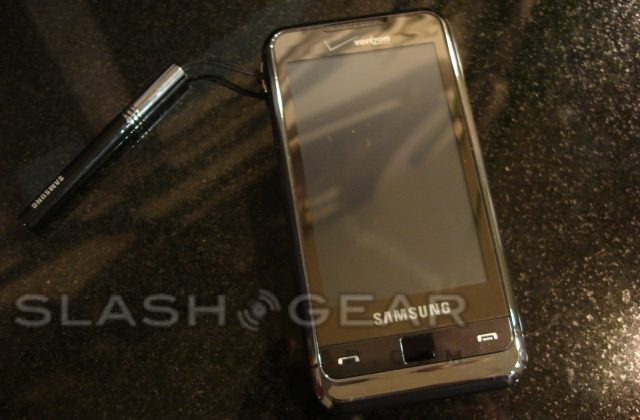
We have been waiting a long time to get our hands on a US-spec version of the Samsung Omnia and finally the time has come. Verizon Wireless was the lucky carrier to get the smartphone, complete with fresh compatibility with EVDO Rev.A. Very similar to the Samsung Behold, the Omnia runs Windows Mobile 6.1 Professional with the familiar TouchWiz interface. SlashGear had the chance to see just how well the Samsung Omnia holds up to all the hype.

Nothing unusual in the box, just your standard charger, stylus, data cable, hands-free headset with two sets of additional earplugs, headset extension cable, software installation disk, user manual and the Samsung Omnia itself. It turns out the hands free headset is a very nice set of premium, in ear headphones, designed to enhance the sound of the music you have stored in the 8GB or 16GB (whichever you choose) of internal memory.
The Omnia is made of quality materials, giving it a very solid, weighted feel in the palm of your hand. Even next to the Touch Pro, this is easily one of the most beautiful Windows Mobile phones on the market. The 3.2-inch 240 x 400 WQVGA touchscreen is stunning with a bit of a chrome gloss to it. Our only complaint is not being able to see the screen in direct sunlight, even with the brightness set to max, and the colors appear to have a yellow, milky hue to them rather than being crisp and bright. The overall screen sensitivity is very responsive; still not in the ranks of the iPhone, but the vibration feedback with every press certainly helps to fill in the gaps. Unlike the Behold, the Omnia comes with a stylus; however there’s no silo built into the device itself to store it. Even with Windows Mobile, however, we did not often have the need for it.
On the face of the device you will see only two buttons, the Send and End keys. Also on the front of the Omnia is an optical navigation pad that allows you to navigate via a mouse pointer, as you would with a laptop’s touch pad. There was rarely a time when we felt that we needed to use this pad as Windows Mobile is easily navigated by using the touchscreen. Alternatively the pad can be used to mimic a four-way directional control.

On the side is where you will find all of the control keys such as volume and a dedicated camera button. On the left there is a lanyard loop and the Samsung proprietary charging and headphone jack. This loop is where you would hang the included stylus if you so choose. The right side bears the notes button, up and down volume keys and a dual-action camera key that allows you to depress slightly to use autofocus and all the way to snap a picture. There is a sleep/power button located on the top of the device in the same place you would find it on the iPhone. Also on the top is a recessed reset button. All of the keys on the Samsung Omnia have what you might call a premium feel to them, every one has a very user friendly location and is placed right where you would expect them to be found.
When you flip the device over, your eyes are drawn from the smooth plastic back to the 5-megapixel camera, LED flash and vanity mirror for snapping pictures of yourself. Sliding off the back cover to reveal the battery is quite easy. Here you will find that in order to swap microSD or SIM cards you must first remove the battery. Generally we prefer an external or at least simpler way to swap cards; it’s much easier to access the memory card from an external side port. Hopefully users won’t have much cause to use a microSD card what with the 8 or 16GB of internal memory. If that’s not enough space though you can purchase a 32GB microSD for a grand total of 48GB of storage.
The Samsung Omnia runs Windows Mobile 6.1 Pro with the TouchWiz user interface. We are still torn between TouchWiz and TouchFLO 3D found on the HTC Touch Pro. Much like the iPhone and identical to the Behold there is a “Dock” lining the bottom of the screen which houses the basic phone functions such as the dialer, phone book, web and menu shortcuts. A convenient slide-out menu hugs the left-hand side of the screen, with various shortcut buttons that users may drag and drop onto the customizable home screen. You can even arrange the icons in the menu in whichever order you like for even quicker access.
Icon placement on the home screen does not follow the grid-like placement of the iPhone. Instead they can be placed wherever you like, even overlapping each other. The top of the screen is occupied by the traditional Windows Mobile header that you would normally see. The home screen icons are a little larger than you would expect, making it easier to make the correct selection. One shortcut icon that we absolutely loved was the interactive photo frame. You can set whichever photo you like to be displayed and even quickly flip through photos without going into the album itself.

The built-in accelerometer responds very quickly when flipping the handset from portrait to landscape mode. There is very little transition time when an application is open. For whatever reason it does not allow you to flip the device upside down, not that you would have any need to. We are not sure if this is because of the hardware or software limitations of the device. The built-in GPS is severely limited to the VZNavigator application. Verizon has a tendency to severely limit their phones in a number of ways greatly compromising their potential.
Placing calls with the dialer is quite easy, the keys are laid out very well with plenty of room for your fingers. Searching through the contacts resembles the iPhone: on the right hand side you will find a scroll bar with the letters of the alphabet on them for quick searching. The large font in the phone book makes contacts very easy to read. Call quality was always top notch with very few dropped calls, and even when using Bluetooth headsets of various kinds we did not experience a loss in call quality. The speakerphone, however, left something to be desired. The sound was really crisp with a good tone, but the volume was always low, often too low to really make use of. The Omnia managed to last through an entire day of moderate use without dying on us. The included 1440mAh battery managed around 5 hours of talk time. Samsung quote up to 500 hours of standby time depending on conditions.
Samsung managed to keep this handset very clean and straightforward. There are virtually no programs preloaded on the device allowing users to have only the applications that they wish to download, eliminating bloat. There is a search application that allows you to explore files on your phone much like you would do on a PC.

The Omnia’s on-screen keyboard variants all work surprisingly well. For single-handed portrait typing you can use the traditional T9 input method. Flipping the handset into landscape mode will instantly trigger the accelerometer and allow you to use the full QWERTY keyboard. This keyboard is very well laid out for use with your thumbs. We found the Omnia not nearly as quick to type with as the iPhone; we blame this on the resistive touchscreen. As you type on the keyboard you will get visual confirmation of the key press. While this is generally a good thing, the confirmation is to the left or right of the key itself, rather than above the keys as seen on the iPhone, and as such your finger can often block it. As with the Samsung Behold there is a box that pops up trying to predict what you are trying to type. This box is more bothersome than it is useful; it will pop up and reformat the text to wrap around itself. We grew sick of this rather quickly because it is very hard to follow what your saying when the text keeps moving.
The browser is one place that the Samsung Omnia takes a clear lead over the Behold. The included app is a customized version of the yet-to-be-released Opera Mobile 9.5 that is powered by Opera Mini’s Presto engine. Tabbed browsing is quick and rendered perfectly in full HTML. Scrolling around the page with your finger is made easier with a popup “map” of the current page. Much like the iPhone, a double tap will either zoom in or out on the selected area. One very unique and useful feature is the zoom out control, just run your finger along the right side of the display. The browser neatly auto formats the text on a web page to fit the zoomed in screen so that you do not have to scroll back and forth all the time.
Now to the camera, this is one of the first Windows Mobile phones with a 5-megapixel camera. You can take great photos with auto-focus and flash. Unlike many new phones, such as the Touch Pro or the T-Mobile G1, the camera operates really quickly especially with the autofocus. On-screen buttons include Video Camera, Focus, Exposure, Scenes, Flash, Shot Mode, Album and Resolution. Other available settings include, Sharpness, ISO Sensitivity, Color, Contrast, Focus Mode, Compression, White Balance and Saturation.

Despite all the megapixels, we didn’t have the best experience with taking photos; for example, outside photos were saturated with color. The tone of the photo did not look very good. Indoor photos were not much better, lacking crispness, and lighting never favored the photo, even with help from the flash. Macro mode however surprised us; the flash dims itself according to the lighting conditions. We were not able to take really close photos however; the autofocus could never seem to get a good lock on the subject. Recording video can be done in MPEG4 format with up to 640 x 480 resolution at 15 frames per second. The sound comes out pretty clear, but the 15fps just doesn’t seem to do it justice and videos always come out choppy.
The Samsung Omnia has a built-in FM radio tuner, with room for 6 different presets of your choosing. Interestingly enough they decided to include a record feature in this application so you can listen to songs whenever you like. Video quality, meanwhile, seemed stunted by the Windows Mobile limit of 65K colors making the transition poor at times. Samsung has made sure to get the word out that this handset is the first to support DivX/XviD file formats. Other formats supported include MP4, WMV, OGG and AMR.
We also found this very interesting Vaja Leather case that goes with the overall style of the Omnia well. Starting at $75 you can personalize your case by choosing from 40 different soft tones for the exterior and interior of the case. Even add text or a graphic to make this case all your own. If you wish to have a belt holster that’s no problem, it will only cost you $5 extra. The case protects your screen from unwanted scratches while allowing access to your external keys such as the volume and camera key.

Overall the Samsung Omnia is one of the smoothest running Windows Mobile phones on the market today. We had no issues with lag, even with several apps loaded. This was certainly one of the most fun phones to review as of late. The Omnia has restored our faith in Windows Mobile phones after playing with the HTC Touch Pro and TouchFLO 3D.
The Omnia has lived up to the saying “A truly all-in-one phone.” The Omnia takes the best of Windows Mobile 6.1 Professional and TouchWiz to make the users’ experience very enjoyable. Every feature from the camera to browsing the Internet works very well. There is no area that the Omnia falls short in. This device delivers all of the features of a smartphone without being overwhelming to first time users.
We would recommend this phone to anyone who loves to take pictures. The picture quality may not be top notch, but it nice shots in comparison to other 5-megapixle smartphones. Photographers will find the large amount of internal storage space more than enough for snapping photos on the go. The Samsung Omnia will be available at Verizon Wireless locations on December 8th for $249.99, when you sign a two-year agreement.
[gallery]


34 Responses to “Samsung Omnia on Verizon Review”
Kevin November 28, 2008
I have read some reports that this phone is Wi-Fi capable, unlike most Verizon phones. Can anyone confirm? That alone would be the deal-maker for me.
+5MIke Brown November 28, 2008
so this is like the iphone u dont need to pay for internet but u can still use it cuz it has wi fi……….nice
+3ed murphy November 29, 2008
Let me see if i am reading correctly; this is a verizon phone that *does not* disable the internal GPS? Can someone verify whether or not that is a cut & paste from a review of the unlocked GSM version of this phone? If anyone can confirm 100% that the verizon-spec omnia does in fact enable the GPS to be used with 3rd party apps like google maps and live search… you will make me (and many others, I am sure) one very happy individual.
+5john November 29, 2008
the verizon website says nothing about wi-fi on the omnia, it does however mention wi-fi on the touch pro so one would have to assume this means no wi-fi :( for the omnia.
-5dennis November 29, 2008
I bought one from a Verizon store in Manhattan (53rd and Lex). It has wi-fi and the wi-fi works.
I haven’t been able to get GPS to work, but I’ve only tried from inside my apartment.
+2ben November 29, 2008
is that the same phone that received not the kindest of reviews all around europe?
-3- bad gps/wlan reception
- low screen resolution
- stylus not embedded in phone
- laggy menus
- not enough ram (they directly mapped the task manager to one of the phone buttons *sigh* !)
- …
smartperson November 29, 2008
The Samsung OMnia does have wi-fi the Verizon website metions it i think but i know mobileburn.com phonedog.com engadgetmobile.com and cnet.com (plus many more) all metion it having wi-fi.
+3Facebook User November 30, 2008
[quote comment="55325"]I have read some reports that this phone is Wi-Fi capable, unlike most Verizon phones. Can anyone confirm? That alone would be the deal-maker for me.[/quote]
Yes Wi-Fi is included in this version.
+4Kevin November 30, 2008
[quote comment="55325"]I have read some reports that this phone is Wi-Fi capable, unlike most Verizon phones. Can anyone confirm? That alone would be the deal-maker for me.[/quote]
Thanks for the confirmation all. This is significant because it represents Verizon finally recognizing Wi-Fi is an option that their customers demand as opposed to their proprietary and over-priced online service. At the same time, it is clear evidence that Verizon understands just how big a mistake it made with the Blackberry Storm and is moving quickly to mitigate their risk and exposure. As a long-time Verizon customer myself due to my geographic location I had been anxiously awaiting the Storm, but after additional post-launch review have decided not to purchase. However, I can no longer wait to get a new phone and the Omnia appears to be the best choice available today.
-1AlphaOmega November 30, 2008
Just FYI……… VZW will require you to maintain a $30.00 minimum data package to even own this device. It seems that even though you have the ability to connect to a WIFI source to connect to the internet, you will still have to pay VZW for the feature. The unlimited data package is still $44.99
and the $29.99 unlimited data package is not available for the Omnia.
With that said, VZW will still force you to pay for a feature (WIFI) that should be considered “part of the device” and free to use without an additional charge. All new PDA devices launched by VZW as of 3 weeks ago will have the same conditions imposed in your contract.
Simple put, if you can afford the minimum ($39.99 +$44.99) $89.00+/- (additional charges my vary, this is what I pay monthly) go for it; otherwise don’t get suckered by VZW just to own a new PDA device. Many older PDA devices have WIFI and are not required to carry the data package. You can get a Samsung i730, i760, etc… off of eBay for a nominal price.
+3msh26 December 3, 2008
Has anyone tried this as a modem yet? Do you need additional software as my Treo does? Any information would be appreciated.
Neutralkevin December 3, 2008
I think Verizon online store already offer this samsung omnia already?
NeutralJoe December 3, 2008
I got mine from Verizon on the 1st of december. I have yet to get the GPS to work. From what I’m reading I should have a Extermal GPS icon in the settings and I don’t on my unit. I’m not sure why and I’m looking for the answer still
+3john December 3, 2008
In the review I read “Recording video can be done in MPEG4 format” but i’m not finding this option in the Omnia. Can you tell me how I can record videos in mpeg4?
Neutralmedken December 4, 2008
I think you all need to take these over the top Omnia reviews with a grain of salt. I bought one several days ago..and let me tell you, its no iphone killer. buggy as hell, difficult to navigate around, hard to send text messages, and schizophrenically split between windows apps and samsung apps so that sometimes you dont know, for example, which media player will pop up. It does have wifi but u do need a data plan per verizon, as others have said. the optical mouse/4 way navigator also has sensitivity issues and the keyboard is not easily accessible. Im thinking of sending this expensive baby back, but will fiddle for another few days to see if Im being overcritical or just right.
+3Mike December 4, 2008
[quote comment="55365"]Let me see if i am reading correctly; this is a verizon phone that *does not* disable the internal GPS? Can someone verify whether or not that is a cut & paste from a review of the unlocked GSM version of this phone? If anyone can confirm 100% that the verizon-spec omnia does in fact enable the GPS to be used with 3rd party apps like google maps and live search… you will make me (and many others, I am sure) one very happy individual.[/quote]
I just spoke with someone at Verizon and she verified that “for security purposes” Verizon disables the internal GPS for use with Google Maps, etc and that you need to buy their (ugly piece of crap) VZ Navigator. GPS does work to locate the phone for 911 purposes, but not for the functionality that is built in by Samsung.
I will probably be returning the phone since it’s wrong that they disable a functional feature of the phone so they can charge me for it.
+2Dave December 4, 2008
I’ve been on the phone for a total of about 4 hours over the last two days regarding the GPS with the Samsung Omnia. It’s clear that the reviews that mention GPS and the Use of Google Maps with the omnia are such that they are “unlocked” and not available for public use. After discussing with two different people with Verizon and finally getting to a director level, it’s clear Verizon has made a choice that if you wish to use the GPS the ONLY way you will have the option of doing so is with VZ Navigator. Google Maps is not an option.
+8With that said, I want to be clear that I’ve used my Omnia heavily in the last few days and have used it in crowded places, quiet places, as a modem and have had excellent luck with it. I find the engineering solid and useful and the windows interface outstanding.
However, the issue of the GPS being “on-board” was one of the sales points for me. What I am hearing regarding the GPS service is what I’d consider a classic “bait and switch” advertisement. Nowhere in either Verizon’s or Samsung’s information does it say if you want to use the GPS on a window’s Mobile Touch device (including the Omnia) or anything affiliated with GPS while affiliated with Verizon, you must use ONLY the VZ Navigator software and that something as common as Google Maps is not available and as was stated over and over by the initial customer service reps “is not supported as a third party set of software.” I am disappointed with what I’m hearing from Verizon to the point where I believe a good attorney needs to be contacted and a class action started. Anyone else here interested pursuing what to me is a classic abuse of the “buyer beware?”
Dave December 5, 2008
[quote]
I will probably be returning the phone since it’s wrong that they disable a functional feature of the phone so they can charge me for it.[/quote]
I couldn’t agree with you more. I’ve done some invsestigating…
http://www.cyberlaw.pro/docs/v.....plaint.pdf
Seems like we could be a part of something that changes poor corporate behavior.
+8Tanya December 6, 2008
I’m confused!!… I got a Samsung Omnia the other day and i’m still learning the many features.. but I can’t get the navigator to work. I downloaded Route66 with Australia maps to try it out. Copied files to the external 8GD storage card.. clicked on the nav.exe file to install it, but it will only run from the storage card (nothing in program files).. AND will not load any maps. Can somebody please advise me on how to install this software???.. I would be happy to buy it, but not if it ain’t gonna work.
-1Another thing is when i key in my address the GPS tells me I’m about 6km or so from where i actually am situated… can’t work that on out either?
Anyway, so far i love my new phone, but one of the main reasons i purchased it was for the GPS and AGPS features, which i can’t seem to figure out yet.
Hoss December 10, 2008
I upgraded to the OMNIA 2 days ago and have spent over 10 hours with it. First of all, I WILL return the phone to Verizon. Second point, I will let them know that I will switch out of their network for the sole reason of locking the GPS feature. It is wrong that they want to squeeze another $10 each month out of their customers. The phone is not cheap to begin with, and I would have gotten it even if it cost another $20-30 more just to be able to use the full built in features. The WIFI works quite well. But a $30-45 fee for data, $40 voice, $10 for VZ Navigator, $5 for 200 messages quickly adds up to highway robbery. Shame on you Verizon.
+2Facebook User December 10, 2008
[quote comment="56413"]I upgraded to the OMNIA 2 days ago and have spent over 10 hours with it. First of all, I WILL return the phone to Verizon. Second point, I will let them know that I will switch out of their network for the sole reason of locking the GPS feature. It is wrong that they want to squeeze another $10 each month out of their customers. The phone is not cheap to begin with, and I would have gotten it even if it cost another $20-30 more just to be able to use the full built in features. The WIFI works quite well. But a $30-45 fee for data, $40 voice, $10 for VZ Navigator, $5 for 200 messages quickly adds up to highway robbery. Shame on you Verizon.[/quote]
I hear what your saying and could not agree with you more. If the phone has a feature, open it up! Verizon just wants to keep all of their phones locked down and fully controlled. If your going to use GPS don’t look to the Omnia or Verizon unless you have money for subscription fees.
+2Chris December 12, 2008
hey everybody, let’s all email vzw and boycott this stupid data plan rule! i’m doin’ it right now.
+3peace…..
Mike December 13, 2008
Potentially great product is really only average. No built in stylus for windows mobil is like having a car without wheels. GPS that says it is searching for your satelite but in reality is disabled is a terrible policy from Verizon. There sales and tech people don’t even know it is intentionally disabled. It’s like selling a compass without a needle. I’ll keep my Omnia but only because Verizon has the best coverage in my area. I can’t wait until others catch up!
+1dhoff9 December 16, 2008
I just bought the omnia knowing that the gps is disabled w/out vz navagator… I hope that either someone will come up with a way to adjust the registry or something (I am not a tech guy, maybe that is impossible) or verizon will get it together and upgrade firmware that solves the problem … am I being naive>
NeutralAlP December 17, 2008
I have had the Omnia for 4 days and can say its really a nice phone plus alot more. The disabled GPS is really #$^% me off. If you return the phone I think Verizon charges a restocking fee. $35 I believe. I would think that after having a reputation for doing things like this in the past they would eventually be out of business. I too am hoping for a hack in the near future. How about unlocking. Would that free up the GPS?
NeutralGPB December 18, 2008
Check it out, they will open the GPS on devices beginning next year (already have done so on some Blackberries)
http://www.unwiredview.com/200.....next-year/
NeutralDave December 21, 2008
Interesting how it says “first half of next year. It’s a simple driver. This is, a way for them to stall to see how the class action against them for locking down their phones plays out in court. I know it’s driving me out of the use of Verizon…where I’ve been for the last 6 years.
+1kristen December 30, 2008
I recieved an Omnia as a gift. It is from Europe and needs a sim card. My Verizon sales person could not activate the phone. Does anyone know what needs to be done to use this as a phone?
NeutralClaudia January 9, 2009
[quote comment="57569"]I recieved an Omnia as a gift. It is from Europe and needs a sim card. My Verizon sales person could not activate the phone. Does anyone know what needs to be done to use this as a phone?[/quote]
I have the same problem – But apparently verizon use CDMA which translates to no sim card – I am trying to see if there is a way of using the phone with a sim card…but doesn’t look like it – any info anyone?
NeutralChester Lee January 16, 2009
Verizon doesn’t really offer sim cards for their service.. it’s because verizon uses CDMA and not GSM for their service. You can go with at&t or T-mobile for a sim card.
My crazy idea I have is a workaround with their world edition phone service rate to get a sim card.
Neutralomniamobile January 31, 2009
samsung omnia is the best phone they had, the touch screen is great, windows mobile offers great potential for the software.
-1Tanya February 9, 2009
I found Garmin XT navigation software for my Samsung Omnia on Ebay.. for only $35 !!!. It works (via Satellite) separately from the mobile phone towers, like a stand-alone-navigator, even if you don’t have the sim card installed, it will work… fantastic, i now have a great phone & a navigator that would normally cost me a few hundred bucks alone.
Neutrallokyto March 2, 2009
i wnat to get the omnia but i cant afford to pay for email and web, so i was wondering if i get the omnia with the web package (initially just to get the phone) and then cancel the feature in the future?
Neutralcould that be possible?
does anyone know?
Tanya March 3, 2009
Hi Lokyto, Hi have the omnia on a prepaid with Optus (Australia).. and i have access to the web as part of that plan. If I pay $50 a month, then i get 500MB of usage included with about $400 or so of credit, which rolls over to the next month if i don’t use it all. I’m sure there are deals around wherever you are, that would suit your needs.. whether prepaid or a plan. Hope this helps :-)
Neutral