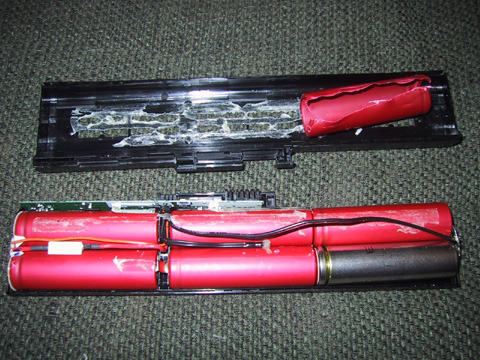
If you’ve ever owned a laptop you’re familiar with that sinking feeling you get when you realize that your battery isn’t holding a charge like it used to. It happens slowly over time, but eventually it will need to be plugged into the wall more and more. Of course, you could always drop $100-$150 on a new battery, but then again you could always just make your own.

It sounds dangerous, and if you don’t know what you’re doing, it is. Thankfully the good people over at Jay’s Technical Talk have created a step-by-step guide for how to replace the Li-Ion cells in your laptop battery.
If you follow their instructions carefully, you’ll end up with a battery that seems just like new, and hopefully you won’t have blown anything up in the process.
Refilling laptop batteries! [via Jaystechnicaltalk]


2 Responses to “Refurbish your dying laptop battery”
jack March 5, 2007
it’s not need so much money on new battery, we are ATOP INTERNATIONAL HOLDINGS CO.,LIMITED, One of manufacturer in Shenzhen,Specilizing in producing the laptop batteries,computer battery pack,adapter,some laptop accessories,all our battery is made by import cells,such as :Samsung,Sanyo,Lg,Sony… ,and also we supply competitive price ,so if you are interested,please feel free contact with us. thank you
http://www.atop-battery.com
-7erick March 6, 2007
one of the reader on that blog comment
BEWARE !!! , not all notebook battery can be refill like this way , some new smart notebook battery got a flash chip inside , when u took off the battery the chip is automatic erase , so you never can recharge your battery , even you change the new cell inside, u only can refill some old nb battery like 5 or 6 year old notebook
+2