

MoGo Mouse Review Follow-Up
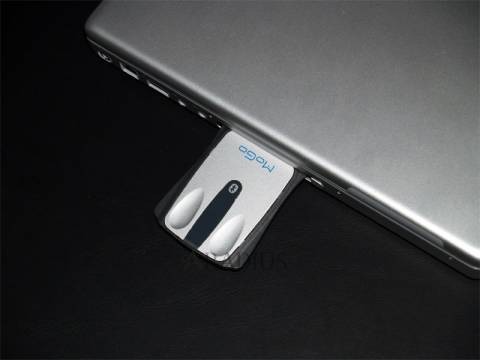
It's been a month now since the MoGo Mouse found itself a hidey-hole in my PC Card slot, and I'm still quite amazed by it. True, the small size takes a little getting used to, but it's not long before you're mousing around just like any ordinary computer rodent and – crucially – with the same precision. It bears repeating that, while obviously far thinner than any desktop mouse, the MoGo Mouse has pretty much standard width and length; a far better fit for the hand than the typical "shrunk in the wash" micro travel mice available.

Nothing is ever perfect, however, and there are a few areas that could warrant improvement. The first, as was mentioned in my unboxing review, is the lack of page scroll – an obvious omission then and still something I miss. Perhaps MoGo Mouse could take a look at Logitech's V500 mouse and its clever touch-strip; scrolling with no physical wheel to accommodate. Second, and perhaps more concerning, is the rubber strip on the underside of the mouse, which slowly comes away as it is removed and replaced from the PC slot.
Despite the few flaws, the MoGo Mouse remains an almost perfect balance of size and usability for all travelers. Add to that the convenience and security of a constantly charged battery, and you've got a winning product.
MoGo Mouse is available now from http://www.newtonperipherals.com/ for $69.95