JP REGISTER LOGIN

Worth Reading?

NoYes

+103 [143 votes]

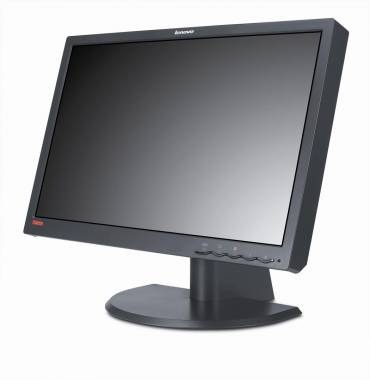
My eyes have just rebelled.  Up until now they were satisfied with the occasional trip to the opticians and a new pair of swish glasses every so often, but now they’ve seen Lenovo’s latest monster monitor – the 1080p HD-ready ThinkVision L220x Wide – they’ve put in for more luxurious demands.  And I can’t really blame them; at 22-inches it’s certainly at the bigger end of the desktop display spectrum, as well as being an industry first to support WUXGA resolution.

 Lenovo ThinkVision L220x Wide HD monitor

 Lenovo ThinkVision L220x Wide HD monitor

WUXGA – or Widescreen Ultra eXtended Graphics Array - is 1920 x 1200 resolution with a screen ratio of 16:10 (enough to put two full-size pages side by side), and the L220x makes the most of all that room with 103 pixels per dot and active rotation from portrait to landscape which automatically flips the picture.

Lenovo ThinkVision L220x Wide HD monitor

Tilt and swivel, four powered USB 2.0 ports and a design that, if not the most stylish, certainly won’t disgrace your desk nor distract from the image, round out a monitor that’s likely to find many friends among graphic designers and anybody who prizes their space.  The ThinkVision will start at around $550 when it launches in November 2007.

Lenovo ThinkVision L220x Wide HD monitor

Update: Lenovo have been kind enough to send over the spec list for the L220x:

Features

  • 22 inches wide Full HD
  • 1920X1200 Resolution
  • 103 dpi (dots per inch)
  • 92% color gamut
  • USB Hub (1 in, 4 out)
  • Autorotation with Pivot
  • Soft-OSM
  • 16:10Aspect Ratio
  • Analog input (VGA) & Digital Input (DVI-D)
  • HDCP Support

Screen Performance

  • WUXGA
  • Recommend Resolution:  1920×1200@60Hz
  • Response time: 6 ms (G to G)
  • Brightness: 300 cd/m2
  • Viewing Angle: 178°/ 178°(H/V, @10:1 CR)
  • Contrast Ratio: 1000:1 (typical)  

Design

  • Stand tilt/swivel/lift/pivot
  • 100mm VESA mount
  • Best engineer cable management
  • lift range:610mm-760mm
  • Interface cable length (Analog): 3M
  • Interface cable length (Digital): 3M
  • USB Cable length: 3M
  • Power cable length:3M

Lenovo

Subscribe via RSS or Email | Read 18,094 times

35 Responses to “Lenovo 22-inch widescreen HD monitor an WUXGA industry-first”

  1. RM September 17, 2007

    Finally, someone makes a high end monitor that can compete with my 2 year old laptop LCD! The pixel size/count on a 24 inch monitor is borderline ridiculous.

    Neutral  Add karma Subtract karma  
  2. alins September 17, 2007

    What panel does this monitor use? Can you ask Lenovo? Is it S-IPS?

    +1  Add karma Subtract karma  
  3. Eddie September 18, 2007

    I wonder why some manufacturers use “dpi” in their specs. Apple uses “pixel pitch” for their Cinema Display tech specs. Could someone compare favorably? The reviewer here wrote a nice review but I don’t understand what the big deal is (industry first wise) to have WUXGA (no offense to anyone, I just don’t know what this buys a person that existing high end flat panel monitors such as Cinema Displays or BenQ monitors both capable of 1920 x 1200 resolution doesn’t already get you? Certainly the price of this Lenovo monitor looks very attractive. Since this monitor supports HDCP then I guess there was no need to add an HDMI input (e.g., the user can convert from HDMI to DVI?). Is this monitor with its HDCP support a move by the computing manufacturing companies caving in to the media entertainment companies and movie studios like Disney and Sony Media?

    -3  Add karma Subtract karma  
  4. llll September 18, 2007

    What a beauty!!!!!!!

    Neutral  Add karma Subtract karma  
  5. Chris Davies September 18, 2007

    [quote comment="28769"]What panel does this monitor use? Can you ask Lenovo? Is it S-IPS?[/quote]

    I’ve asked Lenovo, just waiting for them to get back to me.

    Neutral  Add karma Subtract karma  
  6. Armane September 18, 2007

    Any answer yet?

    -1  Add karma Subtract karma  
  7. Chris Davies September 19, 2007

    Not yet, sorry. I’ll post as soon as I have one.

    Neutral  Add karma Subtract karma  
  8. Chris Davies September 19, 2007

    I’ve just got this reponse from Lenovo’s Desktops & Visuals team:

    “The L220X uses an S-PVA panel. That is why it is able to have such high viewing angles combined with a fast response time”

    +7  Add karma Subtract karma  
  9. Mark September 21, 2007

    Anyone know what’s the power consumption is?

    Neutral  Add karma Subtract karma  
  10. Nick October 12, 2007

    this looks spot on, working on 1920×1200 in 15.4 widescreen, want to move to docking station and hook up external monitor without loosing resolution.
    despite what some people think there is definitely a market for a smaller display but still with wuxga, i dont want it to take up the whole room
    i can almost see running two – 1 landscape, the other portrait!!
    not sure what expected date is for the UK, hopefully not too long

    Neutral  Add karma Subtract karma  
  11. Arron October 18, 2007

    My word!

    Yes, i’ve been looking for a second monitor for some time. Being a designer and artist, one of my major concerns is the screen’s ability to reproduce colour compared to a CRT (namely my Iiyama visionmaster 454) and its ability to display “black”. Sometimes when i’ve seen black on an LCD, even recently, it looks like a dull dark grey.

    I’ve also been waiting for a larger res 2nd monitor. I would look to use this initially as a second monitor in portrait, to the side, having all my messenger, IRC and extra whatnots in, leaving my main screen free for the main focus. If i’m impressed with the image quality, I may purhase a second and have two in portrait, and get rid of my 454. Shame really, it was bloody expensive!
    (mind you this will be!)

    Neutral  Add karma Subtract karma  
  12. Aramil November 28, 2007

    HI,

    I was wondering if the L220x will be completely compatible with the Xbox 360.
    What I know Xbox 360 only displays at 1080p (1900×1080) at it’s highest. Will this result
    in the picture being stretched a little? Since the L220x seems to be stuck at the 16:10 aspect ratio. It is possible that the Xbox 360 can display at 1900×1200 with a VGA-cable but I don’t really know very much about that.

    Neutral  Add karma Subtract karma  
  13. seth November 28, 2007

    aramil, if it is anything like the other 16:10 monitors coming out now a days, it will simply overscan to fit the 360’s required 1080p resolution. this will give a vertical stretch affect to everything. this only exists when hooking up 1080p/i devices to a monitor like this. i could be completely wrong and it may have proper 1:1 pixel mapping and just apply a black frame to the top and bottom.

    hope that helps with your question.

    Neutral  Add karma Subtract karma  
  14. seth November 28, 2007

    update!
    http://www.lenovoblogs.com/designmatters/?p=180

    post # 45, no 1:1 pixel mapping :(

    it is the almost perfect 22″ monitor.

    +1  Add karma Subtract karma  
  15. Aramil December 12, 2007

    Ok. Thanks for the info.
    I must say it is very unfortunate since stretching the picture, even the slightest, could result in serious quality losses. But I have read a lot specs and info from Lenovo about the L220x and they seem to imply it is very good and compatible for 1080p video and such. Could this mean it won’t be stretched after all?

    Neutral  Add karma Subtract karma  
  16. Thomas Sainsbury February 1, 2008

    all,

    i work for lenovo in the uk and sell these units (they have just come out). amazing display i must say. I noticed a question on power consumption preiously, this is Energy Star 4 compliant and has an EPEAT silver rating which is very impressive for a 22″. After all though, Lenovo are the greenest PC manufacturer in the world.

    hope this helps

    Neutral  Add karma Subtract karma  
  17. bob d March 14, 2008

    what purpose do the usb ports serve?

    +1  Add karma Subtract karma  
  18. simon March 31, 2008

    Dose anyone know how this compares to a NEC LCD2690WUXi Adobe RGB color space is supposed to be 93% ?

    Which are better monitors for Photographic editing ?

    Neutral  Add karma Subtract karma  
  19. Ben June 4, 2008

    [quote comment="38142"]what purpose do the usb ports serve?[/quote]

    USB ports on the monitor are usually very handy for a USB keyboard and mouse. They enable you to put the PC farther away, such as under the desk, without worrying about the keyboard and mouse cables reaching that far.

    Neutral  Add karma Subtract karma  
  20. Gebuzz October 9, 2008

    What purpose do the usb port serve?

    T add to Bens’s comment above. They also reduce the likelihood of leaving your valuable information loaded flash drives or for that matter any portable usb device, by keeping them close at hand.

    Neutral  Add karma Subtract karma  

Post a comment

Please login to leave a comment. If you haven't signed up, you can do so free here. Lost your password? Reset it. With SlashGear account, you will be able to participate on SlashGear Forums.