

Keyspan VP-24A Cordless VOIP Phone Review
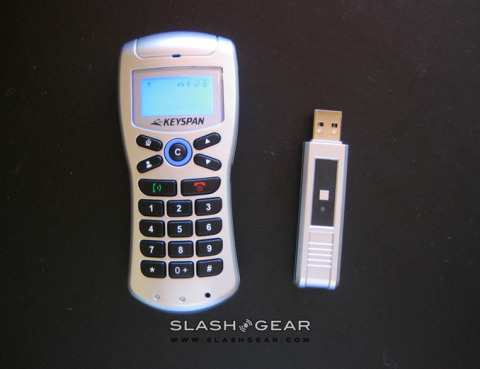
If you're looking for a VoIP handset but have an aversion to cords, Keyspan might just have the answer with their VP-24A Cordless VOIP Phone; plus, it's one of the few phones that works with both PC and Mac.
Installing the phone is fast and easy. Insert the CD to your PC or Mac, plug in the USB dongle, fiddle the AAA Ni-MH rechargeable batteries into the phone, press a button on the dongle and hold the phone near to it to establish a connection. That's it; in a few minutes you're good to call. Don't worry if you're not too good at this kind of stuff, or if you're giving it to a tech-clumsy relative. The user manual, which comes on the installation CD rather than in paper-form, shows you how to install step-by-step for both PC and Mac.
The phone's dimensions are 116.7mm(L)x50.3mm(W)x25.5mm(H) and it weighs 92g with battery. Fitting nicely in the palm, the reasonably big buttons are easy to push. Its black text with blue backlight LCD display shows signal quality, phone status, volume level, your Skype status and battery level. It also shows caller ID when you get a call.
Making a phone call is indecently straightforward. Press the contacts button to browse who's online, press call and you're there. Unfortunately the phone doesn't show you if a contact's status is set to away, not available, or do not disturb; hopefully this could be solved with a later firmware update. Until then, it might be a good idea to make sure that the person you're about to reach is not one of those statuses, so you won't bug him or her. You can also make calls to speed dials that you have assigned to Skype. The phone lets you juggle two incoming calls, and lets you start a second call while you're in conversation with the first; you can't, however, talk to them at the same time. After finishing chatting with your buddy, you can end and close Skype all from the phone. I'd love to see a speaker phone facility added to it though.
The phone communicates with the receiver via the 2.4 Ghz wireless signal, and sound quality is awesome at both ends. I didn't hear any echo, which I usually do with other devices. The feature I really love about this phone is the real-time volume control. When I hear someone's high-pitch, hurts-my-ears voice, I can instantly turn the volume down with a key placed on the side of the handset.
Even you're a super chatty person, the phone's long battery-life won't disappoint. The manual says the phone lets you talk up to 15 hours, and has 1200 hours stand-by time. I've been using the phone for about a week, and there is no need for charge so far. Still, charging is no trouble though; just hook the handset up to your PC via the included USB cable.
Considering its sound quality, long battery-life and MRSP of $79, I would give a great big thumbs up for the Keyspan cordless VoIP phone. There's no annoying cord like you find in cheaper USB handsets, and it's more affordable and easier to install than WiFi phones. It would make a good choice for those who use Skype often and like the "traditional" phone style; making phone calls from your PC is easier than ever.