

Jeff Hawkins On The Palm Foleo
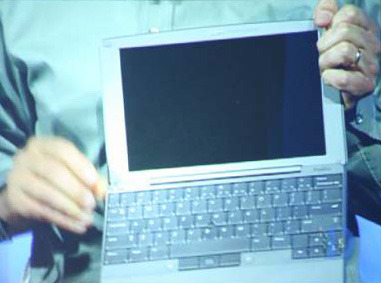
Palm just finished up their webcast a little while ago, and after seeing what it can do and how easy it is to use, I may have to get one of these when they come out. I'll give you the highlights of the webcast.
Jeff Hawkins, founder of Palm talked at length about the overall focus of the company. 15 years ago they started Palm with the idea that the future was in mobile computing. They wanted to build a device that could do many of the same functions that a desktop or laptop computer could do, but small enough to fit into your pocket.
They started off small by finding a market to which they could appeal. They found that niche with the Palm Pilot as a mobile organizer. Their thought was that they could appeal to a market, then let their product grow. The Palm Pilot eventually evolved into the Treo which incorporated a phone into the organizer, and let you do more of the basic computing functions.

The Foleo represents the next step Palm is taking to bring the computer down to a mobile size. Again they've decided to cater to a specific crowd. They are targeting users that are looking for mobile mail and web browsing, but want a larger screen and a full-size keyboard. But there is plenty of room for the Foleo to grow into much more than just an email machine.

The biggest features of the Foleo are the small size, full keyboard and instant-on technology. The device is only as wide as the keyboard itself to allow for the smallest possible size. This allows for a 10" screen which at a resolution of 1024 x 600 should be more than adequate for use. It has built-in WiFi and Bluetooth to keep you connected to your phone and the internet. Even with WiFi turned on, you should be able to use it for 5 hours without needing to recharge it.
What really sets this apart from other mobile solutions is the instant-on function. This is not a suspended state or a sleep mode, in fact the Foleo has only two modes: on and off. So every time you press the power button, it will instantly turn on or off, no waiting. You don't have to worry about saving what you're doing, you can just shut the lid and go. Next time you press the power button it will be exactly where it was when you closed it.
The device looks very sleek when closed, you only have ports on one side, all three of the other sides are smooth, you'll only see the word Palm on the top of the case, otherwise it is very smooth all around. As for the ports you will see the VGA port, a USB port, an SD slot for expansion, a headphone jack and a place to plug in the power adapter.
The Foleo is Linux-based, so you have the option to switch to the terminal at any time. This also means that the software is open-source and they are encouraging people to write their own software for it. They will be making the full SDK available at launch. They feel that if you give users all of the tools, they will surprise you will cool stuff.
For the web browser they have chosen to use Opera, and Versamail and Pocket Outlook will be used for email. You can view flash videos, but unfortunately you won't be able to see YouTube videos at this time. He did mention that they are currently working on support for them. You will also be able to open and edit Word and Excel documents on it, as well as view PDF files and PowerPoint presentations.
Setup is a breeze, it's only a four-step process. You pretty much just select the model of phone you have and what carrier you use, then it starts syncing your files. At this time it only syncs your email, attachments, folders and contacts, but support for other files can be added in the future. When asked what phones the Foleo supports he stated that out of the box the Treo line will work, as will most Windows Mobile phones, though he did warn that they have not had the opportunity to test all Windows Mobile phones on the market. He also included that they hope to include support for other platforms including RIM and Symbian and if Apple were to open up the phone to 3rd-party applications they would make it compatible with the iPhone as well.
If you haven't heard already, Steve Jobs announced today that they would in fact allow 3rd party apps to work in the future. So we should be able to assume that it will be able to work with the iPhone at some point.
At the end of the broadcast he took a few questions, most of the information I've already covered, but an interesting point that was discussed is security. You can password protect the Foleo, however, it diminishes the instant-on feature. A feature that he touched briefly on was using your phone as a key, so that as long as your phone is within range of a Bluetooth connection, you wouldn't need a password, otherwise you would. Now that is cool.
One of the best questions was why I would want a Foleo rather than a laptop? Several times during the webcast Hawkins said that the Foleo is not a laptop replacement. It is targeted at people that want something small to check email and browse with. Right now if you want something this size to do those things you'd have to pay a hefty premium to get a full-featured laptop. You'll only pay $499 for the Foleo after a $100 rebate, that's cheap. He then went on to state that over time it may evolve into something that is more of a laptop replacement, but for now that's not what they are aiming for.