REGISTER LOGIN

Worth Reading?

NoYes

+2 [2 votes]

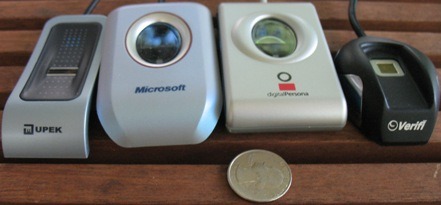
If, like me, you dread deleting the cookies in your browser because you’ve forgotten most of the usernames and passwords to regularly-visited sites, then a simple fingerprint scanner might be a good option.  Yes, a mixture of Hollywood scaremongering and honest security concerns have seen us nervous of people either cutting off our digits or copying them with Jell-O, but for general avoidance of login screens there’s little denying the convenience of biometrics.  Todd Haselton over at Ars Technica gathered up four and tried to fool them with Vista, Firefox and Silly Putty.

 Fingerprint scanners

Gelatin Fingerprint copy

With scanners ranging from $34.25 to $116 from four different manufacturers, Todd found a range of features and, more worryingly, compatibility issues.  For instance, while the Microsoft unit is sold as Vista-compatible (with an upgrade patch) it only worked on his system for a day and then, no matter what was tried, refused to work again.

Check out the review for details on which are worth the money and which will make you want to give them the finger, as well as the results of Todd’s gelatin-digits test.

Ars Technica

Subscribe via RSS or Email | Read 464 times

2 Responses to “It’s safe to touch: fingerprint scanners reviewed”

  1. John July 8, 2007

    These articles from Todd reviewing fingerprint readers were great. I read them hoping to find a good solution for my case: I run Windows and Firefox, and once bought the Microsoft Fingerprint Reader to get rid of my passwords.
    The reader works great… to log on to Windows and browsing the Net with IE. But when I thought that everything was lost, I discovered Fingerfox. BUT… It just didn’t work. Frown
    Finally, after hunting a lot, I found the perfect solution: there’s a new add-on for Firefox called FingerAuth Password Manager ( http://www.fingerauth.com/ ) that does the same to Firefox as DigitalPersona Password Manager does to IE (and both work together!).
    Now I can log on to Windows and to my websites on Firefox by just slapping my fingerprint reader.
    Personally, I prefer the Microsoft Fingerprint Reader. I almost switched to UPEK before discovering FingerAuth. But the MS reader is faster to scan my fingerprint, more accurate and is also more beautiful than the ugly flat gray DigitalPersona reader.

    Neutral  Add karma Subtract karma  
  2. Chris Davies July 9, 2007

    Thanks for the feedback, John.

    [quote comment="24088"]These articles from Todd reviewing fingerprint readers were great. I read them hoping to find a good solution for my case: I run Windows and Firefox, and once bought the Microsoft Fingerprint Reader to get rid of my passwords.
    The reader works great… to log on to Windows and browsing the Net with IE. But when I thought that everything was lost, I discovered Fingerfox. BUT… It just didn’t work. Frown
    Finally, after hunting a lot, I found the perfect solution: there’s a new add-on for Firefox called FingerAuth Password Manager ( http://www.fingerauth.com/ ) that does the same to Firefox as DigitalPersona Password Manager does to IE (and both work together!).
    Now I can log on to Windows and to my websites on Firefox by just slapping my fingerprint reader.
    Personally, I prefer the Microsoft Fingerprint Reader. I almost switched to UPEK before discovering FingerAuth. But the MS reader is faster to scan my fingerprint, more accurate and is also more beautiful than the ugly flat gray DigitalPersona reader.[/quote]

    Neutral  Add karma Subtract karma  

Post a comment

Please login to leave a comment. If you haven't signed up, you can do so free here. Lost your password? Reset it. With SlashGear account, you will be able to participate on SlashGear Forums.