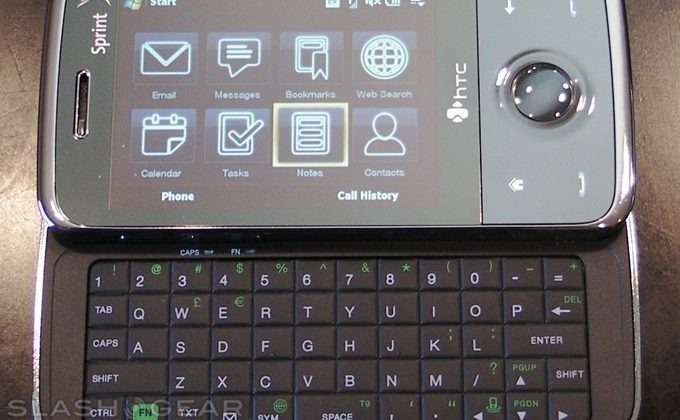
Sprint recently sent us the HTC Touch Pro, and we are absolutely loving it. We have had a few days to play with it and, so far, there are no major deal-breakers that we can see. HTC have taken the Touch Diamond and edged one step closer to perfection with the addition of a full 5-row QWERTY keyboard.

Included in the box there is the phone (of course), a 1GB MicroSD card with case, AC charger, USB data cable, an extra stylus, micro-USB headphone adapter, screen protector, belt holster and a wired stereo headset. The phone itself is a little thicker than previous HTC handsets, at 4.17 x 2.05 x 7-inches, however it only weighs 5.3 ounces, battery included. The display is the same 2.8-inch TFT-LCD VGA touchscreen from the Touch Diamond.

The keyboard is laid out perfectly, with designated number keys that don’t feel crowded in any way. The enter and shift keys are twice as wide as the rest, making them easy to locate, and there are shortcuts to the messaging applications. Overall the keyboard seems a little smaller than on other HTC smartphones, but with no drop in usability. The overall thickness of the Touch Pro is larger than that of the original Touch Diamond, but it still remains very handy and usable.

The Touch Pro has a 3.2-megapixel camera that also records video. Taking pictures is a breeze with auto-focus and built in flash; however there’s no dedicated camera shortcut key, just an option in HTC’s TouchFLO 3D user-interface. The Touch Pro is also capable of taking panoramic photos that are virtually seamless, and we’ve spent hours taking panoramic photos of everything in sight. Videos are of good quality in comparison to other smartphones.
The HTC Touch Pro is loaded with plenty of pre-installed applications such as the Opera Browser, Internet Explorer and Windows Live Messenger. In addition to Windows Live Messenger there is another instant messaging client that supports AOL Instant Messenger, Windows Live and Yahoo Instant Messengers. The Touch Pro also comes with Adobe Reader LE, Excel Mobile, Live Search, JETCET PRINT 5, OneNote Mobile, PowerPoint Mobile, RSS Hub, YouTube and Word Mobile to name just a few.
Unfortunately, the processor does not seem to keep up with Windows Mobile 6.1 Pro very well. More often than not scrolling was very choppy and animations were not smooth. TouchFLO 3D did not live up to its potential in the Touch Pro because of the lag that Windows Mobile often had. However when the phone responded the way it was meant to it was very quick and easy to navigate. GPS was slower than you would like; when driving around the phone would display where you previously were, rather than your current location. The only time we felt the Touch Pro accurately tracked our location was when walking down the street.
Using your phone as a modem is very simple. Just plug the Touch Pro into your computer via USB, opening Internet Sharing, select either USB or Bluetooth PAN and hit connect to use your phone as a modem. Connection speeds are relatively quick using both USB and Bluetooth. Video output is surprisingly very good, and it seems a shame that many customers may never know just how crisp the video output of the HTC Touch Pro really is, because you must buy an additional cable to use this feature.
The ability to swap memory cards is quickly becoming more popular among new handsets. Personally we would rather have the option of using a memory card than having the 4GB internal memory that the Touch Diamond had. These days, being able to swap your cards between handsets, and have whatever amount of storage space you like is more covenant than being limited to a certain amount of space that cannot be transferred.
For the most part the Touch Pro can be used with your fingers rather than the included stylus. While the general user interface can be navigated with your fingers without much trouble, some options on the Start menu were harder to select because of the size of the option. The onscreen keyboard was surprisingly easy to use with only your fingers. We found it very odd that the onscreen keyboard only showed up while the physical keyboard was slid out. There was also an onscreen SureType keyboard for use when the device is closed. It appears to be laid out more for the right handed population, with the actual letter input keys further to the left preventing your thumb from being cramped up.
An obvious improvement to the next-gen Touch Pro would be the processor speed. The phone’s processor never seemed to keep up with what was going on, whether it be instant messaging or just flipping through the main menu. Windows mobile did not seem to be the issue here, the phone itself was the under-achiever causing the Touch Pro to lag. More often than not, sliding out the keyboard would call for a 5+ second wait before the phone itself adapted to the change. Also we would like to see a designated camera button for quick photo opportunities. Having more control options such a touch and hold options would make this phone easier to navigate, even without multitouch. Overall, though, aside from the lag that we experienced, the Touch Pro is a fun and very stylish device that is capable of doing many different things. It all comes down to the keyboard, without it this phone would not be nearly as appealing.
We can see a lot of Instinct owners enjoying the Touch Pro. We recommend this phone to anyone who is looking for a device that is capable of doing a lot of useful tasks such as editing Word documents and receiving exchange email. The HTC Touch Pro is priced at $299.99 with a two- year contract , after a $100 mail-in-rebate and a $25-or-higher data add-on or Everything plan with data.


LOGIN
REGISTER


Thanks for the information. I’ve always been a palm guy, but I’m considering the move to Win-Mobile with the launch of the touch pro.
One thing that I haven’t seen in the reviews is the video player. Typically I watch a show or movie when at the gym that is stored on my memory card. Wondering what video formats are supported on the existing video player (if there is one). Also, how well does it play videos from the micro-sd card?
Thanks for a great initial review.
I think that the onscreen keyboard will also come up when you have the phon on it side. It should recognize when it is in landscape (without the keyboard open) and then offer it.
Oh. I forgot. HTC and Sprint know about the GPS issue and are working on a fix. I have one on the way for my business, so I read a bunch of info on it
I too have been a Palm guy for some years. I was a little apprehensive about making the switch but it has turned out great. I say give it a try and see how you like it. The TouchFlo eases the pain of switching to a WM6.1 environment. I love my new phone.
I have had the Touch Pro for eleven days(got in October 31,2008) and I have issues with the phone. First, I love this phone, however, the battery will not hold a charge. I started with a fully charged battery, used sprint navigation to direct me on a 2 hour trip. My phone was dead by the time I got to my destination. The phone was extremely hot, I mean extremely hot during the entire trip. The next day I took the phone into the sprint store and they switched the battery and told me that the phone check out okay. for the next several days, i used the phone sparingly to see if the battery was okay. I made about 7 calls and 12 text messages, my battery was down 3 bars after being fully charged. I tried the navigation within the city limits and the phone again stared to get hot. My sprint picturemail would not work, it takes hours to send a picturemail. I call customer care and talked with technical support, who did not have a clue about the phone, they had me on hold, researchec, told me to do a few things and then had me to perform a hard reset. The picturemail worked for a few messages and then it started to take hours to send a picturemail. i then went into a sprint store for ready now service to see if there was something I was doing that was causing the battery loss, etc. The CSR in the store did not have a clue about the phone. He went through the computer told me a few things to do and that was it. My battery continued to perform poorly, so I again called customer care and was told afte a serious of conversations and procedures that i need to have the phone replace and that my phone could be defective. They told me to go in to a store and have them make the switch. Well, there are no phones in any of the stores in my area. I call customer care again and asked them to look at the notes on my account and send me a replacement phone, because there are none available in the stores. That was a horror story and i currently have an expensive phone that i have to keep on the charger. i actually purchased a universal charger from sprint that can be used in your car and/or in a wall socket to make certain I don’t lose my charge. I think the phone is over priced for how it is operating for me. Sprint should provide an additional battery for the touch pro like they do for the Instinct. The should also include the universal charger in the box. The phone cost to much to not operate better. The sprint picture mail sucks, The sprint TV sucks, but the phone is really nice, if sprint can correct the issues mentioned.
I got my Touch Pro yesterday, and I love it. It does get very warm, and I am a bit disappointed with the battery life while I’m using all the gizmos. In fact, it also seems to not want to charge while you have it plugged in to USB and the battery starts to get too hot… That’s sort of a pain.
But I must disagree with the “CPU is too slow” comment. I have not had any speed issues whatsoever and am infact (having upgraded from a PPC6700) very pleased with how fast everything is working. When I switch to landscape by popping out the keyboard, the screen rotates immediately with no lag at all, and it’s usually a second or so when I rotate with the sensor. Touchflo seems to work very smoothly, and all the lists I’ve used also work very well.
I completely agree about the lack of physical buttons (ie the camera), but would rather see buttons for Voice Comand, the start menu, and “OK”… (I know that you can hold down talk to get voice command, but the delay is a pain. Luckily I can use my bluetooth to kick off voice command.
Overall, I LOVE this phone, I may look into getting the extended battery, but it’s still really great.
I have the phone for about a week. I replaced the rom with a custom one I made at one with the tools offered at various websites.
Regarding battery life: There are many tweaks to be made to make the data connection stop after 1 minute or so and that is what I did. By default, you are connected full time. That is unnecessary as you need only download a webpage, email or video, and then no need for connection. With that tweak alone, I can go all day with plenty of battery time left over. Do a search for “Advanced Configurator Touch Pro” and you will find that tool.
This is the best phone I have ever owned. I traded up from a Treo 755P.
If you are pretty technical, you can really dial in the settings to make this thing unbelievably fast, but if you are a normal user, I would only recommend you fix the data connection and you will have a better phone than the I-Phone in my opinion.
Battery, Battery, Battery
The rest is near perfection…Its that darn battery, I go 7 hours of no use then 1/2 hour of radio and its done. I can’t even imagine what its going to be like when I throw movies on it. If I could go without playing with it for 10 minutes I could get a better sense of the battery life sans usage.
We’ll see, I might go to the sprint store and see if they give me a new battery or get the long life one. 50 bucks though, after 400 on the phone that seems like a lot…
I agree with all the postings above re: the battery. Battery life is really bad…. This is a real problem for me, and it doesn’t even last a full day, EVEN when I make hardly any calls and only check my e-mail status 5-10 times during the day. Very dissapointing with the regular battery.
i have had my touch pro for about a week and a 1/2. i think its great but just like everyone else my phone dosn’t stay charged very long and it gets warm…other than that i love it, its the best phone i have had and im not going to upgrade unless they come out with a upgraded version.
The battery does not last and my phone gets hot..very.Don’t like that I can’t copy and paste or dial a number from a website.I’m having trouble using three way calling does anyone know how.Sprint great customer service could not help me.
I purchased the PRO about two weeks ago and I am on my second one now after Tech Support advised me to bring it to the store for a replacement as mine might be defective. I had problems implementing multiple tasks on the phone. If I decide to watch CNN mobile and then listen to Sprint Music, answer a phone call and so one, the pro starts being slow. The reason I returned mine for a new one was because, while watching Sprint TV or listening to Sprint music, the phone wouldn’t charge the battery though the charger was connected to it. At first, the phone battery would charge fine while enjoying the TV/Radio and then (after 10-15,mns), watching the battery icon on the “home” screen, I realized it was using the battery instead of the charger. It will continue using the battery until the phone died. However, while the charger is still connected, if I stop the TV/Radio it will not charge the battery for a while and then resume charging it without the charger ever being disconnected. I am on my second phone and both of them did the same thing. This is a nice phone but for the price I expect something better.
Where can you get an extended battery? I haven’t been able to locate anything better than a 10% increase over the crappy one that is included.
Also, I am having trouble with email I send getting stuck in the Outbox and continually sending the same email to the recipient over and over.
I’ve had my touch pro for a couple of months now and this is the second device now because the battery life issue, the phone will last for a maximum of 9 hours when its on stanby I’ve been very disapointed specially the cost of the pro isn’t cheap and with the second device the problem is still there plus the speaker volume is very poor with both phones.
I’m going back to my sponser to see if I could replace it with a thired one now hoping the issue will be solved. If anyone here knows how to fix the problem I mean really solve these issues please let me know.
Maybe I can help all you folks with battery problems. I can get 2 days on standby with moderate usage. The main problem is that many programs do not end when you close them. They only minimize and since they are still active they use processor and therfore battery. There is a program you can download called advanced config that allows you to change the behavior of the X button on many applications. Also turn off bluetooth and wifi if not in use. Go into your power setting and set your screen to turn off after 30 seconds and the device to turn off after 1 minute when on battery.
The biggest thing is closing the unused applications. In the upper right hand corner when in the main touchflo interface you can click on an icon to bring up the task manager. It will show all running applications. Just click the close all button.
I almost forgot, if you use active sync for exchange, don’t use direct push unless you really need it. Set the sync schedule for every couple hours and that will help battery life as well.
The phone definelty falls short on battery life even compared to my HTC 8525 but then it did not have GPS or many of the features you get in the Touch Pro. The more you ask the phone to do the quicker it will use up battery.
I too had to do a bit of experimentation. It’s not possible from the UI, in my experience. Once your are in your first call, dial your second number and press the physical talk button on the phone. Once that call answers, press that talk button again and all parties will be joined. I am a bit surprised about this as it is the same old-fashioned method I had to use on a Smartphone I had about five years ago.
I’ve had my new HTC Touch Pro for a couple of days and realizing the same sort of battery drain issues described by many on this blog. It is unfortunate that Sprint does not bring attention to this serious shortcoming, I could not even find a expected useage time in the owners manual, sprint is very tight lipped on this issue, which confirms the problem, I purchased this for work and at this rate of drain, I have no confidence that my phone will operate past noon and this is after a full night of charge and very little to no useage. They have to step up and provide some real support, I can’t function with it at this rate of drain. I would seriouslu recommend that no one invest in this phone until the battery charge problem is somehow resolved.