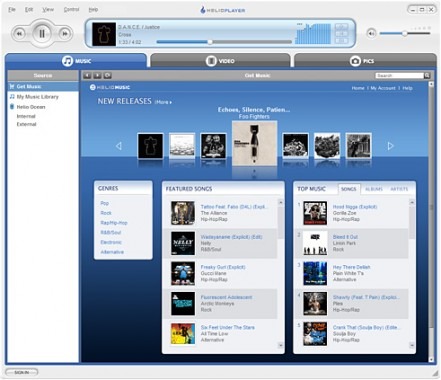
So this Helio Player was designed in partnership with RealNetworks, and you can tell it when you open the app up. Furthermore, it works to varying extents with every single Helio ever made except the Kickflip and Hero.

Basically this is an all in one app that lets you transfer media (pictures, videos and music) to and from your Helio device. For some devices the transfer goes both ways, for others it’s a one way transfer (to the device) and then you have to use other software to pull stuff off of the device (like my Fin, I can only transfer stuff to it using this software, and then I have to fire up PCLinkPro to pull stuff off of it).
However, by far the best part about this app is that all the music and such you’ve downloaded onto your Helio device; you can now download copies of it to your computer. Also, the entire music collection you have access to on your Helio device through the Helio music store, you also have access to it through this app, with the ability to download music to your PC (and subsequently your mobile device) using nothing but your Helio number and password, then you get charged for it on your next bill. It seems to me, with the addition of this software, the Helio library (at least through this app) has grown considerably. One more major feature of this software, you can consolidate all your music from your computer as well as other music subscription services using this app, and, when you transfer music over to your device, it will automatically reformat it for you.
That’s what this app is supposed to do, but I assure you, I still can’t get the damned thing to work, let’s go through a list of problems I had:
First, downloading and installing the app, not a problem, but midway through the installation, they do the drive installation for your device so that you can transfer stuff, well, I had the old drivers from PCLink Pro installed, so instead of offering to uninstall them and install the new ones, or better yet, just updating the old ones with the new ones, it just cancels the drive installation altogether. Then, they don’t just give you the drivers so that once you uninstall them you can point device manager to the right location and it will do all the magic, no, they are in an .exe that is slow and buggy as hell.
Second, so, I get the Helio Player app installed, sans drivers, so I can’t connect my device, and I find that they have direct links to just the new drive installation software for each of the devices, so I go through the uninstall process to remove all the old drivers, restart my computer since its required, and I run the driver install, it says it takes 300 seconds, or 5 minutes, it ran for closer to an hour and still didn’t work, I still apparently don’t have the proper drivers installed, or, if I do, the driver installation software still refuses to connect the damn thing so I can use it.
Third, those were just my problems with installation, once I started using the software, I couldn’t download anything (any new songs, or any of the songs that are also on my device, since you get free downloads of those for your PC) without getting a “License Acquisition” error, and, the first couple of times I booted up the app, there were no updates, and the software was hogging over 50% of my system resources (trust me when I say its not because I have a slow or old computer). However, somewhere along the way the app decided that there was an update available, downloaded and installed it, and at least now its not freezing my computer and hogging up large amounts of system resources, but all the other problems are still there.
So, in conclusion, I’d recommend giving it a try, but make sure you have all the old drivers for your Helio uninstalled. And, after doing some searching, the “license acquisition” error I was having is apparently a server issue, for which they recommend you try back later, but I have been trying for a few hours now and still have yet to get a single song to completely download. I just uninstalled the software, all the drivers, and everything else related to the software I could find and I am going to reboot and try starting from the beginning again, but if it doesn’t work this time, I am giving up until I have time to contact Helio and get an answer. Please, leave your tips, successes, problems, etc. below in the comments section, and if any part of my status changes I will do the same. Good Luck!
Helio announced the launch of its Helio Player PC software [via slashphone]


6 Responses to “Helio Player released, finally transferring your media to and from your Helio is easy”
Asif Ahmed December 24, 2007
This is an incredible app by Helio. You can see from the interface that the frontend is clean and easy to use. The backend is bug free and works with nearly any media file. We have been testing this app at the Invicta Labs for over a week now and we are preinstalling it on every Helio Ocean that we sell. This ensures an out of the box, ready to use experience for the customer. Our preinstalled Helio Oceans can be found exclusively at http://www.heliobuy.com
Thank you,
Asif Ahmed
-1Invicta Wireless
http://www.heliobuy.com
QUINCEY January 3, 2008
HELIO SUCKS………..thats right helio screwed me and im letting you know ….i bought a whole kit and a few months latter the phone would not power up ,I called helio and what they said was that they will replace it sence it was under warranty ,but they did not have a phone to sent me then after a few weeks of me calling they sent me a phone but it was just a phone !!!!!!!! no charger no nothing!!!!
-3I had to buy a blasted charger to talk on the phone they told me they was not going to replace everything even tho it was a different devise that what I paid for ,,that realy pissis me off I bought a whole kit and want what I paid for, not piece’s of a kit that I will have to spend money for to make up a kit ,4 days after reciving my replacement I had to call once again due to it not charging ,guess what they got me again and charged me for another charger and I had to buy a battery!!!!!!!!!!!!!!!!!!!!!!!!!!!!!!!!!!!!!!!!!!!!!!!!!!!!!!!!!!!!!!!!!!!!!!!!!!!!!!!!!!!!!!!!!
This is crap ……………………………………………..all I get is im sorry ……well I hate helio and they suck and im telling everyone and calling every gov. office to find out what rights I have ………………………………………..quince locklear………706-464-0464
helio sucks balls +2 September 9, 2008
I am having the exact same problems as the author of this article. My debacle starts out after the 1-yr warranty has expired from an aging Drift phone, when it just died on me. Luckily I had the insurance so was able to get a Mysto for the $50 deductible. Well, I want to get some songs from my pc to my new Mysto, but because I had my old Drift installed, i’m having the same problems as the author…. how do i uninstall the old drivers? the new driver program keeps detecting it on my pc but i cant find it anywhere!
Neutraljennie September 22, 2008
I’m having the same problems as the author, I’ve been trying for over an hour to install the driver for my mysto but can’t get the device recognized. I’ve uninstalled and reinstalled the entire program already.
+1nicflame October 27, 2008
How do i download helio player if i dont have an helio contract?
+1Johnny December 20, 2008
[quote comment="34145"]HELIO SUCKS………..thats right helio screwed me and im letting you know ….i bought a whole kit and a few months latter the phone would not power up ,I called helio and what they said was that they will replace it sence it was under warranty ,but they did not have a phone to sent me then after a few weeks of me calling they sent me a phone but it was just a phone !!!!!!!! no charger no nothing!!!!
I had to buy a blasted charger to talk on the phone they told me they was not going to replace everything even tho it was a different devise that what I paid for ,,that realy pissis me off I bought a whole kit and want what I paid for, not piece’s of a kit that I will have to spend money for to make up a kit ,4 days after reciving my replacement I had to call once again due to it not charging ,guess what they got me again and charged me for another charger and I had to buy a battery!!!!!!!!!!!!!!!!!!!!!!!!!!!!!!!!!!!!!!!!!!!!!!!!!!!!!!!!!!!!!!!!!!!!!!!!!!!!!!!!!!!!!!!!!
This is crap ……………………………………………..all I get is im sorry ……well I hate helio and they suck and im telling everyone and calling every gov. office to find out what rights I have ………………………………………..quince locklear………706-464-0464[/quote]
Judging by the way you speak I would say your problem was purely your own lack of intelligence. I’ve had Helio for a few years. I own the Ocean, Fin, Heat and Mysto. I am able to switch my number between which ever one I’m in the mood to use. Every problem I’ve ever had was resolved quickly. It helps to remain calm, explain your situation, have respect for the CS representative and (what helps the most) is getting the Device Protection Plan.
There’s absolutely NO REASON for them to send you a charger and everything when the problem is with your phone. If you bought the phone in the first place you should still have your charger and headset and everything from when you bought your original phone. How does having your phone replaced effect those items? It sounds like you’re just throwing a little tantrum about not getting an extra charger.
I’ve had Helio for a few years and I have never been happier. I previously had Verizon which was one horror story after another. Moved to AT&T and it wasn’t any better plus I was paying way too much for things I didn’t need. Finally I found Helio and have absolutely NO complaints. Everything I want is included and unlimited. No hidden fees, no adding this, adding that, adding a whole data package just for a few things and blah blah blah. Helio is simple and the perfect place for a “common sense” plan.
Neutral