

He Said, She Said: Fashionable Netbook Or Second-Hand Laptop?
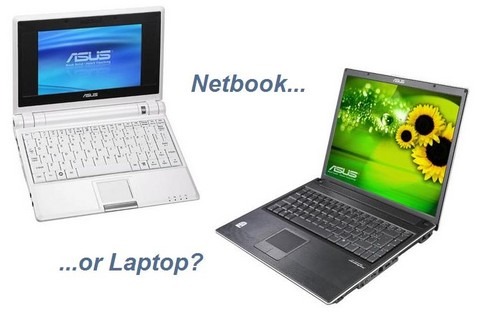
Last week's "He Said, She Said" editorial pitted Brenda and I against each other discussing what sort of touchscreen device Apple might have on their cards. This week, it's something equally as topical here on the frontpage of SlashGear: netbooks, or budget ultraportables. They're the niche of the moment, certainly, but are consumers really getting the best value for their hard-earned dollar?Brenda: Netbooks, also known as nettops, are not just "mini-laptops." In fact, they serve a different market than laptop users and act as a smaller, more portable, more convenient means of carrying around files and information and accessing the Internet. These sub-notebooks are prepped and primed for Internet access, making them more portal than powerhouse tool. While a laptop is basically a complete portable computer, netbooks are the streamlined version for those that don't need to carry the world with them–just the essentials.

Chris: Laptops, or notebook computers, don't need much introduction. In fact when it comes to computing, desktop sales are on the decline while laptop sales keep climbing. Unless you're comparing to a particularly powerhouse desktop, a laptop can do pretty much everything its stationary brethren can, and there are desktop replacement laptops that will take over all the heavy grunt processing tasks 99-percent of people will ever be asking for.
Brenda: Sure, laptops can do just about everything a desktop computer can, but what if that's not what you need? What if all you need is something lightweight to carry around that contains your important information, files, and lets you look up information on the fly? A netbook would be ideal. The real benefit of netbooks, however, is their ability to keep you connected. Sure a smartphone can do that but the functionality isn't quite there yet to make mobile computing on your phone a breeze. Enter the netbook. With one of these minicomputers, you can blog, write emails, social network, finish proposals, browse the Internet and more from anywhere you can get a WiFi signal. And the real plus? The price. You can expect to pay just a few hundred for a netbook whereas a good laptop can run you $400 and up. Chris: You might not need everything your desktop can do today, but how about a few months down the line when something unexpected and more processing-intensive comes up? And who's to say that there's even a desktop waiting at home for you; most people I know haven't bought a stationary PC in years, and rely on their laptop for all their computing. A single machine, that does everything you need, means there's no issue with synchronising files across multiple devices, no remembering to charge everything before you leave the house, and at the end of the day is cheaper than buying a "main" computer and a portable one. You can browse the internet, blog, do everything you've mentioned – but you can also crunch video files to share on that blog, you can run multiple apps like Skype, IM and a browser full of tabs to really communicate.Brenda: Certainly a laptop is the choice if it will be your only computer, but if you're merely looking for something to take with you, a netbook is the way to go. The simple fact of the matter is not everyone can afford to buy a full blown laptop. They can be quite expensive, so if you know you don't need all of that high processing power, why not get the best of something smaller? Netbooks are ideal for students as well and act as a great introduction to computers for children. Since they weigh less, kids can tote them easier and their focused functionality better serves those newer to computers without overwhelming them. They are often sturdier as well. Netbooks may not be for everyone, but they are a great laptop alternative to those seeking the basics in a portable, easy to use format.Chris: I'll admit that the price of the cheaper netbooks stands them apart from current low-end notebooks, but you pay a significant penalty on specification. Most people are going to want to step up at least a couple of rungs if they pick, say, a basic 700-series ASUS Eee PC, and even then you'd do far better – in performance and flexibility – going for a second hand laptop. In fact eBay would be where I'd turn every time before opting for one of the cheaper netbooks; why introduce new users to a slimmed down (or even compromised) system, when they could get used to a full system based on last-year's hardware?

Brenda: eBay may be a good place to get used or restored laptops with last-year's hardware, but with a netbook you'll get this year's hardware without the bells and whistles. And let's face it: it's the bells and whistles that amp up the price on laptops. With a netbook, you get exactly what you need at an affordable price. If you're just going to answer emails from the local coffee shop or write reports in the library, a netbook will do the job and then some. If you need some guidance as to which netbook is the prime choice, you can't go wrong with the Acer Aspire One. This mini laptop has an 8.9-inch display, a 1.6GHz Intel Atom N2770 Processor, 512 MB RAM, an 8 GB SSD and runs Linux. What's really great about this one is that you don' t really have to sacrifice power for sleek and minimized design. The Acer weighs less than two pounds and is optimized for the Internet. This is the ultimate keep-in-touch device and is perfect for travel. And what will it cost you? Just $379.99. You get the portability of the laptop without the sky-high price. If you ask me, that makes this a great buy.
Chris: I won't argue that the Aspire One is a tempting machine, but even a cursory check on eBay throws up some full-sized notebooks for the same price but offering much more in terms of their spec-sheet. A 2GHz Dell D410 with a 12-inch display, 1GB of RAM and 60GB HDD just went for ten bucks less than the Aspire. Or how about a 2.1GHz Toshiba L300 for a bigger display: 15.4-inches, 160GB HDD, 2GB of RAM and a DVD burner; that just went for $381. Both running Windows XP, so there's no Linux learning curve; both offering far greater performance, with someone else having already paid the premium Dell or Toshiba wanted for the "bells and whistles". Fancy something with an Apple logo? Take your pick of MacBooks or iBook G4s going for the same as Acer ask for their netbook.
So do you trawl eBay or do you bypass all that searching and head to the new shelves with your credit card in hand? Brenda and I can't quite agree – she loves the netbook simplicity, while I'm a cranky Brit who wants the most grunt for his money – but we'd both love to hear your views. Netbook or notebook: let us know where you stand in the comments.