Wednesday, Oct 3rd 2007 by Chris Scott Barr


Worth Reading?


YesNo


+9 [17 votes]
Loading ...

Microsoft loves money, your money to be exact. When you buy something like their Xbox 360, they want you to use their special proprietary hardware. Take the wireless adapter, you’d think any old adapter would do the trick, unfortunately you have to buy the $100 one from Microsoft. (Or at least that’s what they want you to think, but that’s a story for a different day). Another great example is the $50 HDMI cable with the audio adapter, that’s way too expensive.

Xbox HDMI hack

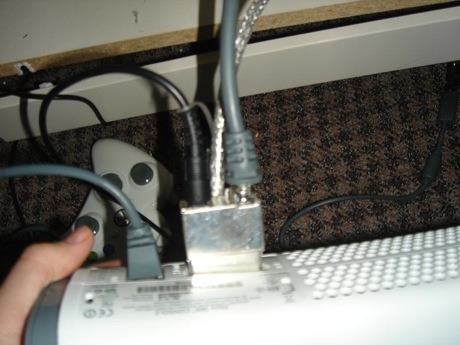
If you have one of the newer Xbox 360 Premium consoles, you likely have yourself a nice HDMI port. Unfortunately, due to the design of the A/V cable, you can’t have both an HDMI cable and the A/V cable (which carries your audio) plugged in at the same time. The Microsoft solution is to pay $50 for a special cable.

The hacker solution is to remove the plastic casing around the connector for the A/V cable. This gives you enough room to plug in an el cheap-o HDMI cable. Take that Microsoft!

How To Stick It To Microsoft On Their $50 HDMI Cable
[via gearfuse]

Subscribe via RSS or Email | Read 508 times


  1.  Wyatt Constantine   View all comments by Wyatt Constantine  +1  Add karma Subtract karma Quote

    I thought this was a really informative article. I didn’t realize the trouble microsoft would go through to get your money.

  2.  xp   View all comments by xp  -1  Add karma Subtract karma Quote

    Between releasing a video game console that can hardly stay out of the repair shop, and doing sneaky things like this HDMI trick… it’ll be amazing if MS manages to stay on top in this business.

    Cheap tricks… they aren’t sustainable

  3.  Yert   View all comments by Yert  -2  Add karma Subtract karma Quote

    Okay, thats nice and all, but at least Microsoft provides all these cables with the Elite version, and High Definition cables with all versions…

    I think the cable cost $50 because they don’t want you to buy it… they probably want you to buy the Elite in the first place… or use a decent stereo system…

  4.  Nadoka   View all comments by Nadoka  +3  Add karma Subtract karma Quote

    This was also what I did to my new HDMI Premium.
    There is however, one side effect. If u have both HDMI and the HD Cable plugged in, the console will reset when you switch video inputs on your TV or if u turn off your TV and back on. At least it did it on my Sony LCD. This doesn’t happen if I remove the HD cable, so I don’t think it’s my TV. Nor does this happen to my Wii, but that just runs off component cables. It also doesn’t do anything strange to my HDMI PC, so I’m pretty positive it’s Microsoft’s doing.

    I was tolerating this up until during an intense Halo3 game where I accidentally sat on my TV’s remote and it switched video’s. :(

    The fix for this is to open up the HD cable dongle and remove a black shorted wire inside. It’s the only one that loops back on itself at the connector. Anyone willing to do this will see right away what I’m talking about when the metal casing is ripped apart. Do so at your own risk, of course.

    I took the extra step of desoldering all the RCA wires off. So I ended up with just an “Optical Dongle”. :)

    I win! Microsoft, you lose!

  5.  Joe   View all comments by Joe  Neutral  Add karma Subtract karma Quote

    Thank you Nadoka, I tried that fix and it worked great!

  6.  Jimmy   View all comments by Jimmy  Neutral  Add karma Subtract karma Quote

    I just ran HDMI (which can hold the 5.1 signal) into my DLP and ran the Optic out into my receiver, seems to be working fine. No out of sync audio either.

  7.  Keimei   View all comments by Keimei  Neutral  Add karma Subtract karma Quote

    I just ran HDMI (which can hold the 5.1 signal) into my DLP and ran the Optic out into my receiver, seems to be working fine. No out of sync audio either.

    Check your receiver, I bet it is going into Dolby Pro Logic 5.1 not Doldy Digital 5.1. Dolby Digital is way better than the old Pro Logic stereo decoding system.
    Later

  8.  pianobryguy   View all comments by pianobryguy  Neutral  Add karma Subtract karma Quote

    Nadoka, just wondering… I’ve done the casing trick (before finding this website, so I thought it was my idea. heh) But my question is, if I go ahead with the removal of that black shorted wire will I still be able to get analog sound through the RCAs? I don’t have the ability to utilize the optical audio at this point but still depend on HDMI for 1080p. I would love to not have the system reset when I change inputs. Plus it would allow me to use the TV’s sleep timer to power down the system when I fall asleep to a movie. (without it waking right back up again) Thanks

  9.  thadwhit   View all comments by thadwhit  Neutral  Add karma Subtract karma Quote

    I did this hack thanks. I was wondering if I cut off the component cables to neaten it up if that will ruin the optical?

  10.  Curt   View all comments by Curt  Neutral  Add karma Subtract karma Quote

    This was also what I did to my new HDMI Premium.
    There is however, one side effect. If u have both HDMI and the HD Cable plugged in, the console will reset when you switch video inputs on your TV or if u turn off your TV and back on. At least it did it on my Sony LCD. This doesn’t happen if I remove the HD cable, so I don’t think it’s my TV. Nor does this happen to my Wii, but that just runs off component cables. It also doesn’t do anything strange to my HDMI PC, so I’m pretty positive it’s Microsoft’s doing.

    I was tolerating this up until during an intense Halo3 game where I accidentally sat on my TV’s remote and it switched video’s. :(

    The fix for this is to open up the HD cable dongle and remove a black shorted wire inside. It’s the only one that loops back on itself at the connector. Anyone willing to do this will see right away what I’m talking about when the metal casing is ripped apart. Do so at your own risk, of course.

    I took the extra step of desoldering all the RCA wires off. So I ended up with just an “Optical Dongle”. :)

    I win! Microsoft, you lose!

    Thank you so much Nadoka for the tip regarding the little black wire! I too now have an optical dongle thanks to you and now my 360 doesnt reboot everytime i switch inputs! Very nice tip. =)

  11.  omid   View all comments by omid  Neutral  Add karma Subtract karma Quote

    if im remove plastic , button in a av cable to change between TV and HDTV is Work or after that is other not work?


Add your comments

Fill in the required fields below to leave a comment or login to your account. If you haven't signed up, you can do so free here. With SlashGear account, you will be able to participate on SlashGear Forums discussion.


Close [X]
E-mail It
About / Advertise / Contact / Archives / Privacy Policy / Terms of Use
Copyright © 2006-2008 SlashGear, All Rights Reserved.