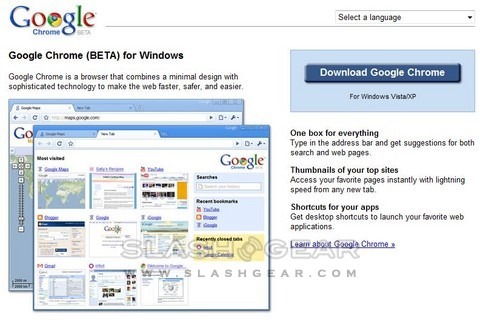
Google’s Chrome browser is now available for download. The Chrome site now has details of the browser’s functionality, including video interviews with the development team and video demos of each major feature. However this first beta release is only available for Windows XP and Vista; Mac and Linux owners will have to wait.
First impressions of the Google Chrome browser after the cut

On first install, Chrome asks to import settings from your current browser including favorites, cookies and search engine preferences. The install itself is fast and doesn’t require a system reboot. With two Chrome tabs open (the introduction pages) there are four mentions of the chrome.exe process in Task Manager, altogether using 51,968K.

Vincent’s first impressions of Chrome:
1. Super faaaaaaaast!2. 78/100 on Acid3 Test3. Tabs work great4. Bookmarks are easy to maintain and move around5. Gears is installed by default – works great with Wordpress and WYSIWYG6. Haven’t seen a site that doesn’t render correctly — even those heavy in Ajax7. Flash sites run well8. Works with VMWare for OSX with Windows XP (see video below)9. Silverlight not yet compatible
We’ll be testing out Chrome and putting together our first impressions over the next few hours. Remember, this is early beta software, so you probably don’t want to be putting all your eggs in a Chrome basket and relying on it for sensitive tasks such as internet banking; it will take a little time before the first security reports come in.


53 Responses to “Google Chrome browser available to download; Install feedback”
john September 2, 2008
It’s quick…
NeutralAndrew Finkle September 2, 2008
Chrome will mean different things depending on who/what you are. The one thing it does mean to everyone though is that the Internet is the operating system, and the clouds are moving closer to earh.
You are Apple;
This means that if it were not enough of a conflict of interest (Iphone VS Google’s Android) to have Google CEO Eric Schmidt sit on your board – It is now. Look for Schmidt to resign sometime in the next six months.
If you are Microsoft;
This means that if you ever considered making Internet Explorer open source in the past, now is the time… You can not afford to wait, not even another minute. Expect Microsoft to make Vaporware like noise over the next few months about cloud widgets to give IE closer ties to cloud based initiatives.
If you are Yahoo;
you need to buy Mozilla.
If you are Firefox;
Keep your friends close, and your enemies closer…yes continue with your Google revenue deal, but learn how to monetize your Browser outside of a paid search deal. Leverage your large user base to form “spin-off” type “power of the crowd” businesses. Note to Firefox, hey you guys ARE a social network…you just haven’t figured that out yet.
If you are Sun;
Realize that Java is even less relevant every day. First we kicked you out of client side computing because you were a resource hog. Realize that Java will now continue to be less and less relevant on the Server. What a waste of a good company… McNealy must have got hit in the head with one to many hockey pucks.
If you are a social network;
“social networks” would follow along with users in the browser. Truth be told, we thought it would be Facebook, or even more likely Firefox that would lead in this initiative. So if you are a social network, you need to know now Chrome is the first step in a series of moves that will make it unnecessary for your peeeps to ever visit your site (directly) again.
If you are an application developer;
Life used to be simple, eh? You knew that you should be developing applications for Windows, because that is where the 100’s of millions of users were. Fast forward, and now you need to choose what platforms to support, and when. Of course it makes sense to develop for Windows still, but Apple now has a mass of millions of Mac OSx users, and if it a browser based app, write once for Safari, and it should work without much adaptation on the Iphone. There are over a billion cell phones in use world wide, however every phone requires writing to separately (yes even all those different flavors of Java are different phone to phone. Suddenly with Android coming, and a matching desktop browser you need to be here.
Lastly if you are a consumer;
There is always a bottleneck somewhere … Think back 5-10 years ago, before what we now refer to broadband… Dial up was painffulllllyy slow, and when you tried to browse, the bottleneck was in your “last mile” connectivity. Once you got broadband, the lag time in reaching a site was likely in your PC (not enough ram, slow processor, etc). Before either of those issues though it was the software that was not “smart” enough to keep up with the ever faster CPU’s being created.
Look for Chrome to optimize all these new “cloud” based application initiatives like Google Gears, etc. This is just another nail in the coffin for desktop based computing. In 10 years, likely 90%+ of your applications will reside somewhere outside of your home or workplace – but certainly not on your desktop.
http://www.twitter.com/A_F
+3Robert Taylor September 2, 2008
Well the only problem I’ve had with Chrome so far is that on my laptop I can’t scroll up or down the pages using the touch pad, and on my desktop I can’t scroll up or down using the scroll bar on my mouse.
And does anyone know if they have released any add-in’s like FireFox’s Ad-Block Plus?
+6Chris Davies September 2, 2008
Robert, I can’t replicate your problem, but I’m finding that my laptop touchpad scrolls far faster than in IE7 or Firefix. Perhaps there are updated drivers for your touchpad?
NeutralJames Madison September 2, 2008
Downloaded and installed Google Chrome. Since this is Beta, I will limit comments to the negative in hopes that someone will fix and update the software. I am unable to change the default browser to Chrome. Even removing the IE access in IE and clicking many, many times on the link to make Chrome the default browser, nothing works. Not really Google’s fault yet, but Roboform does not work like it works with IE. Instead of loading a toolbar and loading passwords automatically, program sits in tray and requires you to cut and paste info to browser. Chrome does have its own password saver in its defense and it has requested to save passwords. My experience with those is that they work periodically but Roboform works all the time. More later.
+3Thomas Jensen September 2, 2008
I have experienced that i’m not able to bookmark the entire adress, just the start like; http://www.slashgear.com/ where the rest won’t be added.
NeutralZeno September 2, 2008
My biggest problems, or at least, reasons for not switching from Firefox:
1) Doesn’t yet have the equivalent of AdBlock.
2) I haven’t found a way to make a search keyword like I can in Firefox.
Of course, this is just the beta and nobody’s had time to make new extensions or what have you. I do like that it’s more lightweight and I think it’s a lot sexier.
NeutralElle Brown September 2, 2008
Many thanks for a great write up. I visited my site and the blue background doesn’t seem to render correctly in Google Chrome. If you compare to IE or Firefox you will see the site has a blue background. Sometimes the pages render OK in Chrome, but many don’t and appear white.
I wonder if many others have the same problem surfing the site.
Elle
+1snyggast September 2, 2008
IE 8 covers and deletes your surfing tracks, leaving Yahoo and Google’s behavioral ad targeting business useless. Chrome will track you down like a criminal.
+1thomaskc September 2, 2008
Hi everyone, i like this beta so far.. however!
I also have the problem with scrolling.. down on laptop mousepad works fine, but up doesnt.
Also, there seems to be NO java runtime yet.
+1Nickollas September 2, 2008
it’s great, but i don’t like the “show saved passwords” in the options. everyone who uses my computer can see them this way!
NeutralSamm September 2, 2008
Will there be a Windows 3.1 version?
+1Josh F September 2, 2008
Same problem as Robert Taylor with the touchpad.
+1David Gerard September 2, 2008
“We are so, so happy with Google Chrome,” mumbled Mozilla CEO John Lilly through gritted teeth. “That most of our income is from Google has no bearing on me making this statement.” – http://notnews.today.com/?p=57
NeutralByron September 2, 2008
I am also having trouble scrolling up using my laptop trackpad.
Neutralkstarr September 2, 2008
also cannot scroll up with touchpad. seems almost unanimous. i’m on a dell vostro 1500. otherwise, i love the lightweight sexiness, firefox was getting a bit too heavy for me. if the bugs are sorted out with chrome, i’m sold.
Neutralcownee September 2, 2008
The same problem scrolling, only up. Nobody from Google answer? But seems excellent, fast and simple
NeutralMohey September 2, 2008
It seems great but i can’t scroll up using my laptop’s touchpad!! that’s really frustrating for me because it scrolls down but it doesn’t let me scroll back up!!
I use a Toshiba Satellite A135 S2246 with Synaptic touchpad
Google help please!!
NeutralChit September 2, 2008
sad.. its not for older versions of Windows..
had IE6.0 still working on windows 98.. google cannot beat it..
Neutralzach September 2, 2008
I have an HP laptop and on any website when I scroll it goes too fast is there any way to slow it down?
NeutralNavjot Singh September 2, 2008
Google Chrome is available for download from http://www.google.com/chrome/
But you will get access only to 474KB online crappy installer.
Download complete offline installer from http://rapidshare.com/files/14.....taller.exe
NeutralNick September 3, 2008
Much slower than Firefox and not much better than IE!
-1pankaj September 3, 2008
i have downloaded and most powerful thing i got on the chrome is java applets are running too fast. But still something is missing. I know it is in beta version but essential applet should be there.
I was trying to open logmein.com website. and looks like it is not allowing the java applet for this website. Any work around if you can suggest that will be great.
thank you for making such a powerful browser.
NeutralMYO HAN HTUN September 3, 2008
I couldn’t download from the site. Even my friend downloaded the file but couldn’t run. I don’t know why?
regards
KO TOE
NeutralS.N.Thakur September 3, 2008
It is very fast website.
I used this today it looks very nice and professional.
We just want to download some effective anti viruses for free.
If google have anti viruses then send the link on Google Chrome so that everybody can avail the facility.
-1iwebie September 3, 2008
I have installed Google Chrome and found browsing fun with its simple Gtalk like Simplicity. I’ll stick with FireFox for now until Chrome gets some useful plugins to enhance it.
Read more below
http://www.iwebie.com/googles-.....fox-killer
Neutralmi September 3, 2008
looks nice and easy, little buttons.
zoom function is just a “font zoom” and could work better, see firefox.
i like the address bar, but i get a nasty un-fitting feeling called “ad-words”.
NeutralRafael September 3, 2008
I experience the same problem as Elle Brown: the black background of my website doesn’t render correctly. Sometimes it does, but most of the time it shows the lower part of the website in white instead of black. Other than that, I think Chrome is extremely fast and easy to use.
Neutraldavid September 3, 2008
I’ve been trying it this morning and it’s just crashed. I’ve never had a browser crash ! I know it’s BETA so there are some bugs. I’m running a newish PC laptop, and all I did was opened up a PDF file from a website. Then all the chrome windows froze, something it said they wouldn’t do, as they all act independently or something, then the little box which said :
‘Whoa ! Chrome just crashed . Restart ?’
I pressed no, and will do until the new version.
NeutralJun Park September 3, 2008
Chrome seems like a clean cut browser. I like the Tabs exclusive allocated resources and the efficiency of the memory management. However, it is still incomplete…
NeutralSince it’s still Beta version I don’t expect it to be perfect. However, they might have prematurely launched, there are some problems while navigating popular sites like Facebook…
Shawn September 3, 2008
I have the mousepad scrolling problem as well, it does not allow me to scroll up :(
NeutralJohn September 3, 2008
My Only complaint so far, no toolbar at the top. If its an option I sure cannot find it
ie: File, Edit, View…..Etc
Please put that in. I am SO impressed with its speed, will play with it once the toolbar is added. If I had to guess that will be the biggest complaint.
John
NeutralANisha Durafe September 3, 2008
This looks good and superfast…but there is no check in the Close window option to double check that closing window will close all the tabs..thats strange…
NeutralAyzad September 3, 2008
The problems so far:
* Scrollbars aren’t rendered with their designed colour;
* It seems impossible to keep the same bookmark in two different folders;
* It would be great if the Favourites panel would keep open after you click an item;
* No Favourites management windows? That’s crazy!
* I’d very much like an option to do ALL my navigation in Incognito mode by default;
* Give me some option to tweak autocompletion, please;
*…And what about making the startpage contents customizable?
Apart from that, thanks for freeing me from previous browsers!
Neutraltreser September 3, 2008
I just checked out Google Chrome…i honestly hope it doesnt catch on…im a flash game developer and chrome gets lousy frame rates…compared to FireFox and MS IE.
Neutralone game im working on gets a solid 25 fps on both FireFox and IE…but in Chrome i get 15 fps.
Su September 3, 2008
Seems to be a quick browser.
+8Downside- only installs on one user of same computer. Have not been able to install on all users, only the original downloader.
Dale September 3, 2008
Certain Elements in some web pages don’t display – blank white areas – when this happens, some elements display on the wrong side of the page. Also, this is nit picky, but the pages look more like a grainy photo than smooth views. Honestly, IE pages are easier to look at, fonts and pics are smoother. I’ve played with the fonts to try to correct this, but have not been satisfied. Also, why can’t I get to my bookmarks from the current page? If I want to browse to a different website that I have previously bookmarked, I have to open a new tab.
+1J Chang September 3, 2008
Hi I was wondering if you could add support for firefox extensions in the future.
NeutralAlso could you possibly update the printer dialogue box with more options (such as collating and and extra copies)
Thirdly, can you adjust the amount of lines the browser skips when I use the scroll feature of my thumpad. Everytime I scroll, I jump 10 lines instead of three.
Fourthly, when I use facebook, I get errors constantly that the site doesn’t exist or the connection was reset.
Overall I really love your browser; its so fast and efficient. When I normally try to Print in Mozilla, I always lag and I can’t doing anything else. However in your browser, I get to print and then do something else like playing flash games.
Curt September 3, 2008
I was able to download and install Chrome on my Acer laptop but not on my HP desktop. The thing I don’t like about Chrome is it’s bookmarks. I can’t keep the bookmark window open in the taskbar like FF. I have to reopen bookmarks everytime I need another bookmark. Too much hassle there. For that reason I’ll stay with FF.
+1David September 3, 2008
I have a problem with chrome that no one else has mentioned.
Two problems, really.
One is that pages just load more slowly. I think part of this is psychological because it seems chrome might wait until it has the entire page loaded before showing it. Still, it certainly seems like it is taking far longer to load.
Second, and more vexing, is that for some reason the keyboard [and to a lesser extent the mouse] input is delayed sometimes. I’ll be typing and the input will just stop showing on the browser. After a 3-6 second delay whatever I typed will show up. That certainly doesn’t happen in IE or Firefox for me.
Neutral[I have a KVM/mouse/keyboard switcher as I run two computers at once on the same input peripherals; I would normally think that has nothing to do with this, but since no one else is reporting this obvious issue, I figured I'd add that piece.]
Erik September 4, 2008
facebook isn’t working properly (chrome difficulties with php?!). it seems that chrome don’t understand links like facebook.com/friends/#, facebook.com/friends/#31896370907, etc. (on click it do nothing).
and all problems mentioned above.
NeutralErik September 4, 2008
oh, and one more thing… i would like to have possibility to save my session as u can do in opera (it’s very convenient to save sessions under different names), because if smbd sit at your computer and lets say use your browser, then close it, next time u will see his restored tabs, but not yours, which u was using before. it would be wonderful feature to save even at least 1 session. it would be really great.
NeutralRuth Harnish September 4, 2008
MAIN problem is no ROBOFORM…I use it constantly every day. Also, it has problems with Facebook…..when selecting and going into some applications it just does nothing.
A great browser though ..potentially.
At the moment I have to stay with Firefox….I use Bookmarks a lot but only have on display the Links toolbar…others going into Bookmarks list…in Google Chrome ALL bookmarks seem to go into bookmarks on view.
So…would like to see other features….it’s like half a browser at the moment.
NeutralMike September 5, 2008
Just tried Google Chrome – fast – but not much good for me, it doesn’t work with Roboform.
+1KK September 6, 2008
Using Chrome but am not being able to certain websites properly…….seems like the secured ones are only well compatible with IE etc
NeutralEnamul Haque September 11, 2008
It is quick but not very comfortable using it because
it lacks
a. home page button
b. quick search button
c. sometimes gets stuck but does not tell why..
d. cannot find history pages quickly.
Google needs to fix it.
NeutralElse I vote for Firefox – much better organized.
Jorge September 16, 2008
why won’t it let me download adobe flash.. when i go to youtube it says it requires the newest adobe or its turned off. how do i turn it on for chrome..
Neutralfilm fan September 16, 2008
there are so many advantages and features with Chrome, such as it’s speed, for example; now if only they would take care it’s flighty cookie management…
NeutralEmily September 18, 2008
I second Zach and Chris Davies, my touchpad scroll is very fast and I’d love to slow it down (usb mouse is easier). they say they’re working on it, other than that- so far so good!!
NeutralPaulus September 19, 2008
For anyone who wishes to fix the issue “cannot scroll up using certain mouse pads” issue quickly, I have released a patcher. You can download it here:
http://users.ecs.soton.ac.uk/pjt2v07/chrome/
Just run chrome_patch.exe. It will patch chrome.dll to fix the issue.
Neutralluis September 22, 2008
hello , I only need a home button to go fast to it ponit
Neutralrobert October 30, 2008
When I run Google chrome, Windows Vista takes me from a 1024X768 view down to a 500X320 (or thereabouts). Anyone else have this problem?
NeutralRob November 19, 2008
I’ve been impressed by it too, but I’m having problems getting some flash games to work with it (such as the ones at kongregate.com). Then again, I haven’t been using it wrong so it’s probably something I need to configure.
It is dang fast, that’s for sure.
Neutral