JP REGISTER LOGIN

Worth Reading?

NoYes

+30 [40 votes]

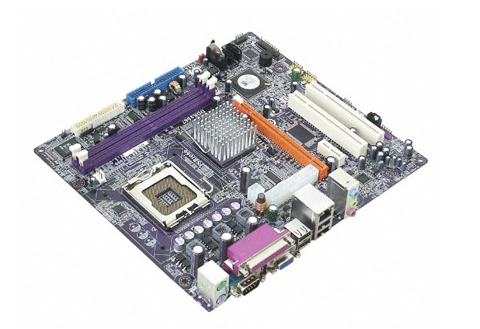
ECS is best known for its low cost motherboard and the new 671T-M motherboard is no different. The board uses SiS671 chipset and claimed to be compatible with Vista. The board will support Intel Core 2 Duo/ Pentium D/ Pentium 4/ Celeron D processors, and DDR2-667/533 memory up to 4GB.

ECS 671T-M - SiS671 based low cost motherboard

“With official certification for Windows® Vista™, the SiS671 is promised to optimize the overall performance of ECS 671T-M motherboard. We are glad to see the adoption of SiS671 in ECS 671T-M motherboard and foresee the forthcoming success of such a valuable product.” said Daniel Chen, CEO and President of SiS.

ECS 671T-M uses Mirage graphics engine as its built-in GPU and sports PCI Express 16x slot. The board also has two serial ATA ports, four USB 2.0, built-in 10/100Mbps Ethernet.

[Press release]

Subscribe via RSS or Email | Read 2,671 times

4 Responses to “ECS 671T-M – SiS671 based motherboard”

  1. Anonymous™ August 18, 2007

    Does this motherboard use IDE hard disk drives? Or, is it able to use IDE hard disk drives? I know that it is SATA hard disk compatible but is ithe board uses SATA exclusively?

    +1  Add karma Subtract karma  
  2. Ewdison Then August 18, 2007

    It have an IDE

    Neutral  Add karma Subtract karma  
  3. masterfu November 27, 2007

    Hello, if you have the answer, could you please email me at uber1337h4xx0r ? It’s a gmail account. (Sorry I wrote it like that. I’m trying to avoid automated spam…. )

    Anyway, here’s my question:

    I bought one of these, because it was advertised as having 6.1 channel sound. I kind of expected at least 6 “audio out” ports. But there’s only one… Is this normal? If so, where do my 5 other speakers go into? I mean, my 4.1 channel sound card has 2 line out ports (rear and front). Will I need a special receiver of some sort? (I hope not… I want to just use regular generic speakers…)

    Thanks in advance.

    Neutral  Add karma Subtract karma  
  4. Newbie December 9, 2007

    Is there a setting that I need to change to get operating systems to see my 3 gigs of RAM? I have tried 64 bit versions of Vista, XP and Ubuntu and they all detect 3 gigs of RAM. I tried the latest BIOS and all 4 gigs show up on bootup. Any help is appreciated.

    +1  Add karma Subtract karma  

Post a comment

Please login to leave a comment. If you haven't signed up, you can do so free here. Lost your password? Reset it. With SlashGear account, you will be able to participate on SlashGear Forums.