REGISTER LOGIN

Worth Reading?

NoYes

+26 [30 votes]

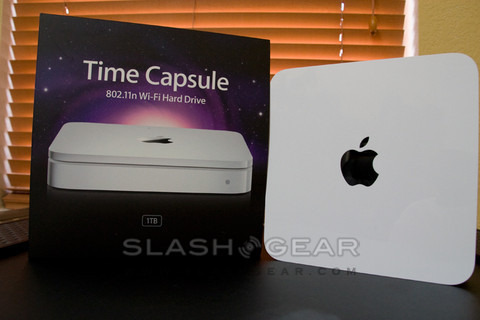
Data backup falls resolutely at the dreary end of the tech-task scale; periodically market researchers release stats showing how few people take the time to safely copy their accumulated files, usually prompting a guilty DVD burning session which never gets repeated. Apple’s Time Capsule, then, was welcomed with excited upon its announcement; with the slick, careful design Apple are renowned for, could they manage to make even backup sexy? To be fair, it’s a pretty huge challenge. You’ll be hard-pressed to find a nicer looking network hard-drive, or one so straightforward to set up, but Time Capsule undoubtedly has its caveats.

time capsule

The resemblance to an Apple Airport Extreme is not just skin deep; the Time Capsule is basically that 802.11n WiFi router with an added hard-drive. That means you get three gigabit LAN ports, one gigabit WAN port, a USB port and WiFi in a/b/g/n flavors. You can choose between the 2.4GHz and 5GHz bands, which is useful if you already have a WiFi network you want to keep using: set the Time Capsule to 5GHz and while you lose out on backward compatibility with some WiFi devices, you won’t be plagued by interference. When we said the Time Capsule was just an Airport sharing casing space with a hard-drive, we weren’t quite accurate; Apple has packed the power brick in there too, meaning the power cable is just that, a cable.

time capsule2

Aside from the device itself and that cable, the typically-minimalistic box contains an installation disc (with software for both Mac and Windows) and the usual clutch of quickstart and warranty booklets. On the disc is the latest version of the Airport utility, v5.3, and a walk-through setup guide that manages to make installing a new router relatively straightforward. You can also choose to add the Time Capsule as a bridged device on an existing network, if you’re happy with your current router, or should you be replacing an Airport Extreme it’ll clone the old settings.

time capsule1

Windows users (for whom XP SP2 and Vista are catered for) get the short end of the stick: the Time Capsule shows up as another volume in the network folder, ready to have files copied across. You can add a password but that’s pretty much it. It’s when you use the Time Capsule with Leopard’s Time Machine app that things get clever; like the rest of us, Apple knows that it’s not enough to slap a chunk of storage down and expect people to religiously backup to it, you need to make things relatively automatic.

The updated software basically lets Time Machine work with the new, network-attached drive as if it were a local one. As with any fresh backup, the first time you run it takes an age as Time Machine copies everything across to the Time Capsule’s hard-drive. Gigabit is your best option here – we found it took roughly an hour to copy 10GB using the wired connection – as, despite the claimed speeds of 802.11n, it would definitely be an all-night operation carried out wirelessly. Of course, subsequent backups only transfer the changed data; Time Machine kicks in each hour (or sooner if you prod it manually) and squirts the altered files across to the Time Capsule’s storage.

In a sense, that could be the end of the review: Time Capsule sits quietly – there’s a low-noise fan in the base but things still get toasty warm – archiving your data until the fateful day you want to perform a restore. However people expect more from network-attached storage, and it’s here that the Apple device is less comprehensive.

time capsule3

As an all-in-one unit, upgrading the internal hard-drive isn’t really catered for. Yes, 500GB or 1TB should see you happy for a while, but if you’ve a few computers backing up to the Time Capsule the space will eventually dwindle. Thankfully the USB port can handle an external hard-drive, which shows up as a separate volume, and you can even plug in a USB hub and add a number of drives. We had no problem hooking up a USB hard-drive and a flash memory key; they were recognised on all the connected machines, both Mac and Windows. There’s no provision, though, for setting up an impromptu RAID array. You can’t mirror the internal hard-drive to an external one, nor can you address all the free space as a combined volume.

The USB port can also handle a printer, letting all networked computers send documents to the same machine. It’s not a print server, though, and we managed to cause it a few headaches by trying to simultaneously print from a number of computers: while dealing with one, the others bounced back with error messages about the printer not being ready, rather than being queued up. Really, asking the Time Capsule to share a printer is only sufficient for home use where print jobs are sporadic; it’s just plain inadequate in a busier environment.

Unlike many network-attached drives, the Time Capsule won’t act as a media server either. Apple TV units don’t recognise the storage, and although you can move your iTunes library onto it there’s no provision for multiple users to all access it at the same time. Hopefully both of these features could be introduced with a firmware update, as they’d turn the Time Capsule into a true media hub.

Anyone looking for something more for their money right now, though, could find better options elsewhere, whether they’re more interested in RAID redundancy, media servers or advanced drive management. The obvious alternative that comes to mind is Drobo, which has all three – however, it also has a $499 price tag (that’s what you’d pay for the 1TB Time Capsule; the 500GB version costs $299) and that’s before hard-drives or an ethernet interface. A better comparison is perhaps Buffalo’s LinkStation Pro Duo, the 1TB version of which you can currently pick up for around $300.

Shop around, then, and you’ll find similar, not as elegant as Drobo perhaps, but with some of the same functionality, and for the same price or cheaper than Apple are asking for the Time Capsule. The biggest clincher, though, is software support: right now, Time Machine won’t backup to any NAS but the Time Capsule, and despite the hardware being basically the same as that of the Airport Extreme, it won’t see a USB drive plugged into that either. Apple earns a big black mark for that one.

Have Apple failed to sprinkle their magic across backup, then? No, not at all: if you’re a Mac user who is less than organized when it comes to data management, Time Capsule could be ideal. It’s very much a set-and-forget solution, with straightforward setup and the reassurance of Time Machine making sure you never lose your files. Advanced users may sneer, but for the legion of Mac owners who up until now have never bothered backing-up, Time Capsule could be just the medicine.

Rating:

  • ★
  • ★
  • ★
  • ½
  • ☆

Unboxing video

YouTube Preview Image
Subscribe via RSS or Email | Read 20,870 times

9 Responses to “Apple Time Capsule Review – Backup Made Easy for Leopard Users”

  1. Larry March 10, 2008

    I pre-ordered the 500gb TC and received it last week. After two-days of fighting with it and a couple of hours on hold with applecare it went back in the box and back to Apple! I don’t understand what makes this so easy unless you have no existing network or devices going on in your house at all. The TC refused to attach properly to my WAN without major massaging and even after it did it would not get a working IP address. When attached to my WAN it messed up routing on the rest of my network. When connected wirelessly to my network it worked only slightly better but since I prefer to keep everything wired (secure) this is not a satisfactory alternative to me. One other issue I noticed is that everytime I touched the TC (moved it a bit) the amber light started flashing and it lost connection to the WAN.
    Perhaps my TC was FUBAR but I think, based upon my experience with the airport express, that Apple’s airport software still needs work interfacing with less simplistic network configurations.

    -1  Add karma Subtract karma  
  2. Rob Wyatt April 17, 2008

    This is for anyone considering a Drobo:

    STAY AWAY FROM DROBO!!! Unless you want to LOSE ALL OF YOUR DATA!!! I was loving Drobo at first. It looks slick and performs as advertised – until one attempts a firmware update. The first firmware update I applied resulted in my Drobo volume disappearing. The (Macintosh) Finder recognized the device, but claimed the disk was not formatted and asked if I wanted to Initialize, Ignore, or Eject. Not good.

    I called Drobo and they walked me through a troubleshooting procedure that involved removing all drives and re-inserting them one by one. At first this didn’t work. I tried it a few times, finally placing each drive in a different bay. Drobo ultimately recognized all drives and proceeded to repair itself. It took about three days.

    Of course, I should have ditched the little black nightmare right then and there, but I foolishly believed all was well. Until the next firmware update…

    Once again, Drobo lost my primary volume. This time, however, nothing saved it. It took Drobo about 12 days to “repair” itself. When all was said and done, the volume was gone, along with my entire media server library. I still have most of the CDs and DVDs that I ripped, but I’ve now lost hundreds of hours of time spent setting up my server. I’ve also lost a number of non-essential files that I chose to store on the Drobo. They’re gone for good.

    DO NOT BELIEVE THE HYPE!!! Drobo doesn’t work. I’ve encountered a number of other Drobo users on various forums whose data has all suffered a similar fate. Bottom line, if you’re a cheapskate and buy Drobo over a RAID solution, you’ll get what you pay for: a serious headache and lost data!!! The few hundred bucks I saved on Drobo isn’t worth the hundreds of hours of re-ripping ahead of me. And, then there’s the data that I didn’t have backed up. Gone for good.

    Needless to say, I urge anyone looking for a storage solution to skip this nightmare box and go with a tried and true RAID solution. Or, at some point, you’ll be very sorry!

    +1  Add karma Subtract karma  
  3. Henrik May 2, 2008

    Got the time capusle yesterday. It worked perfectly fine with my macbook and PC. I joined the time capsule to my existing wireless network. My only request for this is, I want a time capsule-like software for my PC.

    +2  Add karma Subtract karma  
  4. thomas May 31, 2008

    got the 500 gb time capsule – works like a charm… the cool thing about many apple products compared to many other products is simply how easy it is to set up… I’ve switched form pc after 10 years with windows to mounth ago… I will never touch a pc again…

    Neutral  Add karma Subtract karma  
  5. Janet July 26, 2008

    How can I retrieve my time capsule password?

    +5  Add karma Subtract karma  
  6. mo August 28, 2008

    i had the time capsule for little over a month and it the internal hard drive crashed. i have a terabyte time capsule and lost 500gb of data coz i trusted it. Apple will not recover the data from the drive because they are not liable for data loss and wont do anything about it. they will replace it though, but no refund on it. i cant open it myself and extract the hard drive because that voids the warranty. i have to pay a data recovery specialist to extract the data and that costs around twice as much as the time capsule.
    all in all, get yourself an airport extreme n plug in a usb external drive if you want time capsule functionality. at least that way you can do something about your data if the hard drive fails, or is corrupted and you know how to do it.

    -1  Add karma Subtract karma  
  7. Fabrizio Bartolomucci September 5, 2008

    I installed my Time Capsule yesterday and I soon stumbled into problems. The object itself keep on having a flashing amber light, while on the mac I experience weirder problems. Basically if I follow the normal installation for Airport it says it feels an active wireless network (patently false) and whatever of the three options I follow leaves it searching for a wireless device without success.
    More fortune I had with the manual configuration: eventually I succeeded in having the drive appearing in Time Machine and to activate the backup. That I tried a few times: first time yesterday night when I unplugged the Capsule during the backup for moving it out of my sleeping room (the drive is quiet, yes, but..). When I plugged it again in the living room there was no finding it again from the mac, not to mention the possibility of proceeding with the ongoing backup. So I reset the Capsule and tried again this morning: again it started to backup but after some time, without having touched anything while having breakfast, I found the backup was not active any longer. Quite expectingly when I tried to connect again to the Capsule it did not show up.

    As for the version I double-clicked the package on the CD but I have no idea what is started when I select Air Port Utility.

    Could someone help?

    Thanks, Fabrizio Bartolomucci
    Lest I have done something patently wrong -

    Neutral  Add karma Subtract karma  
  8. Patrick September 14, 2008

    Fabulous machine. Unfortunately, I lost my password through my own silly fault. Anyone figure out how to retrieve the password for this puppy?

    Neutral  Add karma Subtract karma  
  9. Graham Turnbull December 21, 2008

    You can reset a time capsule using the reset button on the back. Hold it in with a pen for up to one second to wipe the password. Hold it for longer and you might lose your wireless settings – no big deal though really…

    Graham

    Neutral  Add karma Subtract karma  

Post a comment

Please login to leave a comment. If you haven't signed up, you can do so free here. Lost your password? Reset it. With SlashGear account, you will be able to participate on SlashGear Forums.