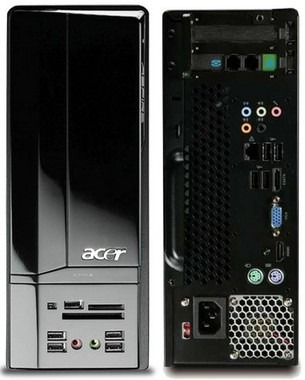
Yesterday we posted about an issue some Acer users were having with their Aspire X1200 HTPCs, in which a BIOS update to solve some network card instability ended up wiping out their HDMI support. The choice many owners were facing was to add an aftermarket network card or live without the HDMI port. Now Acer has been in touch, with a new hotfix that the say will address the issue.
The new BIOS can be downloaded from the online service center [.exe link] Obviously it goes without saying that you shouldn’t try to install it if you haven’t got an Acer Aspire X1200.
Since we don’t have an Aspire X1200 on hand, we’d like to hear from anyone who installs the new BIOS and whether it fixes their HDMI/networking problem. Let us know in the comments.


6 Responses to “Acer issues Aspire X1200 HDMI hotfix”
Kellie August 30, 2008
I loaded the BIOS update this morning to no avail. I am using a 2Wire Gateway and will try a new Ethernet cable. This really shouldn’t be the problem since I’ve been using it for less than a month. Same goes for the Acer network card. Just shouldn’t have happened in the first place. The computer is only a month old as well.
Anyone else have any luck or helpful input? Please?
NeutralAdam W. September 24, 2008
First off, thanks very much for posting this. I did the new bios update which you linked to and everything works fine again. HDMI is fully functional – yay! Needless to say, I am going to be very cautious when doing any updates from Acer or windows, particularly those of the BIOS nature lol.
Yes it works…try it everyone – you’ll be relieved!
NeutralMichele M October 20, 2008
I installed the update but to no avail. Vista x64 thinks it is playing sound and everything is turned up to well past comfortable audible levels, but my LCDTV produces no sound. I guess Acer needs to try again. For now, I am going to flash back to the old version of the BIOS and deal with resetting the NIC all the time. At least everything worked then.
Neutralricardo October 27, 2008
this from cnet might help:
The X1200 also has HDMI output, but we ran into an initial snag with both audio and video in Vista, similar to what has been reported by users on the AVS Forum. Acer sent us its A3 BIOS upgrade and after a quick install and some settings changes (setting our HDTV image size to “just scan” instead of 16:9, and changing the default audio output in Vista’s control panel to the Nvidia digital out option), we were able to output video and five channel audio from a single HDMI cable to an HDTV. We didn’t run into any of the networking issues that some users have reported.
gl
NeutralSuzanne November 5, 2008
After having issues with the network card, I downloaded the BIOS update to a USB drive, plugged it in – and viola – everything is working great (both network and HDMI). Thanks for posting this along with the link to the update. I’ll post again if I have any other issues.
NeutralKin December 8, 2008
one of the easy fix that i found out is that after you turn on the computer, you put it on sleep mode. After you awaken it again, the system could detect the nVidia HDMI Audio Output. Of course that is way inconvenience fix. Hopefully it could help somebody who suffer the same syndrome.
Neutral